

Cómo calcular el margen de beneficio en Excel (y una alternativa más inteligente)


Cómo calcular el margen de beneficio en Excel: paso a paso
Calcular tu margen de beneficio en Excel puede ser sencillo una vez que conoces las fórmulas. Aquí tienes una guía rápida paso a paso que puedes seguir:
Paso 1: calcular el beneficio
Primero, necesitas obtener tu beneficio. La fórmula básica es:
Ejemplo:
- Ingresos: $2,000,000 (EUR 1.666.667)
- COGS: $700,000 (EUR 583.333)
- Otros gastos: $500,000 (EUR 416.667)
Beneficio = $2,000,000 - $700,000 - $500,000 = $800,000 (EUR 666.667)
Paso 2: calcular el margen de beneficio
A continuación, calcula el margen de beneficio dividiendo tu beneficio entre tus ingresos.
Ejemplo: usando las cifras anteriores:
Margen de beneficio = ($800,000 ÷ $2,000,000) × 100 = 40%
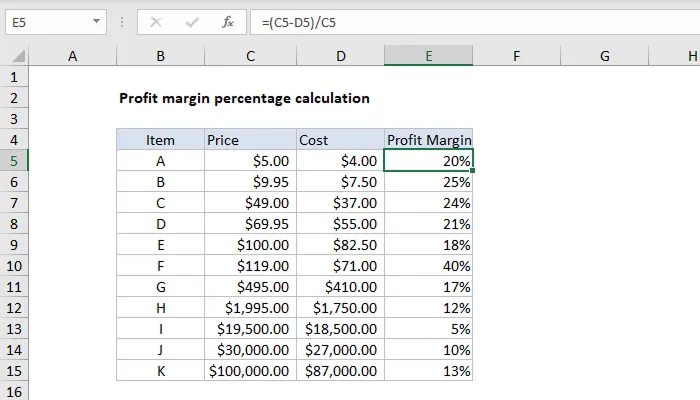
Paso 3: configurar el cálculo en Excel

Leah Tran is a Content Specialist at TrueProfit, where she crafts SEO-driven and data-backed content to help eCommerce merchants understand their true profitability. With a strong background in content writing, research, and editorial content, she focuses on making complex financial and business concepts clear, engaging, and actionable for Shopify merchants.








The Newsletter for Dropshippers
Who Hate Losing Money
Weekly tactics from dropshippers & eCom operators who've cracked profitability in an era where thin margins kill most stores.
Your next wise move starts with seeing your True Net Profit now.
Get instant net profit insights into your numbers to make every choice count with TrueProfit!