

Wie man die Gewinnmarge in Excel berechnet (und eine intelligentere Alternative)


Wie man die Gewinnmarge in Excel berechnet: Schritt für Schritt
Die Berechnung deiner Gewinnmarge in Excel kann einfach sein, sobald du die Formeln kennst. Hier ist eine kurze Schritt-für-Schritt-Anleitung, der du folgen kannst:
Schritt 1: Gewinn berechnen
Zuerst musst du deinen Gewinn ermitteln. Die grundlegende Formel lautet:
Beispiel:
- Umsatz: $2.000.000
- COGS: $700.000
- Sonstige Ausgaben: $500.000
Gewinn = $2.000.000 - $700.000 - $500.000 = $800.000
Schritt 2: Gewinnmarge berechnen
Als Nächstes berechnest du die Gewinnmarge, indem du deinen Gewinn durch deinen Umsatz teilst.
Beispiel: Mit den Zahlen oben:
Gewinnmarge = ($800.000 ÷ $2.000.000) × 100 = 40%
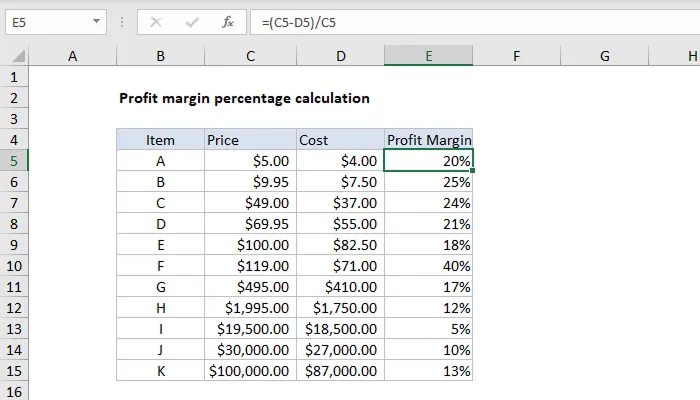
Schritt 3: Die Berechnung in Excel einrichten

Leah Tran is a Content Specialist at TrueProfit, where she crafts SEO-driven and data-backed content to help eCommerce merchants understand their true profitability. With a strong background in content writing, research, and editorial content, she focuses on making complex financial and business concepts clear, engaging, and actionable for Shopify merchants.








The Newsletter for Dropshippers
Who Hate Losing Money
Weekly tactics from dropshippers & eCom operators who've cracked profitability in an era where thin margins kill most stores.
Your next wise move starts with seeing your True Net Profit now.
Get instant net profit insights into your numbers to make every choice count with TrueProfit!