15+ Shopify AI Features Every Merchant Should Know (July 2026 Updated)


Shopify has grown into far more than a store builder. Heading into 2026, its native AI reaches across product content, search, recommendations, marketing, analytics, support, and even AI-assisted checkout.
That matters because AI now sits right at the center of how customers discover products, weigh their options, and buy. It is no longer an optional app layer bolted on at the edges.
The easy mistake is stacking up tools that generate activity without ever touching profit. This guide breaks down the Shopify AI features in 2026 that actually move conversion and efficiency, how each one works, and how to prioritize them without losing your grip on brand, data, or margins.
Before You Explore Shopify AI Features
For Shopify merchants, Shopify AI is the layer of artificial intelligence built into the platform to help with everyday ecommerce tasks.
It is not a single app or chatbot that does everything. Instead, Shopify AI includes different tools and integrations that support different parts of running an online store, from creating content and managing operations to analyzing data and building custom experiences.
Think of Shopify AI as an ecosystem rather than one feature. Some AI tools are designed for merchants using Shopify day to day, while others are built for developers and app creators who want to add AI-powered capabilities to the platform.
The most visible examples are Shopify Magic and Shopify Sidekick. Magic focuses on helping merchants create and improve content, such as product descriptions, marketing copy, and images. Sidekick works more like an AI store assistant, helping merchants understand their business, complete tasks inside the admin, and get support with daily decisions.
Beyond these built-in features, Shopify’s AI ecosystem also includes tools that help developers create more advanced AI experiences, such as the Shopify AI Toolkit and Model Context Protocol (MCP). These technologies make it easier to connect AI systems with Shopify data and workflows.

15+ Best Shopify AI Features Every Merchant Should Know 2026
Here’s a complete breakdown of the 15+ Shopify AI features worth knowing in 2026 and how each one can help merchants save time, improve customer experience, and grow more efficiently.
Shopify Magic: Embedded AI Across the Admin
Shopify Magic is built into everyday admin tasks, from writing product copy to editing images. Used well, it helps you publish faster, sharpen product clarity, and keep a consistent shopping experience.
1. AI Product Description and Content Generation
Shopify Magic generates or rewrites product descriptions from a few inputs. You give it the title, key features, target audience, and tone, and it returns a draft you can edit before publishing.
This helps most with large catalogs, seasonal launches, and frequent updates. Instead of writing every page by hand, you create a first draft and refine it for accuracy and brand voice.
AI content supports SEO only when it is reviewed.
Magic can produce meta titles, meta descriptions, and structured benefit copy, but publishing generic descriptions will work against you. Search engines and shoppers both reward specific, product-accurate detail, so I'd recommend never letting a raw draft go live untouched.

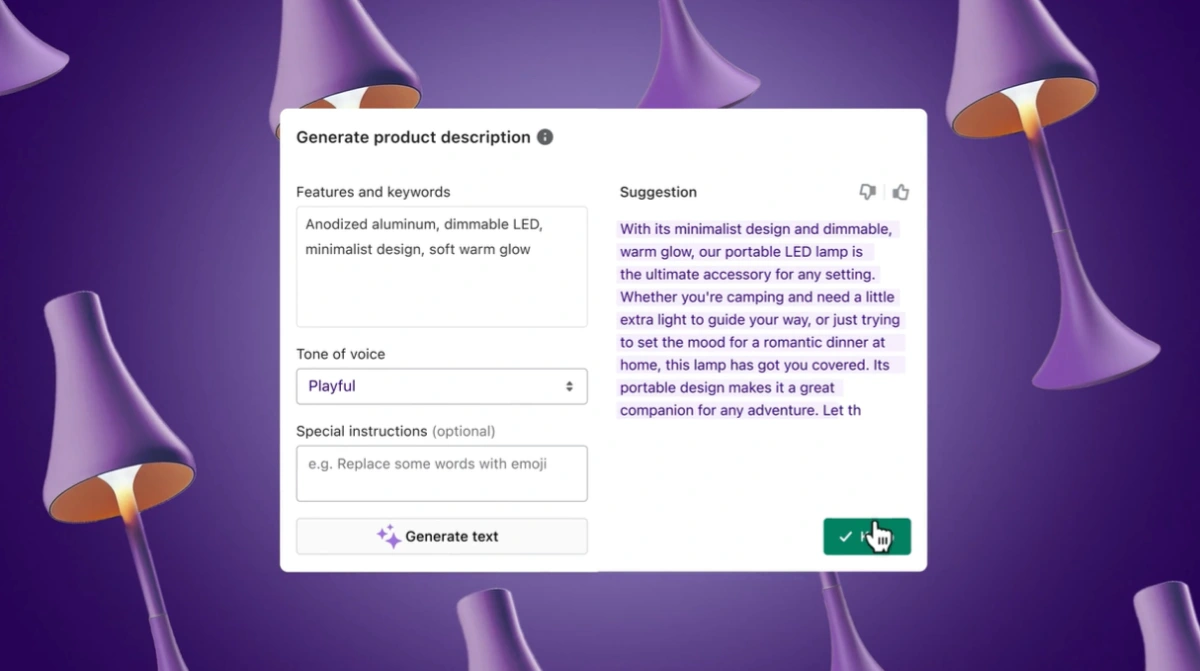
For better results, I recommend sticking to this workflow:
1. Add the product's target audience, key benefits, and important specs.
2. Include relevant keywords naturally, not as a forced list.
3. Ask Magic to generate a clear description and SEO metadata.
4. Review claims, sizing, materials, compatibility, and legal details.
5. Edit the final copy so it sounds like your brand.
2. AI Marketing Content for Emails and Campaigns
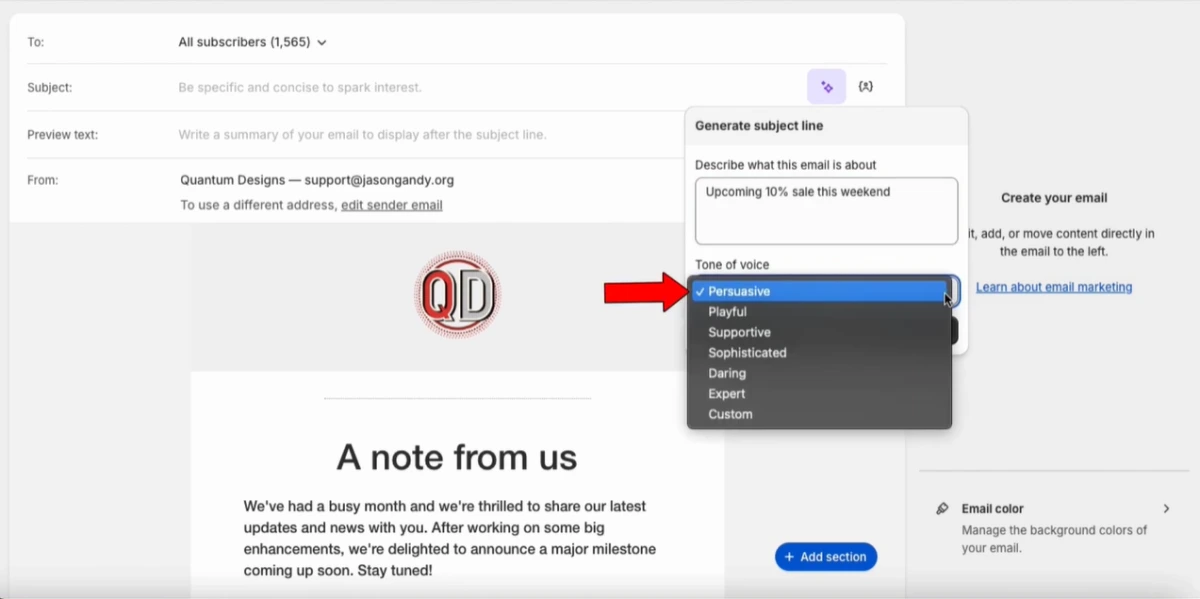
Shopify Messaging uses AI to write subject lines, campaign copy, and promotions. That cuts launch time, which matters for small teams juggling products, fulfillment, and support.
It can draft abandoned checkout emails, welcome messages, launch announcements, holiday campaigns, and winback flows. It can also suggest products based on customer behavior and store data.
The smart move is to treat AI as a testing assistant. Let it churn out several subject lines or angles, then pick the one that lands best with your audience. Even so, I recommend reviewing the offer, segment, discount logic, and landing page before anything goes out the door.
3. AI-Assisted Store Content and Blog Creation
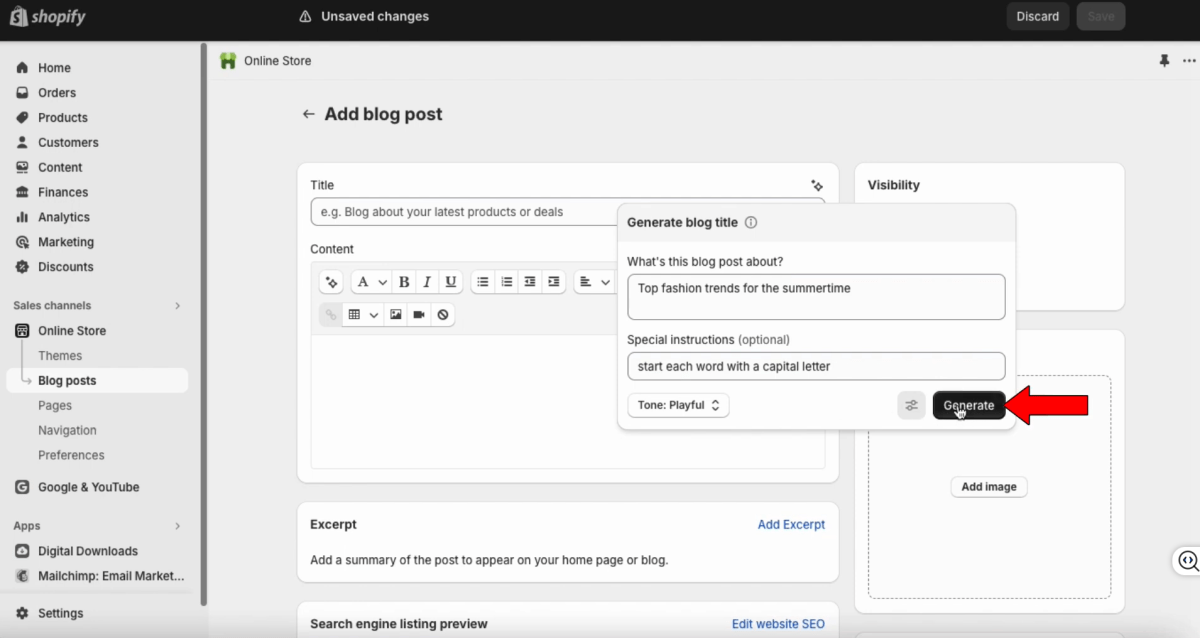
Shopify Magic can draft store pages and blog content. That works for launch announcements, gift guides, category education, seasonal content, and basic SEO articles.
Drafts help you keep a steady content schedule, but they cannot stand in for real expertise. Product guides need genuine knowledge: the questions customers actually ask, use cases, care instructions, sizing, and buying advice. Firsthand product knowledge is what makes an article more trustworthy than a generic draft, and it is exactly what search engines and shoppers are looking for.
For ecommerce SEO, AI-assisted blogs should answer specific customer problems. A useful article helps shoppers compare options, understand fit, or make a better purchase decision.
4. AI Product Attributes and Taxonomy
Shopify AI suggests attributes like material, color, size, fit, style, occasion, and product type, plus tags based on images and descriptions.
Clean data matters because search, filters, and recommendations depend on it. Poorly tagged products surface irrelevant results or miss matches entirely.
Better taxonomy improves three things at once: on-site filtering, search relevance, and recommendation quality. A fashion store with consistent color, material, fit, and occasion attributes can offer sharper filters and more relevant "complete the look" suggestions.
5. AI Image Creation and Editing
Shopify's media tools include AI-assisted editing like background removal, lighting adjustments, and asset creation. You improve visuals without a full design workflow for every image.
Better images raise click-through rate, perceived value, and conversion. For fashion, beauty, home, and accessories, image quality directly drives buyer confidence.
These tools earn their keep when they bring consistency. Use them to strip out distracting backgrounds, brighten dark shots, build clean promotional assets, or prepare ad variations. Just make sure the edited image still represents the product accurately.
Shopify Sidekick: Your AI Store Assistant
Shopify Sidekick is the conversational assistant that connects store data, admin workflows, and increasingly third-party app actions. Where Magic handles individual creative tasks, Sidekick helps you understand what is happening and what to do next.
6. AI Assistant for Store Management
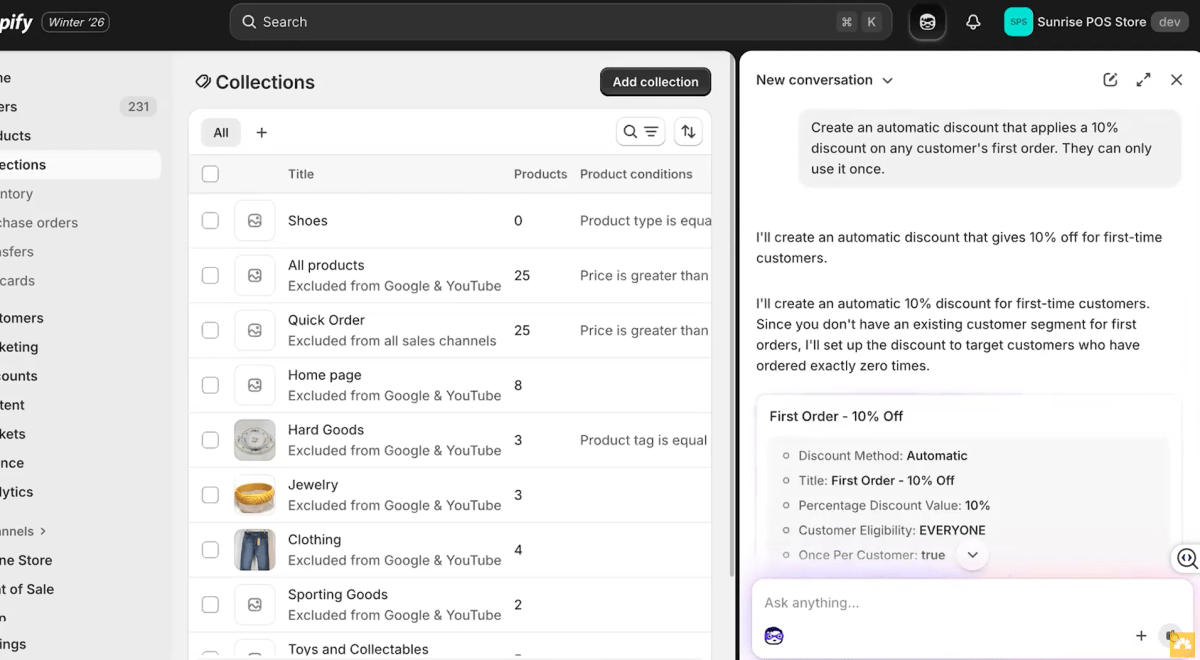
Sidekick helps merchants complete everyday Shopify admin tasks with just simple commands. Instead of manually navigating through different settings, you can ask Sidekick to create discounts, update products, edit store content, customize themes, or build simple workflows.
For example, merchants can use prompts like “Create a 15% discount for returning customers,” “Update this product description,” or “Create a workflow to notify me when inventory is low.” Sidekick turns these requests into actions inside the Shopify admin, helping reduce repetitive manual work.
The biggest advantage of Sidekick is speed and accessibility. Tasks that previously required multiple steps across different Shopify menus can often be started through a simple conversation.
7. AI Analytics and Performance Insights
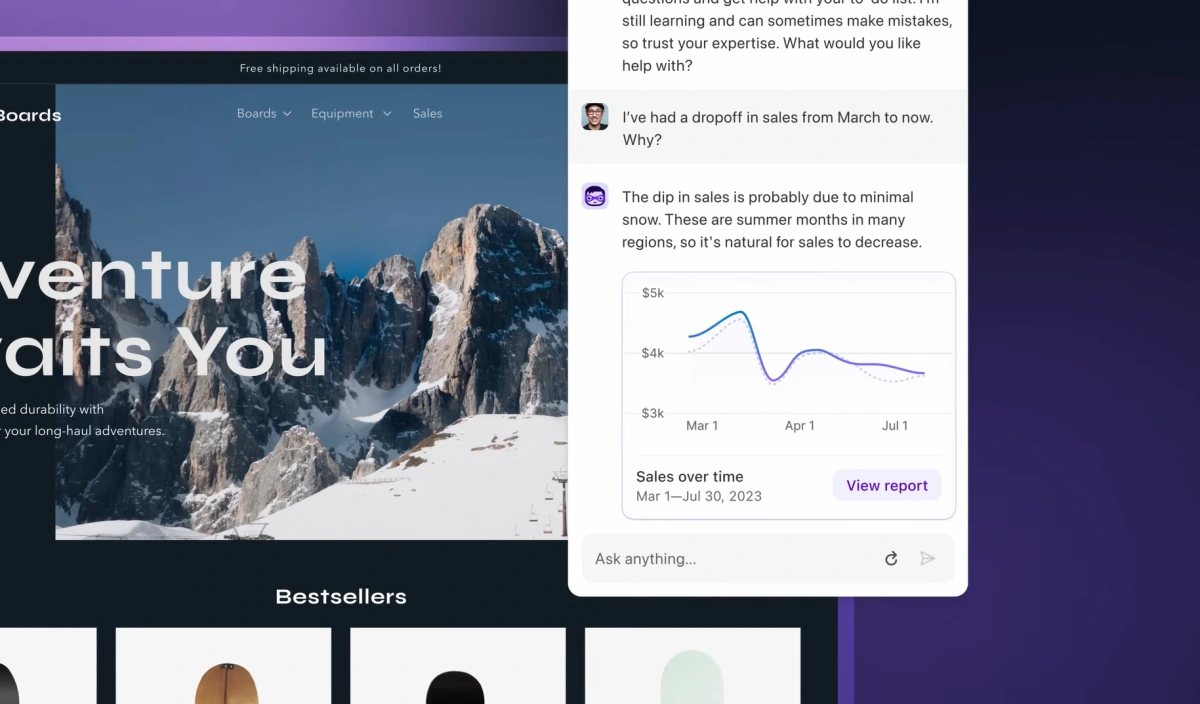
Shopify analytics in 2026 surfaces trends, changes, and performance signals without forcing you to dig through every report. AI-assisted insights flag sales movement, campaign impact, product performance, and conversion issues.
You can also ask Sidekick questions such as "Why were sales lower this week?" or "Which marketing campaign generated the most orders?" It pulls relevant store data into a clear, conversational response, making it easier to investigate performance without building custom reports.
These AI-powered insights help merchants spot opportunities and potential issues faster, whether it's a sudden drop in traffic, a spike in abandoned carts, or a product that's outperforming the rest of the catalog. While they don't replace in-depth reporting, they significantly reduce the time it takes to understand what's happening in your store.
8. Sidekick Integrations with Shopify Apps
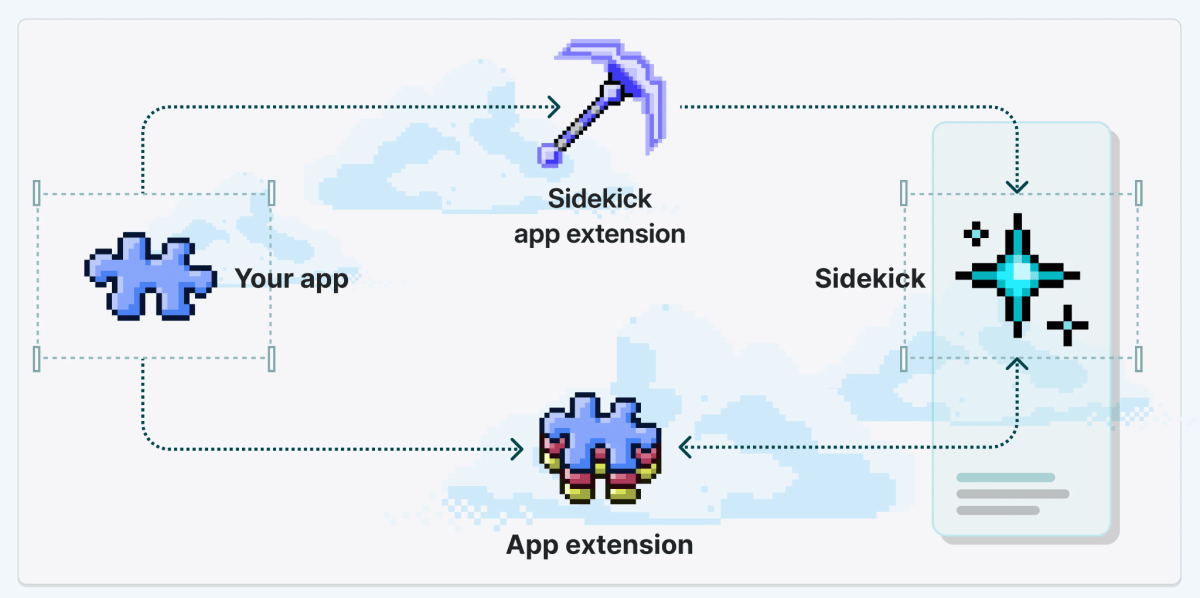
In 2026, Sidekick extends beyond Shopify's built-in tools by connecting with supported third-party apps through app extensions. Instead of jumping between multiple dashboards, you can access information or perform actions across connected apps from a single conversation.
Depending on the apps installed in your store and the permissions you've granted, Sidekick can surface data such as email campaign performance, customer reviews, loyalty activity, subscription metrics, or returns information. As more Shopify apps add Sidekick support, its ability to work across your tech stack continues to expand.
For merchants who rely on multiple apps every day, this creates a more connected workflow.
Source: Shopify Dev Docs
9. Sidekick Recommendations and Insights in Admin
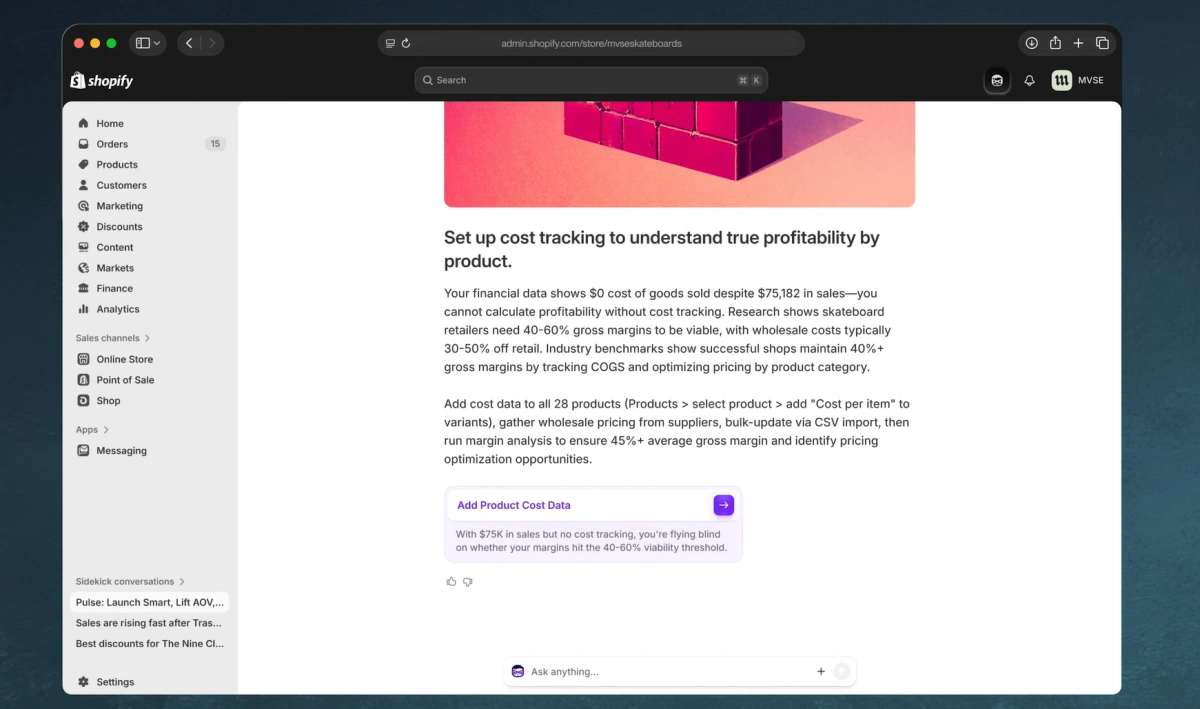
In addition to answering questions, Sidekick proactively highlights opportunities and potential issues as you work in the Shopify admin. Instead of waiting for you to dig into reports, it surfaces recommendations based on your store's current data and activity.
These suggestions may include missing product information, incomplete SEO metadata, unusual sales trends, fulfillment bottlenecks, or pages that could benefit from performance improvements. The goal is to help merchants spot issues earlier and prioritize the next steps.
Think of these recommendations as a smart to-do list rather than automatic instructions. Sidekick can point you toward areas that deserve attention, but deciding how to improve a product page, optimize a campaign, or resolve an operational issue still requires your knowledge of your brand, customers, and business goals.
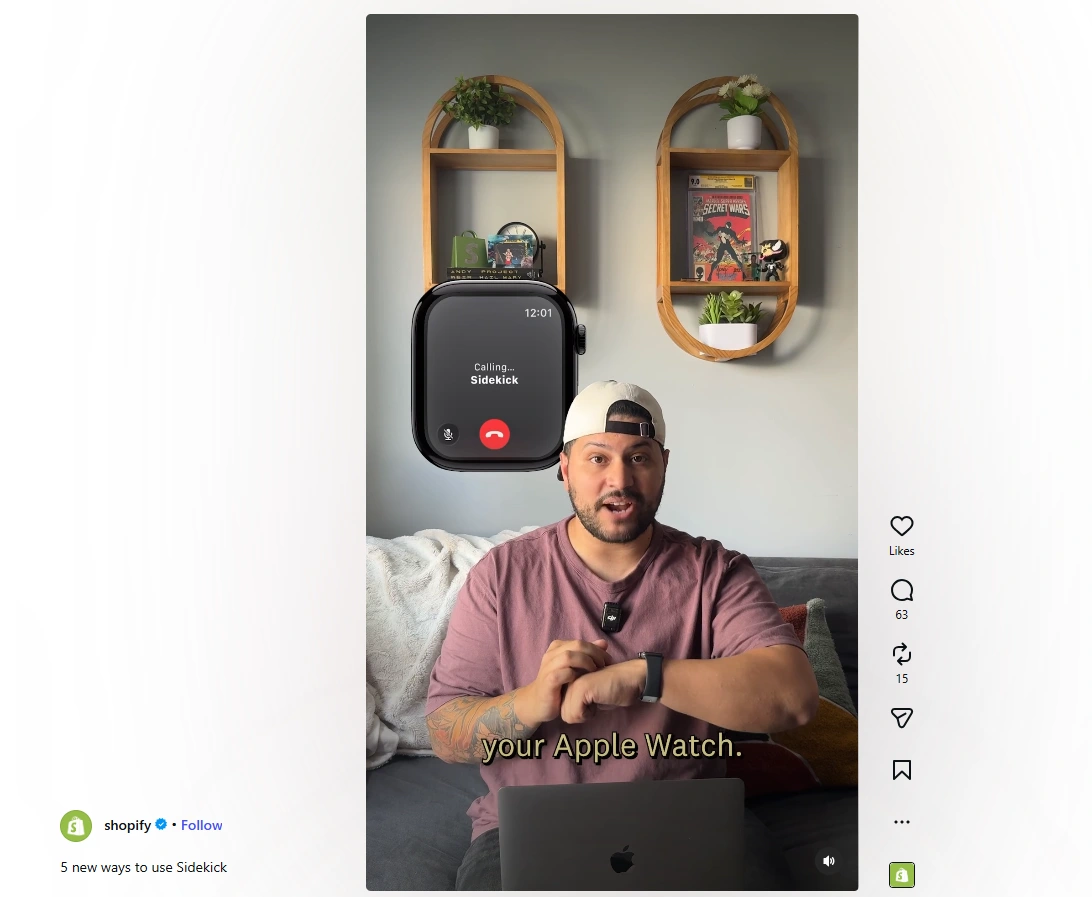
10. Sidekick on Mobile and Apple Watch
Sidekick is more useful on mobile now, which helps when you manage orders, inventory, and questions away from a desktop.
On mobile it handles quick edits, admin guidance, and performance questions. On a watch, short queries like "How many unfulfilled orders do I have?" keep you informed without opening a dashboard.

These are best for monitoring and quick action. For strategic calls like pricing changes or pausing campaigns, review full performance data first.
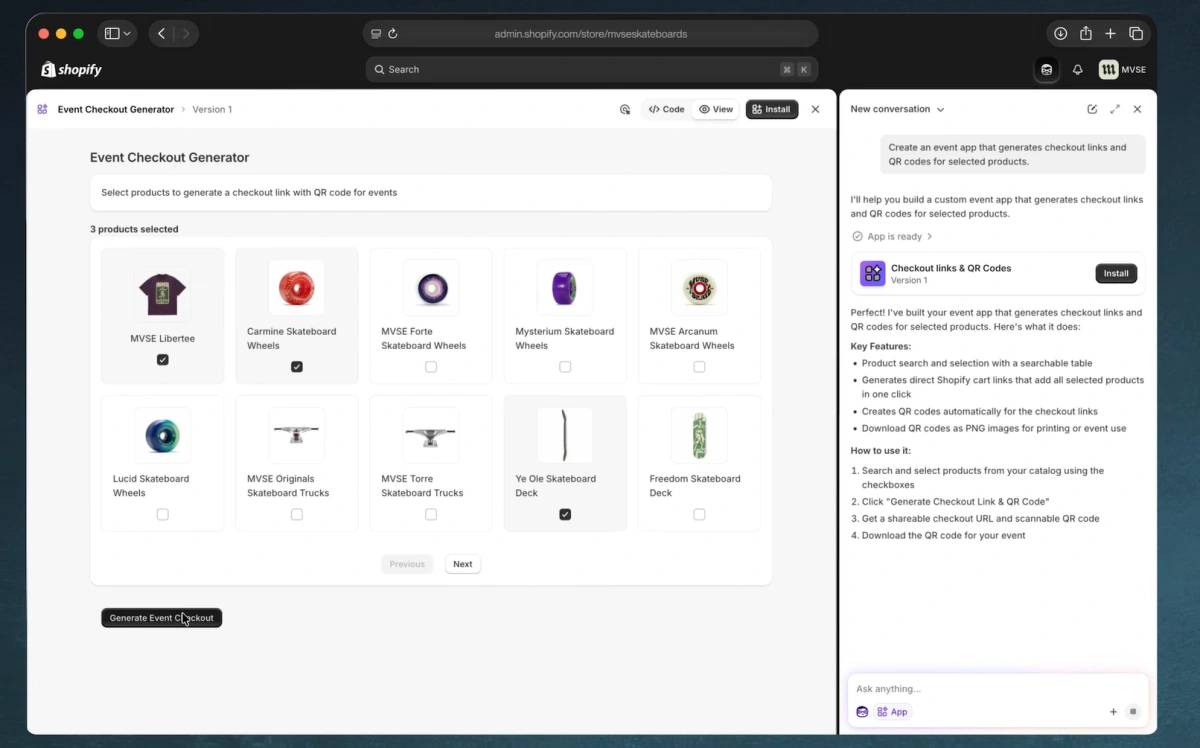
11. Sidekick App Extensions: Connecting AI With Your Apps
Developers can build Sidekick extensions that let apps provide data and perform actions inside conversations. That turns Sidekick into a control hub for merchants running multiple apps.
An app could let Sidekick answer campaign questions, retrieve app-specific analytics, or trigger approved actions from chat. That smooths workflows for stores with complex marketing, fulfillment, subscription, or loyalty setups.
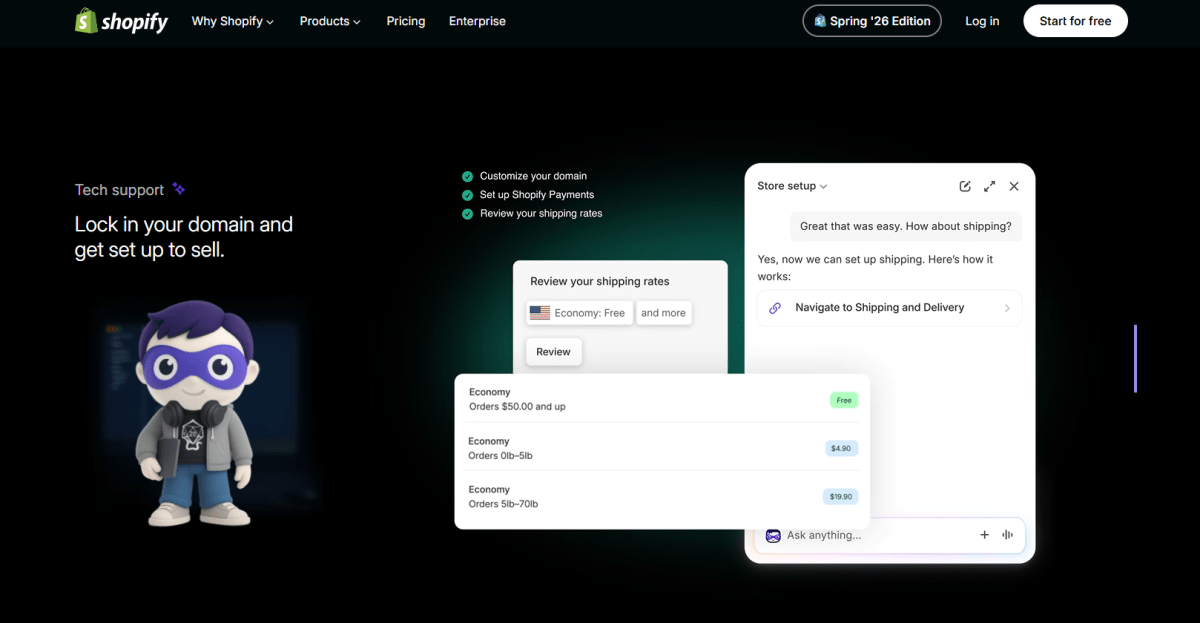
12. Set up your store and start selling
Shopify Sidekick helps take the guesswork out of launching your store. Whether you’re connecting a domain, setting up payments, or checking what’s left before you go live, it gives you clear guidance right inside Shopify.
Just ask for what you need, like “I need to set up payments” and Sidekick walks you through the next steps, so you can spend less time digging through settings and more time getting ready to sell.
AI Search, Discovery, and Recommendations
Once your content and data are in better shape, help shoppers find the right items. AI search and recommendations directly affect conversion rate and average order value.
13. Semantic Search: Helping Customers Find Products Faster
Shopify Search & Discovery supports search, filtering, and recommendations. In 2026, semantic understanding matters more because shoppers rarely type exact product names or tags.
Semantic search interprets intent. A shopper might search "animal print decor" even when your title says "animal decor," and AI connects that intent to the right product when your data is structured well.
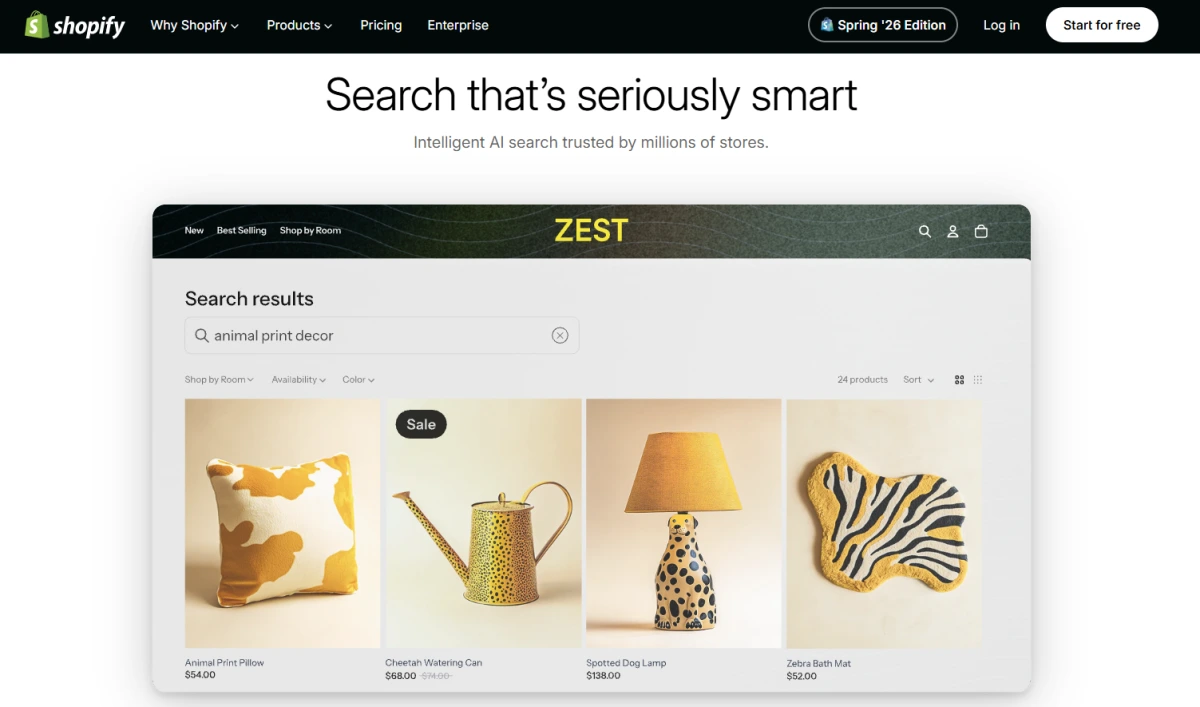
Semantic search understands shopper intent based on meaning, not exact keywords
This cuts no-result searches and improves discovery, especially for large catalogs. It also makes synonyms, attributes, and taxonomy more important than ever.

It helps customers find what they're looking for faster
14. AI Product Recommendations
Shopify AI generates recommendations across the journey: home page, product pages, cart, and checkout. They draw on browsing behavior, purchase patterns, attributes, and complementary relationships.
This is one of the clearest use cases for conversion and average order value. Relevant recommendations surface accessories, bundles, refills, and upgrades shoppers would not have found alone.
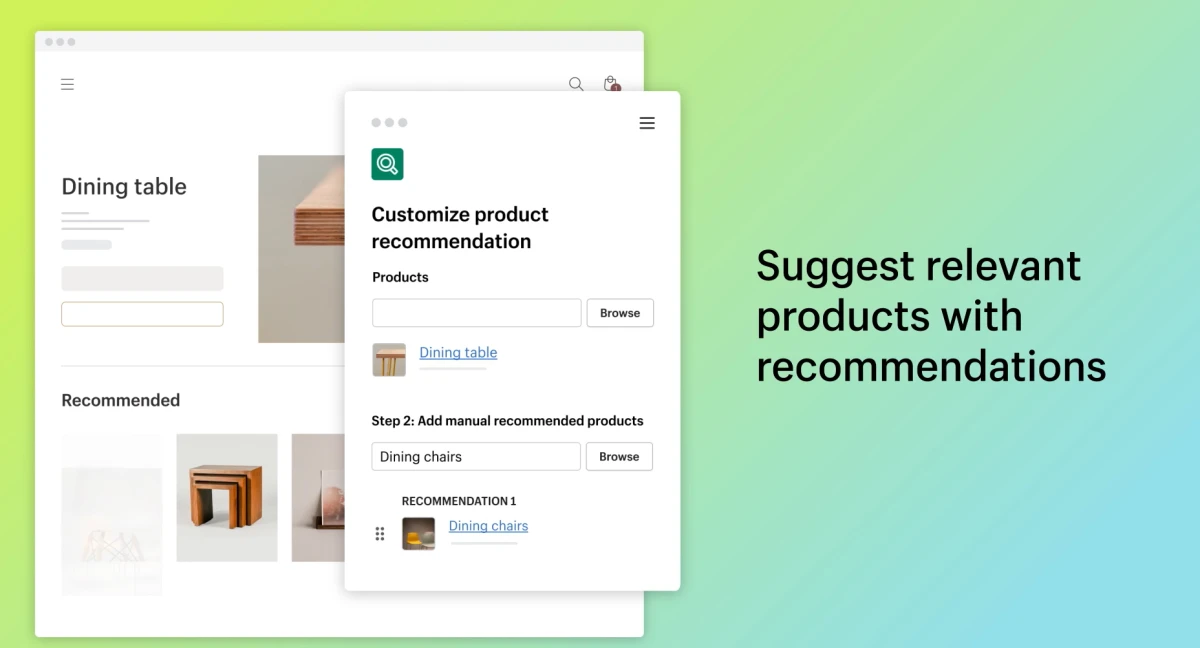
To measure whether they pull their weight, I recommend this approach:
1. Record baseline conversion rate and average order value before enabling recommendations.
2. Turn on native recommendations without over-customizing at first.
3. Track clicks, add-to-cart rate, and order value from recommended items.
4. Refine placements and rules based on real performance.
5. Compare revenue lift against product margin and fulfillment cost.
AI Marketing Features for Shopify Growth
Once the shopping experience is in good shape, turn your attention to acquisition and retention. Here, Shopify AI helps you spin up campaigns, automate workflows, and read performance faster.
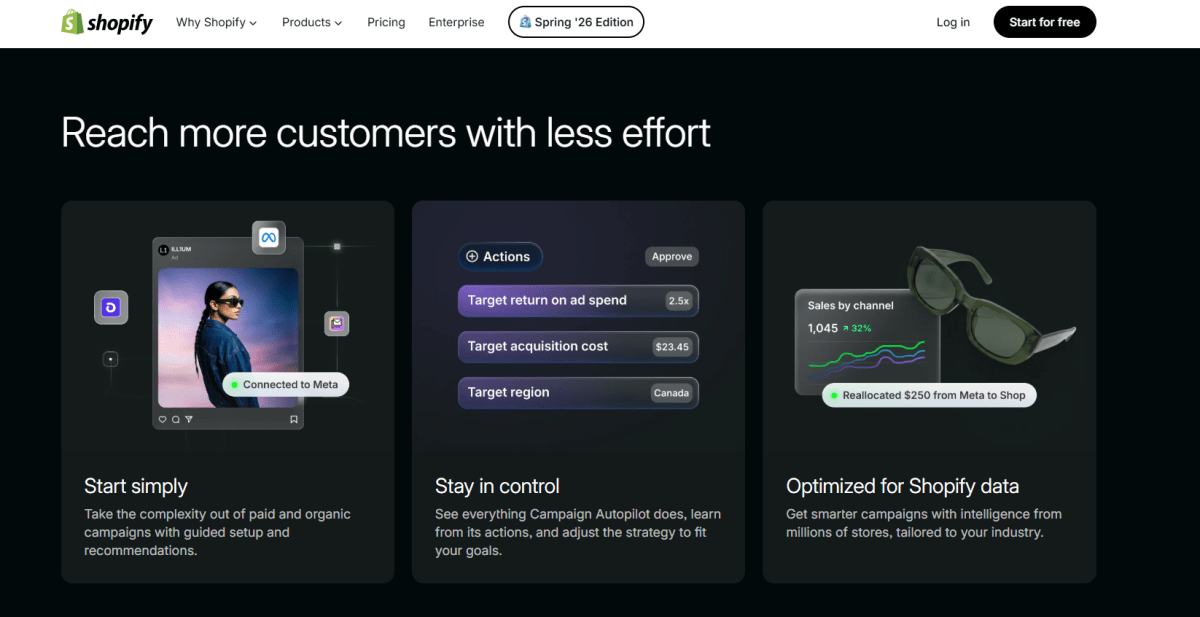
15. Campaign Autopilot: AI-Powered Marketing Automation
Shopify's Growth experience introduces Campaign Autopilot as a unified marketing workflow. It uses store, customer, and product data to generate campaigns across Shopify Email, Shop campaigns, and supported ad channels.
Autopilot creates branded emails, abandoned checkout flows, welcome sequences, promotions, and acquisition offers. You still control budgets, approvals, and settings.
This is a solid fit for small businesses that need steady marketing without a full team. But automation is not a strategy. You still have to pick the right offer, protect margins, and steer clear of over-discounting.
AI Customer Support and Agentic Commerce
Support and agentic commerce push AI beyond your storefront. These features shape how customers ask questions, discover products, and complete purchases through AI-assisted channels.
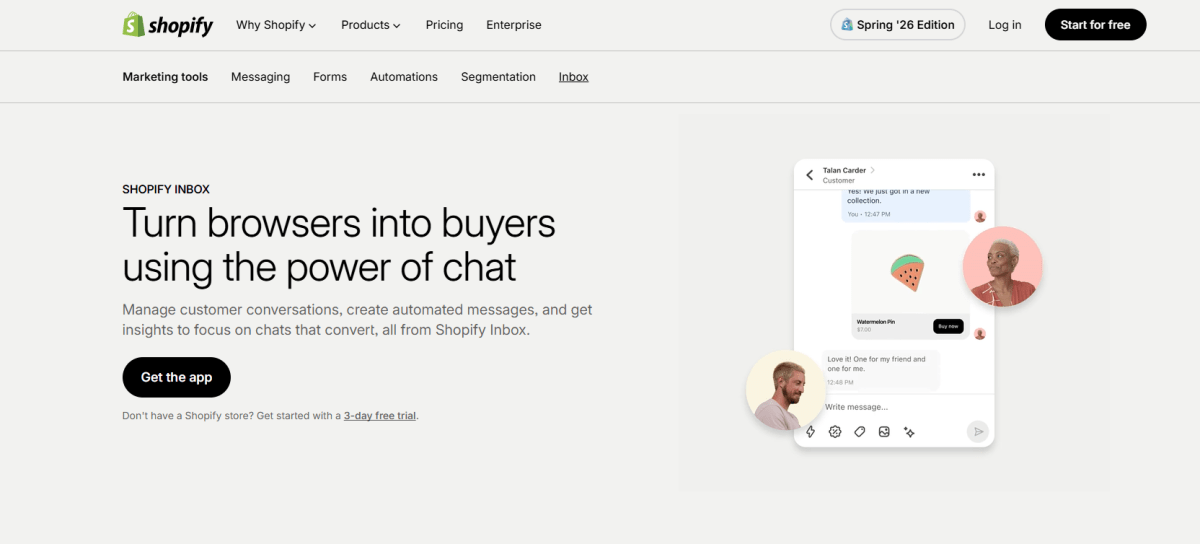
16. Shopify Inbox: AI-Powered Customer Support
Shopify Inbox includes AI-assisted support that answers common questions about shipping, returns, product details, sizing, and order status faster.
As these tools improve, they act like AI sales associates. They guide shoppers toward the right product, answer buying questions, and cut response time for high-intent visitors.
Still, I'd urge you to review your support flows carefully. AI replies have to be accurate, transparent, and in line with your policies. One wrong shipping promise or return answer can chip away at trust and pile on extra support cost.
17. Agentic Storefronts and Shopify Catalog in AI Channels
Agentic storefront lets your products appear in AI-driven shopping experiences outside your storefront. Shopify Catalog structures product data so AI agents and platforms can read accurate price, availability, images, and descriptions.
This matters because discovery is expanding beyond Google and social. Customers increasingly ask AI tools for recommendations, comparisons, and buying options.
The foundation is product data quality. Agentic channels perform best when titles, descriptions, prices, inventory, policies, and attributes are accurate and complete.

Sell through AI shopping channels with Agentic Storefronts Reference
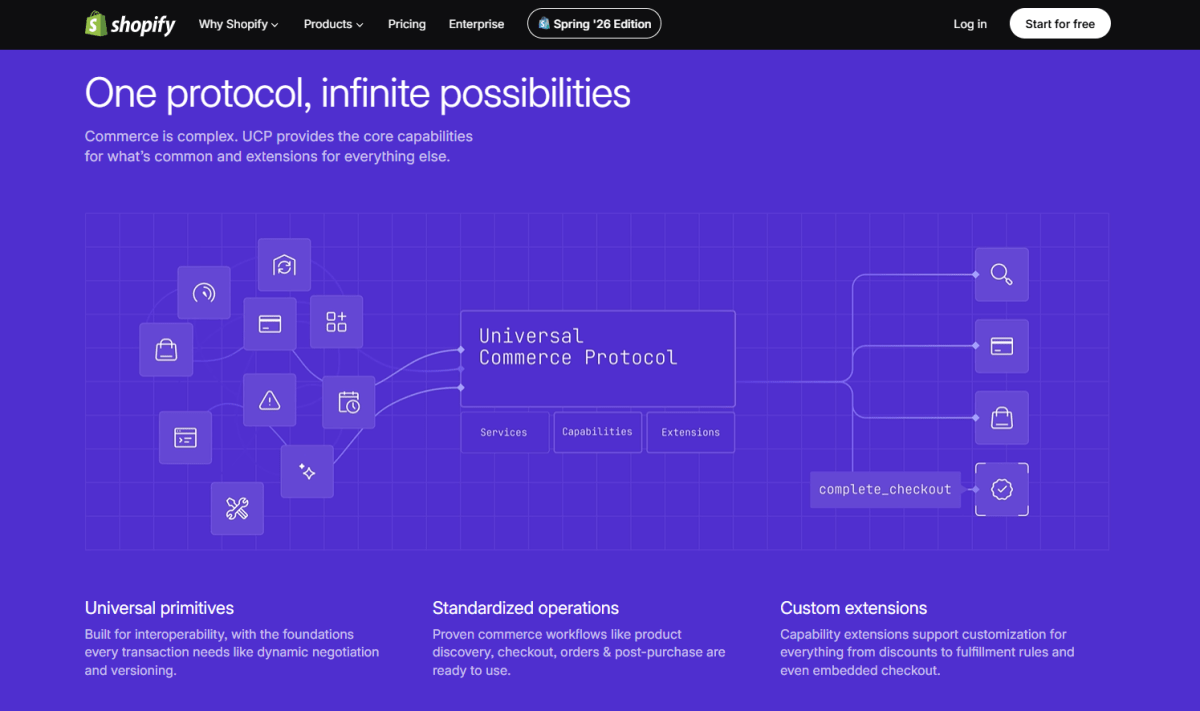
18. Universal Commerce Protocol and In-Chat Checkout
Universal Commerce Protocol, or UCP, lets AI agents build carts and support checkout across merchants. In supported cases, shoppers can discover products, compare options, assemble carts, and buy through conversational AI.
This flips how you think about search and conversion. A future buyer may never lay eyes on your homepage. They might size up products through an AI assistant and only land in your checkout right at the finish line.
For Shopify merchants, that raises the value of clean product feeds, clear policies, strong data, and competitive offers.
How Shopify AI Features Can Improve Store Profitability
It is worth being clear about when AI actually helps the bottom line. Shopify AI improves profitability when it removes friction and cuts cost, not when it simply generates more activity. Here is where each one comes into play.
1. Increase Conversion Rate
AI chat support answers objections in the moment, recommendations point shoppers toward the right item, and Rollouts let you validate product page changes before rolling them out for good.
This is where Shopify AI features for conversion rate become practical rather than trendy. The whole idea is to smooth out the spots where shoppers hesitate, not to scatter AI across every corner of the store.
2. Increase Average Order Value
On the AOV side, AI powers bundles, frequently-bought-together offers, smart upsells, and post-purchase recommendations.
What separates a win from a miss is relevance. Off-target upsells slowly chip away at trust, while genuinely useful ones help shoppers build a better cart and feel good about it.
3. Reduce Customer Support Costs
AI sales associates take the repetitive questions off your plate, and cleaner product data heads off a lot of confusion before it ever reaches checkout.
Sidekick pulls its weight internally too, helping your team find answers faster and cutting the time lost jumping between reports and admin screens.
4. Improve Marketing Efficiency
When it comes to spend, Campaign Autopilot and AI analytics help you spot the campaigns, audiences, and channels that are genuinely working.
Even so, I recommend weighing revenue against ad spend, discounts, and margin before you pour more budget into anything.
5. Protect Net Profit, Not Just Revenue
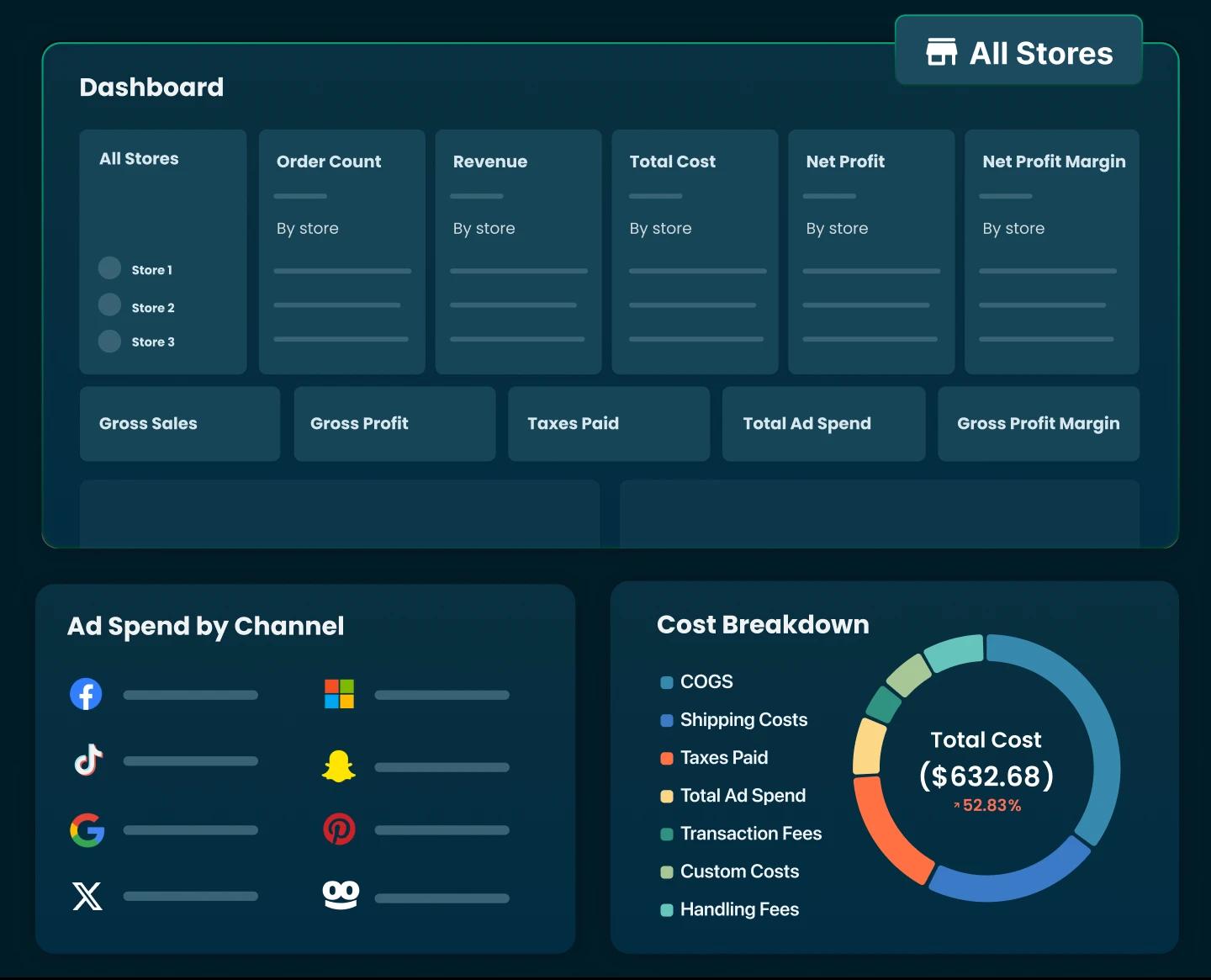
This is the one that ties it all together: AI-driven revenue is not always profitable revenue. To see the real picture, track gross margin, ad spend, shipping, transaction fees, app costs, discounts, returns, and net profit side by side.
Risks and Limitations of Shopify AI in 2026
Shopify AI has real limits: it depends on clean store data, can produce wrong recommendations, and cannot fix a weak business model. Availability also varies by region, plan, and eligibility, so verify before you rely on any feature.
1. AI Is Only as Good as Your Store Data
Poor titles, missing policies, weak descriptions, and inaccurate inventory all reduce AI performance.
This also shapes AI impact on Shopify store SEO in 2026, because AI search depends on clear, structured product information.
2. AI Recommendations Can Be Wrong
I'd always give product suggestions, campaign copy, support answers, and analytics summaries a once-over before acting on them.
AI speeds up decisions, but it should never take the wheel entirely. You remain on the hook for product claims, pricing, legal policies, and anything customer-facing.
3. Over-Automation Can Hurt Brand Experience
When every message reads like it came off an assembly line, customers start to trust your brand less.
Lean on brand guidelines and keep reviewing customer-facing content. AI should make your brand faster and clearer, not colder or more robotic.
4. Availability Varies by Region, Plan, and Eligibility
Some features are early access, invite-only, region-specific, app-dependent, or limited by Shopify plan.
This is worth keeping in mind when checking Shopify AI features pricing in 2026. I recommend confirming through your admin and official Shopify updates before assuming a feature is included in your plan.
5. AI Does Not Fix a Weak Business Model
AI cannot fix poor product-market fit, weak margins, bad pricing, slow shipping, weak creative, or a poor customer experience.
It can fine-tune a store, but it cannot rescue a broken offer.

Final thoughts
If there is one thing to take away from all of this, it is that the Shopify AI features in 2026 are no longer a novelty bolted onto the edges of your store, they now run through nearly every part of how you create content, merchandise products, market, support customers, and even how shoppers discover and buy through AI-assisted channels. That is a genuine shift, and it changes what "keeping up" actually means for merchants.
But more features are not the same as more profit. The stores that get the most out of AI are not the ones that switch on every tool at once.
Treat AI as a capable assistant, not the person in charge. Let it draft, suggest, and surface insights, then bring your own judgment to anything customer-facing, financial, or tied to your brand. Get that balance right and Shopify's AI becomes a real lever for growth, one that helps you spend less time on repetitive work and more on the decisions that actually move your business forward.

Harry Chu is the Founder of TrueProfit, a net profit tracking solution designed to help Shopify merchants gain real-time insights into their actual profits. With 11+ years of experience in eCommerce and technology, his expertise in profit analytics, cost tracking, and data-driven decision-making has made him a trusted voice for thousands of Shopify merchants.