How to Drive More Shopify Sales Through Social Media Marketing (2026 Guide)



Table of Contents
- 1. How to Choose the Best Social Media Platforms for Your Shopify Store
- 2. How to Set Up Social Media Marketing for Your Shopify Store
- 3. 6 Shopify Social Media Marketing Strategies to Drive Sales
- 4. How to Measure the Profitability of Your Shopify Social Media Marketing
- 5. Final Thoughts
- 6. FAQs About Shopify Social Media Marketing
Social media marketing can help you promote your Shopify products, connect with customers, and bring more shoppers to your store. But how do you turn that attention into actual sales? It starts with choosing the right platforms, creating content that speaks to your audience, and knowing which efforts are worth investing in.
In this guide, you'll learn how to choose the best social media channels for your Shopify store, build a strategy that fits your business, and measure performance to make smarter marketing decisions.
In this blog:
- 1. How to Choose the Best Social Media Platforms for Your Shopify Store
- 2. How to Set Up Social Media Marketing for Your Shopify Store
- 3. 6 Shopify Social Media Marketing Strategies to Drive Sales
- 4. How to Measure the Profitability of Your Shopify Social Media Marketing
- 5. Final Thoughts
- 6. FAQs About Shopify Social Media Marketing
How to Choose the Best Social Media Platforms for Your Shopify Store
The best social media platform for your Shopify store isn't necessarily the one with the most users. It's the one where your target customers discover products, look for recommendations, and feel ready to buy.
Before committing your time and budget, consider four things:
- Target audience: Where do your customers spend time, and what do they use each platform for? Some browse for inspiration, while others actively seek product reviews or recommendations.
- Product type: Products that are easy to demonstrate may perform well on TikTok or Instagram Reels. Products that require research or comparison may benefit more from YouTube tutorials or Pinterest content.
- Content resources: Be realistic about what you can produce consistently. A video-first strategy requires a different workflow from one built around product photography, graphics, or educational posts.
- Business goals: Choose platforms based on what you need to achieve, whether that's building awareness, driving first-time purchases, or encouraging repeat orders.
Here's how the main platforms compare for Shopify merchants.
My advice is to start with one primary platform and test a second only when you have the resources to maintain both. Look beyond views and engagement to see which channels bring qualified traffic, convert visitors into customers, and generate sales at a sustainable cost. That will give you a much stronger basis for expanding than follower growth alone.

How to Set Up Social Media Marketing for Your Shopify Store
Before you start posting, connect your social accounts to Shopify and make sure your products, tracking, and store links are ready.
Step 1. Create business accounts.
Set up business profiles on your chosen platforms, such as Instagram, Facebook, TikTok, Pinterest, or YouTube. Add your store logo, a clear bio, and a link to your Shopify store.
Step 2. Connect your social accounts to Shopify.
In your Shopify admin, go to Settings or Sales channels and add the relevant channel from the Shopify App Store or your admin's available options. Follow the setup instructions to connect your accounts and sync product catalogs where supported.
Step 3. Set up social commerce features.
Configure product catalogs, product tagging, or in-app shopping features if the platform supports them and your store meets its eligibility requirements. This helps customers discover products and reach your store more easily.
Step 4. Install conversion tracking.
If you plan to run paid campaigns, set up the relevant tracking tools, such as the Meta Pixel or TikTok Pixel, through Shopify's supported integrations. Verify that key events, especially purchases, are tracking correctly before spending on ads.
Step 5. Plan your first batch of content.
Prepare product photos, short videos, demonstrations, customer reviews, and posts that answer common buyer questions. Create a simple weekly posting schedule so you can publish consistently and identify which formats resonate with your audience.
6 Shopify Social Media Marketing Strategies to Drive Sales
1. Build Content Around Different Reasons to Buy
One product can appeal to different customers for different reasons. A posture corrector, for example, might attract someone looking for back support, someone who works at a desk all day, or someone trying to improve their workout routine.
Instead of repeating the same product pitch, develop several creative angles around the problems, use cases, and desired outcomes your product addresses. Test these angles to learn which customer motivations generate the strongest response.


2. Turn Customer Experiences Into Social Proof
Your brand can explain why a product is great, but prospective customers often want to see how it performs in real life. Customer reviews, unboxing videos, and user-generated content (UGC) help bridge that trust gap by showing the product beyond its listing photos.

Focus on content that answers real buying questions, such as how the product works, fits, or holds up with regular use.
If you need more video variations to test different product benefits, tools like Proveny AI can turn a product listing URL into video ads featuring an AI presenter and product-in-action shots, giving you more ways to demonstrate the product without filming every variation yourself.
3. Use Creator Content to Test Your Sales Message
Creator partnerships can do more than expose your brand to a new audience. They can help you discover which product benefits are easiest to communicate and most persuasive to potential buyers.

Give creators a clear understanding of the product and its intended audience, but let them explain it in their own voice. Different creators may naturally emphasize different use cases, objections, or benefits. Compare the resulting content to identify which messages are worth testing further.
When assessing performance, distinguish between reach and sales impact. Use trackable links, discount codes, or campaign attribution where available, and consider the cost of producing the content alongside the revenue it generates.
4. Turn Customer Objections Into a Content Pipeline
Your best social content ideas may already be hiding in customer questions. Questions about sizing, durability, compatibility, shipping, or returns often reveal the uncertainty keeping shoppers from purchasing.
Group recurring questions by theme and create content that answers each one visually where possible. A sizing comparison, setup demonstration, or close-up durability test can communicate information more effectively than a generic promotional post.
You can also reuse these answers across product pages, email campaigns, and retargeting ads. This makes each piece of content useful beyond its original social post.
5. Test Creative Variations Before Scaling Production
When a post underperforms, the problem may be the opening hook, the product demonstration, the audience, or the offer. Replacing the entire creative without identifying the issue makes it harder to learn what works.
Start with one core concept and test meaningful variations. For a product demo, you might compare a problem-first opening with a result-first opening while keeping the rest of the video similar. Once an angle shows promise, test different demonstrations, lengths, or calls to action.
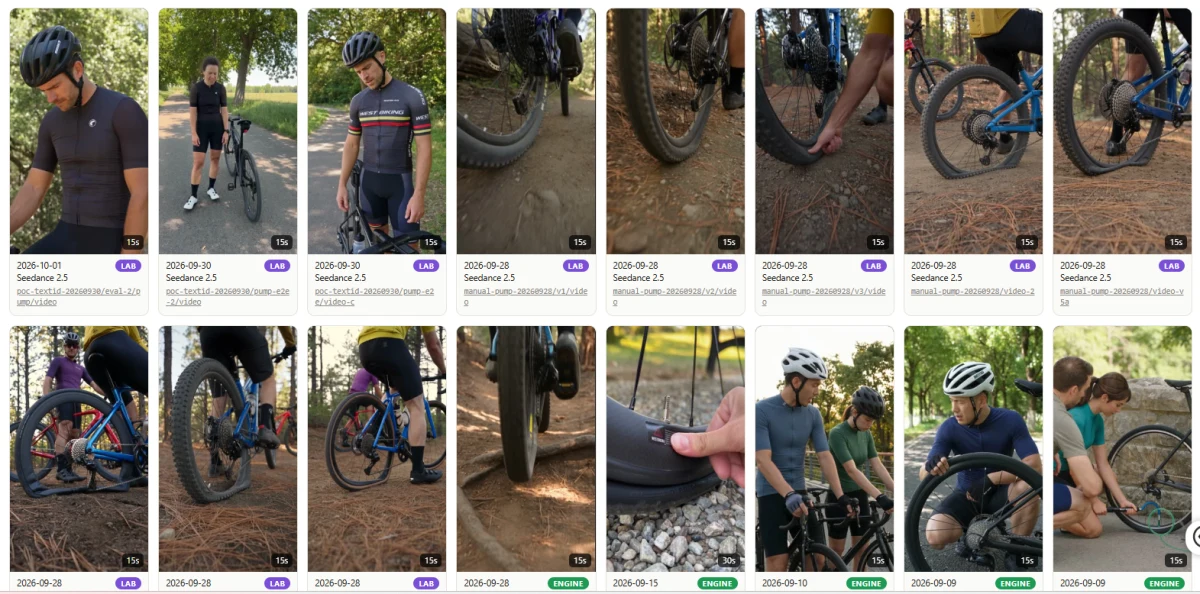
This approach helps you build a repeatable creative testing process instead of relying on occasional viral posts. For paid campaigns, validate the strongest variations against conversion and acquisition cost before increasing spend.
6. Match Social Content to the Customer's Stage of Consideration
Not every viewer is ready to buy. Someone discovering your brand for the first time may need to understand the problem your product solves, while someone comparing options may want proof of quality, product details, or customer experiences.
Build content for these different needs. Use problem-focused videos to attract new audiences, demonstrations and comparisons to help shoppers evaluate the product, and reviews or clear purchase information to address final concerns.
This also makes paid social campaigns easier to structure. Rather than showing the same sales message to everyone, use relevant content for eligible audiences based on their interactions with your brand.
How to Measure the Profitability of Your Shopify Social Media Marketing
Likes, views, and follower growth can tell you whether people are engaging with your content, but they don't tell you whether social media is making your Shopify store more profitable. To evaluate performance, connect social activity to store sales, acquisition costs, and the expenses behind each order.
1. Track the Metrics That Connect Social Media to Profit
Start with a small set of metrics that helps you understand the full journey from discovery to purchase.
These metrics work best together. For example, a campaign may bring in plenty of traffic but have a low conversion rate, suggesting a mismatch between the ad's promise and the product page. Another campaign may generate fewer orders but attract customers with higher order values and better margins.
2. Separate Organic Social Results From Paid Campaign Performance
Organic posts and paid ads serve different purposes, so assess them accordingly.
For organic social, look at referral traffic, assisted conversions where measurable, and sales linked to your social activity. Engagement metrics such as saves, shares, and profile visits can help explain why certain content attracts interest, but they shouldn't be treated as sales by themselves.
For paid social, monitor ad spend, purchases, CAC, and return on ad spend (ROAS). ROAS measures revenue generated relative to advertising spend, but it doesn't account for product costs, shipping, transaction fees, or refunds. A campaign can therefore achieve strong ROAS and still generate little profit.
3. Use Profit Data to Decide What to Scale
When you market your Shopify store across multiple social platforms, comparing performance isn't always straightforward. Meta, TikTok, and other ad platforms use their own attribution methods, so the same purchase may be credited differently across reports.
Looking at each dashboard in isolation can make it difficult to judge which campaigns are actually contributing to your store's profitability.
TrueProfit helps Shopify merchants track real-time net profit by bringing paid advertising performance and store-level profit into the same picture. It brings revenue, ad spend, and the full range of store expenses into one view, from COGS, shipping, transaction fees, and refunds to other direct and indirect costs that affect your bottom line.
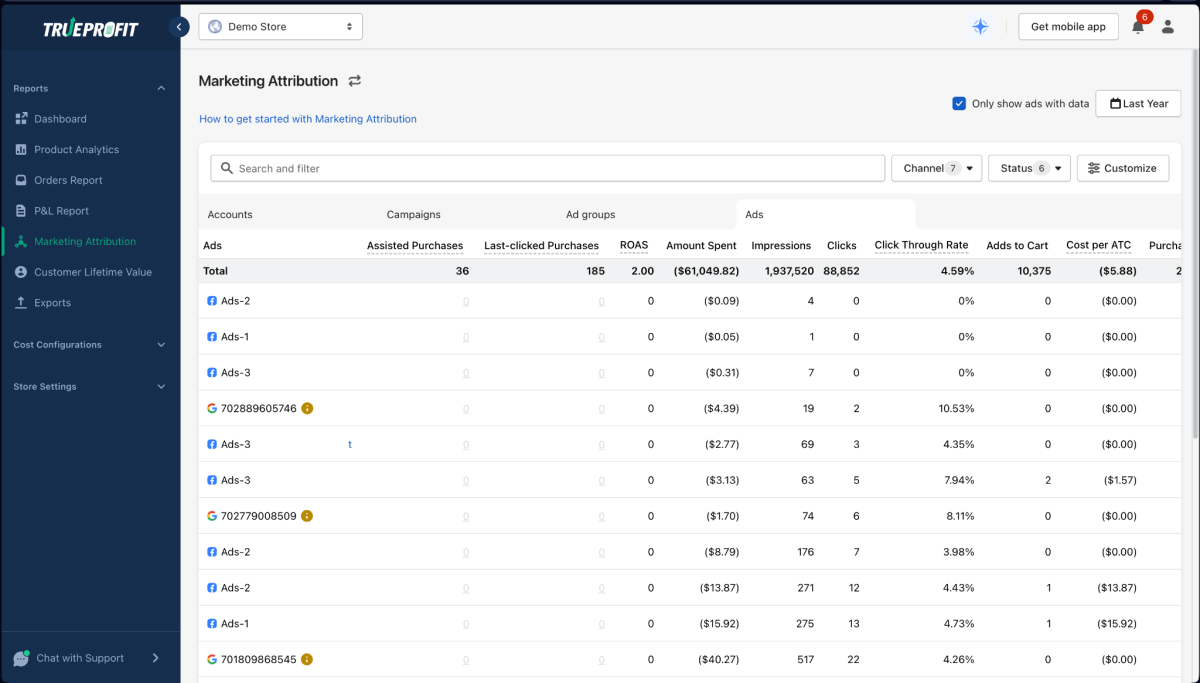
Its Marketing Attribution feature distinguishes last-clicked purchases from assisted purchases, helping you understand how different ads contribute to conversions. By connecting attribution data with net profit analytics, you can compare paid social campaigns based on both the sales they drive and the profit they generate, rather than relying on ad platform metrics alone.

Final Thoughts
Growing your Shopify store through social media takes more than chasing viral posts or increasing your posting frequency. Sustainable results come from understanding your audience, showing how your products solve their problems, and building trust through consistent, relevant content.
Treat every post and campaign as an opportunity to learn what motivates your customers to buy. As you identify the platforms and messages that work best, you can focus your time and budget on activities that support long-term growth rather than short-lived engagement.

Irene Le is the Content Manager at TrueProfit, specializing in crafting insightful, data-driven content to help eCommerce merchants scale profitably. With over 5 years of experience in content creation and growth strategy for the eCommerce industry, she is dedicated to producing high-value, actionable content that empowers merchants to make informed financial decisions.