How to Sell on Shopify in 2026 (From Zero to First Sale)


Shopify is an e-commerce platform that lets you create and run an online store without knowing how to code. You can list products for sale, allow customers to add items to a cart, check out, collect payments, and manage orders. Shopify provides everything needed to operate an online store in one place, which is why it’s one of the most popular e-commerce platforms.
This guide walks you through how to start selling online on Shopify, from setting up your store to getting your first sale, with a focus on what actually works for new store owners in 2026.
How to Start Selling Online on Shopify?
Starting a Shopify store is straightforward, but building one that sells requires intention. The steps below don’t just cover technical setup, they help you prepare a store that real online shoppers are willing to buy from.
Step 1: Build Your Shopify Store
To get Shopify, you visit the Shopify website and enter your email address on the landing page. This starts a free trial, and no payment information is required at this stage.
Then, you open your very first Shopify account. Shopify’s setup process is beginner-friendly and guides you through the basics like store name, currency, and location.
After setting up your account, Shopify will require you to set up a domain. You can buy one directly through Shopify (approx. $14/year) or connect an existing one. A professional URL like yourbrand.com is essential for trust.
Now with a domain, you can pick a theme. A theme controls the layout and structure of your store. Shopify includes free themes like “Dawn,” and you can browse additional free or paid themes in the theme store. When choosing a theme, the best way is to focus on layout and features rather than colors or images, since those can be customized later.


Beginners like you often feel stuck because you all often start from a blank store page with no structure. This way, you’re immediately faced with decisions like choosing layouts, typography, colors, and mobile optimization, although literally you have no previous experience to say what’s right.
So, here’s our quick tip:
Instead of reinventing the wheel, you can use this Shopify theme detector to spy 3-5 top stores in your niches. analyze 3–5 top-performing stores in your niche. The themes they’re using are already proven to work in the real-world.
Step 2: Set Up Your Shopify Plan
Once your store is generated, Shopify walks you through setup questions to understand how you plan to sell: online, in person, or both. You also choose what pricing plan you’ll use for the store.
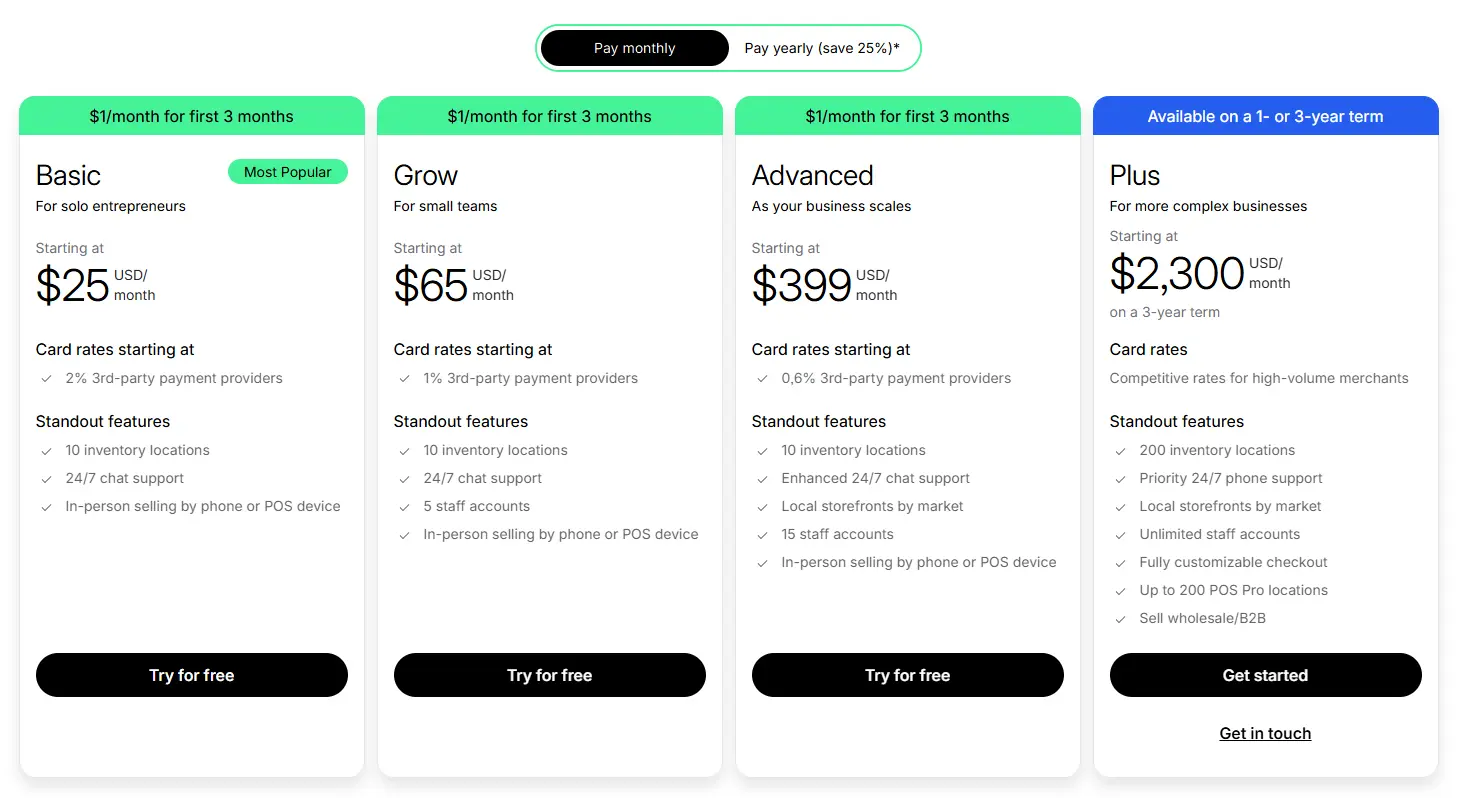
Shopify offers multiple plans, from Basic ($25/month) to Plus ($2,300/month). For beginners, the basic Shopify plan is more than enough. It gives you everything needed to start selling without paying for advanced features you won’t use yet. Keeping upfront costs low is critical when you’re just starting out.
Step 3: Add Products to Your Store
To add a product, you enter a product title and description on the product creation page. Shopify provides text formatting tools and allows you to add media such as images or videos to enhance the product listing. Honestly, this is the easiest part.
The hardest part actually lies in picking products to sell and when first selling online, not knowing what to sell happens a lot. It’s totally normal. Just remember: Product selection is never about personal taste. Choosing products based on what “looks cool” is one of the biggest reasons new stores fail.
High potential products are chosen based on:
- High demand from a niche audience: Product people already search for and have an intent to buy it.
- Estimated good gross profit margin: TrueProfit study of over 5,000+ Shopify stores reveal that a 60–70% gross profit margin is considered good, but different niches offer different profit potential.
In short, the strongest signal for a product worth selling is profit potential and real demand from real buyers. For demand, you can filter it by keyword search volume, Google Trend. For engagement, you can test it by platforms like TikTok, Facebook, Instagram, etc. They’re all showing exactly what people are ready to buy through likes, comments, shares, and sales data. Consistent engagement and steady sales growth indicate real demand, even in competitive niches.
Step 4: Create a High-Converting Product Page
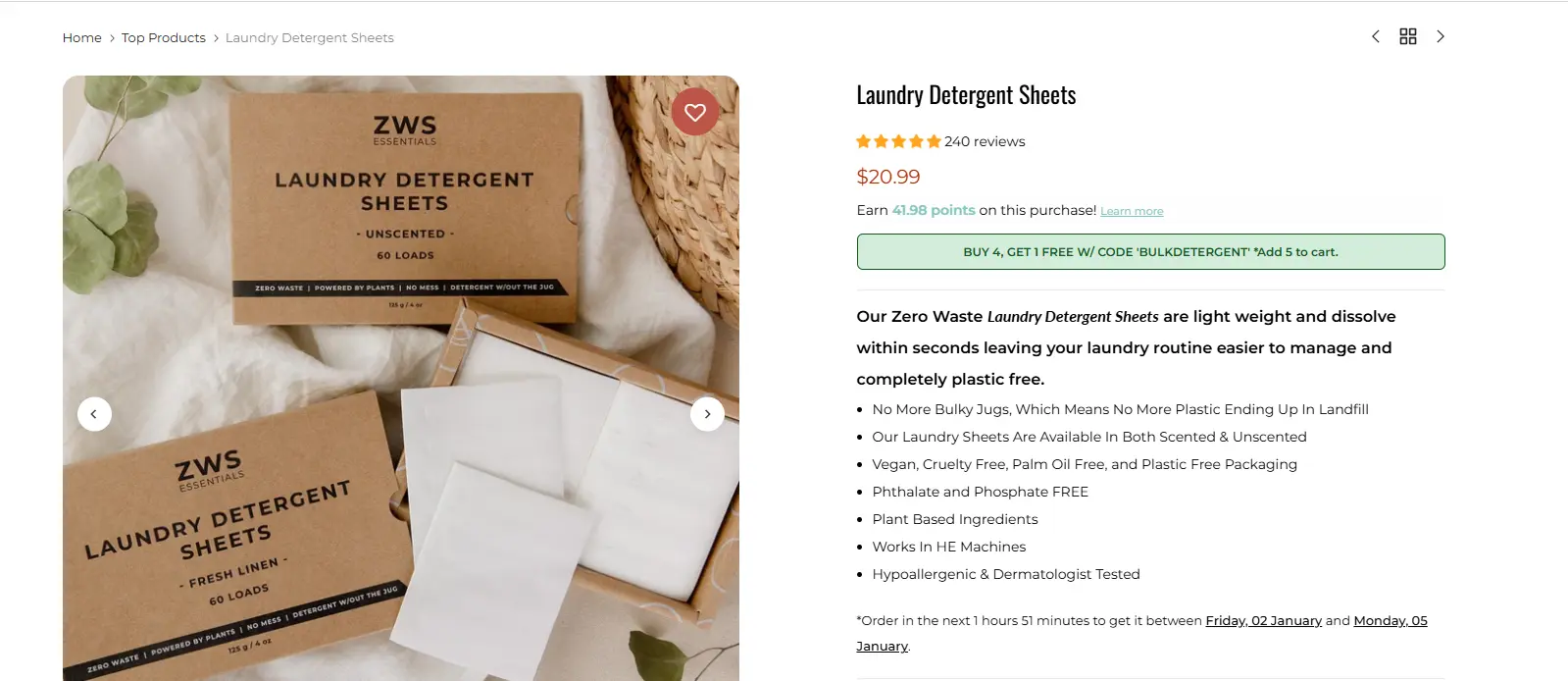
The Shopify product page is the most important page on your store. This is where customers decide whether to buy or leave. So, the best way to start designing your new Shopify store is by adding your first product page.
Here’s a structure you can trust cuz most Shopify Product Pages follow:
- Announcement Bar
- Navigation Bar
Top Fold/Hero: Product Images (Left) | Buy Box (Right)
Below the Fold:
- Key Benefits / USP
- Product Details & Features
- FAQ
- Guarantees
- Customer Reviews
Winning brands in your niche might already have figured out what works. So we think your job is to just follow the beaten path by finding 3-5 top performers in the same niche, studying their patterns, and using their product page structure as your starting blueprint, then designing your own page from there.
Step 5: Create a Homepage That Builds Trust
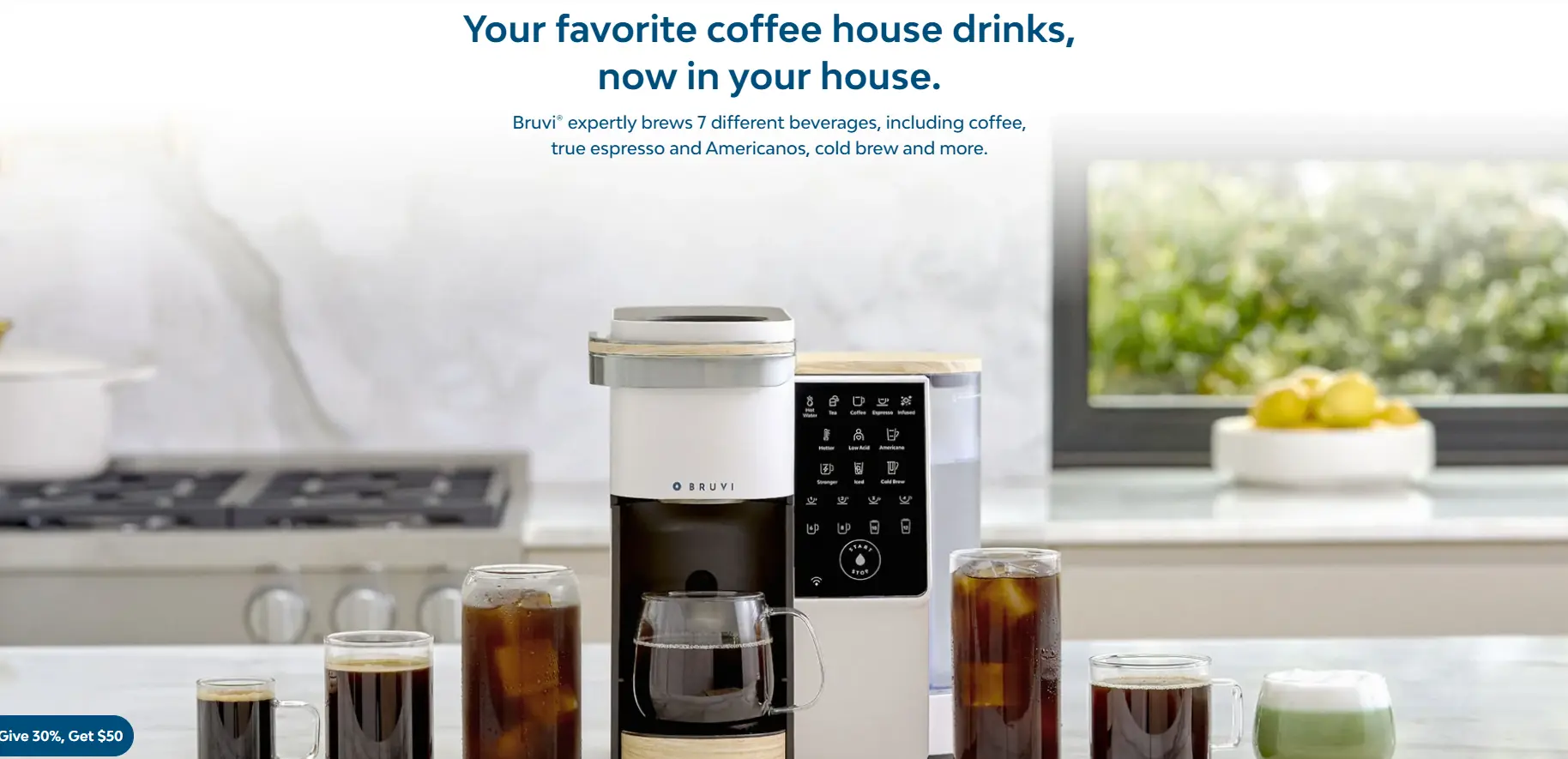
Even though ads usually send traffic to product pages, your homepage still plays a major role in branding. Customers browse. If they click around and get a strange or low-quality vibe, they won’t buy.
A strong branded homepage includes:
- A clean header with a short, inviting brand message
- High-quality lifestyle imagery
- Featured collections or best sellers
- A clear mission or purpose statement
- Promotional sections used sparingly
- Visible products and collections
- A final call to action that explains what the brand is about
This layout works across most Shopify themes. Paid themes like Impulse make it easier, but free themes can still apply the same principles.
The key idea is that your homepage should feel like a real company, not just a product catalog. And that’s exactly what we’ll talk about in the next steps.
Step 6: Do Branding for Your Store
The foundation of a real brand is a clean, professional, and intentional website. Successful Shopify stores don’t look random or rushed, they feel legitimate.
A strong branded store has a clear name and logo that fits the niche, high-quality images, multiple collections within a focused category, consistent design and layout, a trustworthy, cohesive look.
This kind of store makes success much easier because customers feel safe buying from it. It also allows you to test multiple products without looking like a generic dropshipping site.

Step 7: Set Up Payment Gateway
Setting up payments in Shopify is how you allow customers to pay you and how Shopify sends that money to your bank account. Without configuring payments, your store cannot accept orders, even if products and design are ready.
You can use Shopify's official, built-in payment gateway. However it's only available in certain countries such as the United States, Canada, United Kingdom, Australia, and a few others. If Shopify Payments is available in your country, it’s usually the simplest option to start with. If it’s not available, you still can use a third-party payment provider instead.
No matter which provider you choose, one key principle is that you should offer as many common payment options as possible.
This includes credit cards, Apple Pay, Google Pay, and region-specific methods. The more payment options you offer, the fewer checkout barriers customers face, and the less likely you are to lose a sale because someone can’t pay the way they prefer.
Step 8: Set Up Profit Tracking System
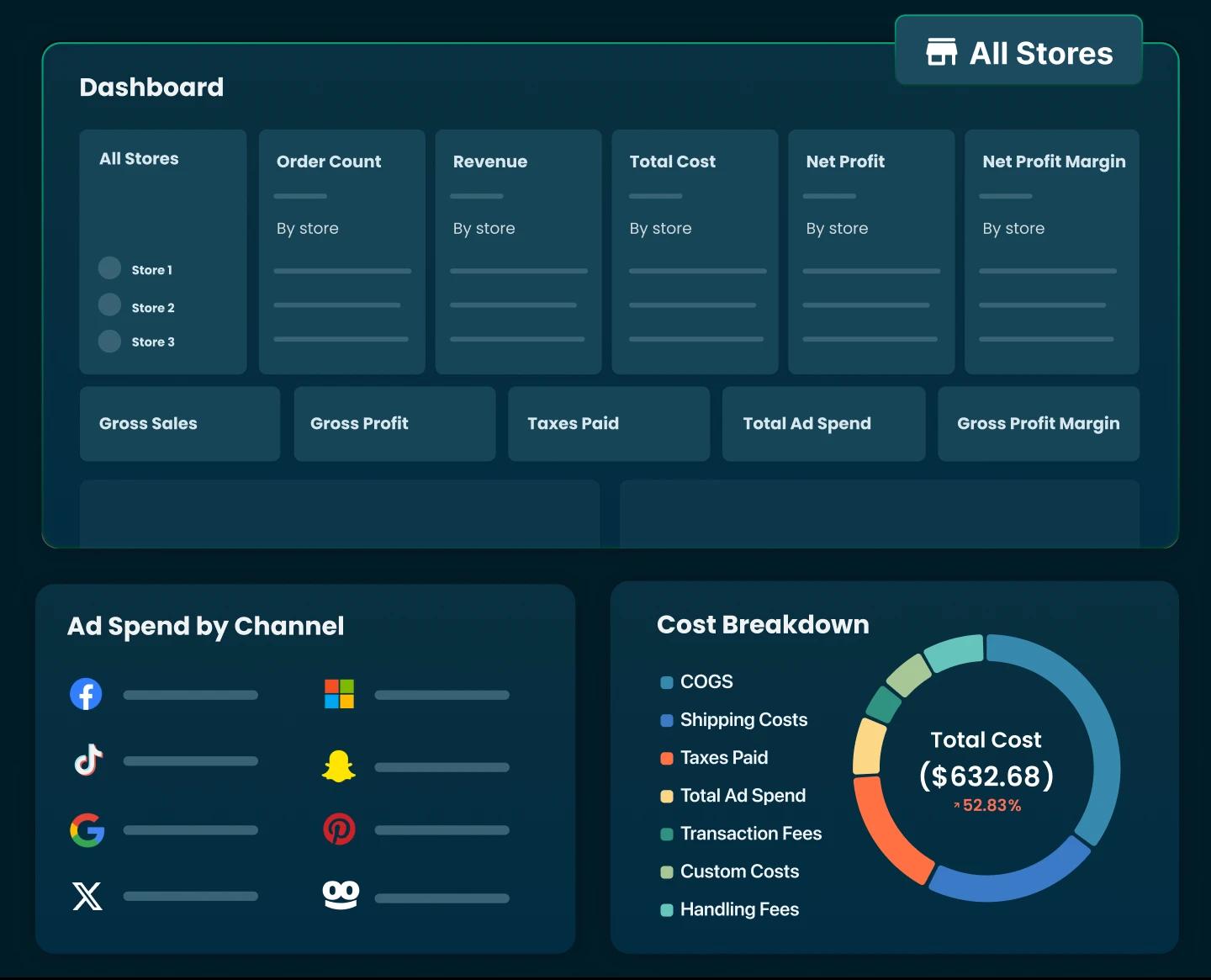
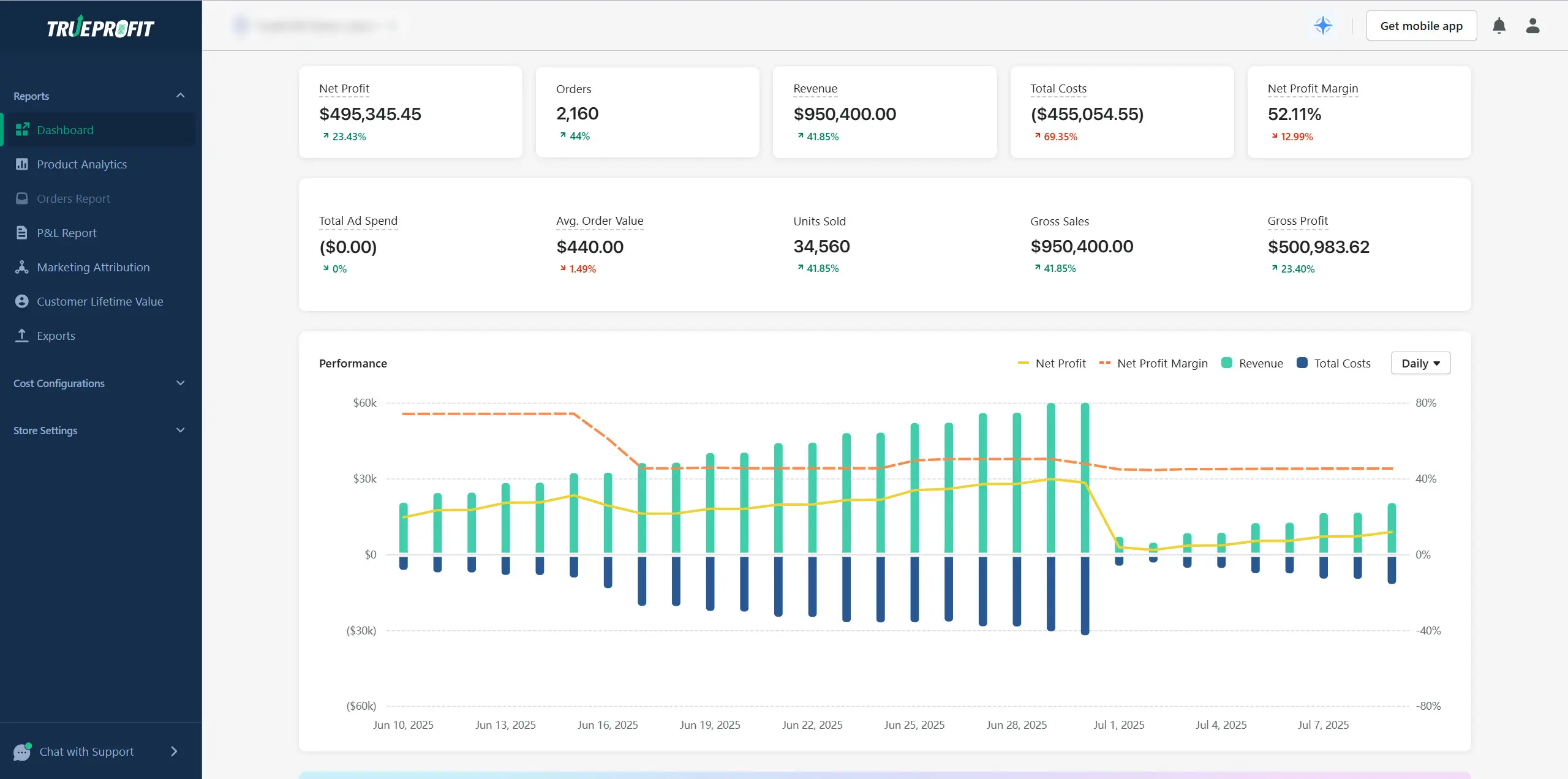
A profit tracking system is the process of tracking and analyzing your Shopify profit alongside other essential critical metrics such as revenue, product costs, store costs, transaction fees, ad spend, marketing performance, customer lifetime value. It’s best used to monitor and report profit performance over a specific period of time, so you can understand the most accurate picture of your store's financial health.
A common misconception is that the profit tracking system only works for established brands, stores with high sales, or companies with big budgets. That belief stops many beginners from setting it up early and often from getting their first meaningful sale ever. Honestly, profit tracking is essential for beginners just as much as it is for large brands. And here's why:
The real problem of making sales but no profit isn't your store itself, but it's starting from the unprofitable product, low-performing ads, or overspending with no profit in return. One small change there can end your long months of loss and open a new phase of consistent profit. But without the right profit tracker, you can’t clearly see where you’re stuck or why your store isn’t making any profit.
For Shopify merchants, one of the most effective profit tracking tools is TrueProfit. It’s a net profit analytics platform used by thousands of merchants worldwide, designed to provide accurate, real-time profit visibility.
What's best about TrueProfit is that by pulling in data such as revenue, costs, products, marketing performance, and fees from massive channels, TrueProfit shows net profit by product, by ad channel, and store-wide. This makes it easy to give you a clear view of your store’s financial health and allows you to make decisions based on data-driven insight instead of guesswork.
Step 9: Launch Your Store
Before launching, Shopify allows you to preview how your store looks on different devices. Mobile preview is important because most Shopify traffic comes from mobile devices. You should check: Text size and spacing, product images, buttons and add-to-cart visibility, navigation and menus. If something looks off on mobile, you should fix it before launching, because mobile experience directly affects conversions.
When your store goes live, it simply means your store is now publicly accessible on the internet and customers can place orders.
The next steps typically include:
- Driving traffic to your store
- Testing whether people actually want your product
- Observing how visitors behave
- Identifying where customers drop off
- Making small improvements based on real data
This is where marketing, testing, and financial tracking become important. Without real traffic and real data, you can’t improve your store or fix problems. Remember: your goal after setup is not perfection. It’s to get real feedback from real visitors and use that information to move toward your first sale and beyond.

How Much Can You Make from Selling on Shopify in 2026?
The reality: 60% of new stores earn under $1,000/month, but 20% hit $10,000+ monthly after consistent effort. The top 10% make $100,000+ per month. These numbers vary significantly depending on the business model, product niche, pricing strategy, and Shopify category.
For beginners selling online for the first time, it’s important to understand that these averages are not day-one results. They usually come with good products, effective marketing strategies, continuously tracking profit, costs, and performance, etc. That’s why starting with one high-potential store and committing to improving it matters more than launching multiple stores without direction.
How Much Does It Cost to Open a Shopify Store as a Beginner?
When selling online, total costs usually take up around 80% of your revenue.
That means a store making around $1,000/month likely costs about $800. At $10,000 per month, total costs are often around $8,000, and for a store making $100,000 per month, total costs are often around $80,000.
Ad spend can take up 45% of total costs, especially for new stores with no branding, no traffic. Meanwhile, fees such as Shopify plan, domain name, transaction fees, apps, etc usually sit around $110+ per month for small-sized stores.
Final Thoughts
Learning how to sell on Shopify in 2026 is about more than opening an online store. It’s about choosing the right product, building trust, and understanding how online shoppers make decisions.
Your first sale won’t come from copying every tactic you see online. It comes from understanding your customer better than your competitors and building a store that feels worth buying from.


Harry Chu is the Founder of TrueProfit, a net profit tracking solution designed to help Shopify merchants gain real-time insights into their actual profits. With 11+ years of experience in eCommerce and technology, his expertise in profit analytics, cost tracking, and data-driven decision-making has made him a trusted voice for thousands of Shopify merchants.