




Shopify Shipping Labels: The Complete Guide to Smarter Shipping & Profitability


Table of Contents
Shopify shipping labels are pre-paid, printable postage documents available directly through your Shopify store, simplifying your e-commerce fulfillment. They integrate label creation, purchase, and management directly into your orders, aiming to boost efficiency and cut costs.
For any online store focused on growth, using Shopify shipping labels can significantly streamline fulfillment, reduce shipping expenses, and enhance the professional appearance of your packages. This makes them a crucial tool for operational success.
This comprehensive guide will walk you through everything there is to know about Shopify shipping labels, from creating and printing them to optimizing their use and understanding their costs.
In this blog:
What Are Shopify Shipping Labels?
Shopify shipping labels are an essential feature for most e-commerce businesses operating on the platform, allowing merchants to manage their shipping needs directly from their admin dashboard.
1. Definition
Shopify shipping labels are the official term for pre-paid, printable postage documents that merchants can purchase and print directly through their Shopify platform. These digital labels contain all the necessary information for a carrier to transport a package from your business to your customer, simplifying logistics.

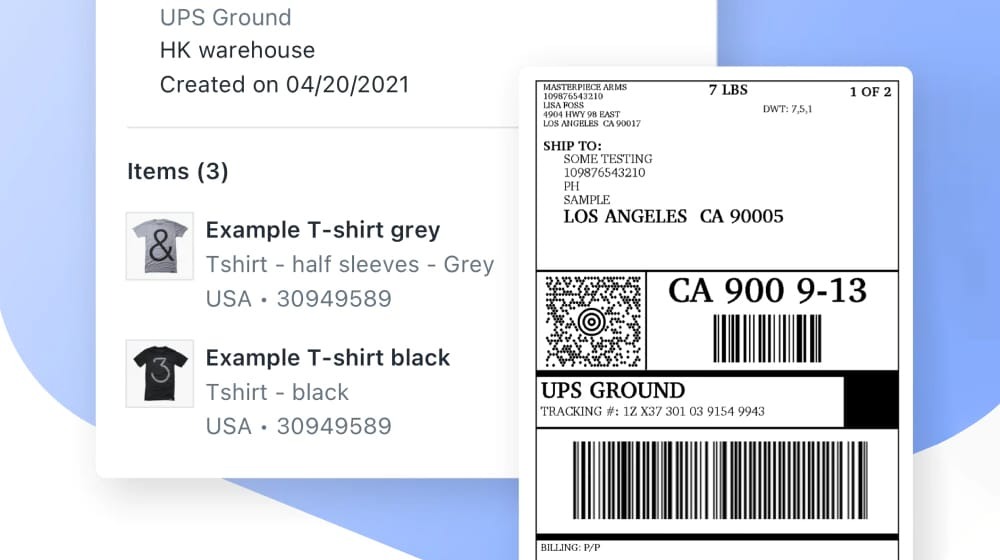
2. How They Work
The process of creating a shipping label on Shopify is fully integrated into the platform's order management system. When a customer places an order, it appears in your Shopify admin as "unfulfilled."
From there, you review the order details, input package specifications, choose a shipping carrier and service, and then purchase the label.
The system automatically calculates the cost based on your inputs and applies any available discounts. Once purchased, the label can be printed and affixed to your package instantly.
3. Key Components
Every Shopify shipping label contains several critical pieces of information to ensure proper delivery and tracking. These include:
- Sender and Recipient Details: The complete addresses of both your business and your customer.
- Barcode: A unique identifier scannable by the carrier for efficient processing and tracking.
- Tracking Number: A specific sequence of characters that allows both you and your customer to monitor the package's journey.
- Carrier Information: Specifies the shipping company responsible for delivery, such as USPS, UPS, or FedEx.
- Service Type: Indicates the chosen shipping speed and method, for example, Priority Mail, Ground, or Express.
- Weight and Dimensions: Declared package weight and size, which are crucial for determining the shipping cost.

How to Create Shipping Labels on Shopify (Step-by-Step)
Creating Shopify shipping labels is a straightforward process designed to integrate seamlessly into your order fulfillment workflow.
1. Accessing the Fulfillment Section
To begin creating a shipping label, log into your Shopify admin. From the main dashboard, navigate to the "Orders" section. Here, you'll see a list of all your placed orders.
2. Selecting an Unfulfilled Order
Identify the specific order or orders that are ready for shipment. Click on the order number of an unfulfilled order to open its detailed view. Within the order details, locate and click the "Fulfill item" button or a similar option to initiate the fulfillment process.
3. Reviewing Order Details and Package Dimensions
Before purchasing a label, it's crucial to confirm the accuracy of the order details, including the customer's shipping address and the items being shipped. You will then input the package's weight and dimensions.
Accurate measurements are vital for correct postage calculation and to prevent additional charges or delivery delays. If you've saved package templates, you can select one here for faster input.
4. Choosing a Shipping Service and Carrier
Shopify will present you with available shipping options from various carriers based on your package details and the destination.
You'll see choices for carriers like USPS, UPS, FedEx, DHL Express, and Canada Post, along with different service types (e.g., standard, expedited, ground, air) and their associated costs. Select the option that best fits your needs and your customer's chosen shipping method.
5. Purchasing and Generating the Label
Once you've selected your desired shipping service, review the final cost. Click the "Buy shipping label" or "Purchase label" button to finalize the transaction. Shopify will then generate the digital shipping label, making it available for immediate printing. The cost for the label will be added to your regular Shopify bill.
6. (Optional) Bulk Label Creation
For merchants handling multiple orders, Shopify offers the option to create labels in bulk. This feature allows you to select several unfulfilled orders, input package details (often using pre-set package types), and purchase multiple labels simultaneously. This significantly speeds up the fulfillment process during busy periods, enhancing efficiency.
How to Print Shopify Shipping Labels
Once your Shopify shipping labels are generated, the next step is to print them correctly and securely attach them to your packages.
1. Printing Directly from Shopify Admin
After purchasing a label, you'll see an option to "Print label" directly within the Shopify order details. Shopify allows you to print these labels using any standard desktop printer (inkjet or laser) connected to your computer. You can usually choose common paper sizes like 8.5x11 inches or specific label sizes, though specialist thermal printers are often preferred.
2. Choosing the Right Printer
While standard printers work for occasional labels, many e-commerce businesses opt for thermal label printers. Thermal printers are highly efficient for shipping labels because they print quickly, don't require ink cartridges, and produce durable, smudge-proof labels. They are especially recommended for printing 4x6 inch shipping labels, which is a standard size for most carriers. Inkjet or laser printers can also be used, but you might need to use special adhesive label sheets for these.
3. Tips for Successful Printing
To ensure your labels are scannable and adhere correctly, consider these practical tips:
- Clear Barcodes: Ensure the barcode is crisp, clear, and not smudged or cut off. Carriers rely heavily on these for accurate tracking.
- Correct Orientation: Print the label in the correct orientation so all information is legible and the barcode is positioned for easy scanning.
- Reliable Hardware: Ensure your printer is well-maintained and has sufficient paper or label stock.
- Test Print: If you're new to printing labels, it's wise to do a test print on plain paper first to check alignment and clarity.
4. Post-Printing Actions
Once printed, securely attach the label to your package. If you're using self-adhesive 4x6 thermal labels, simply peel and stick the label to a flat, prominent surface on the package, avoiding seams or edges.
If printing on standard paper, use clear packing tape to cover the entire label, especially the barcode and tracking number. This protects it from moisture and damage during transit. Ensure no tape covers the edges or creates wrinkles that obscure information.
Benefits of Using Shopify Shipping Labels
Utilizing Shopify shipping labels offers numerous advantages that contribute to a more efficient and profitable e-commerce operation.
1. Discounted Shipping Rates
One of the most significant benefits is gaining access to pre-negotiated, discounted shipping rates with major carriers like USPS, UPS, and DHL Express. These rates are often considerably cheaper than what you would pay at a retail post office or by setting up direct accounts as a small-to-medium volume shipper, directly improving your margins.
2. Streamlined Fulfillment Workflow
Shopify integrates label creation directly into your order management system. This means you don't need to log into separate carrier accounts or manually transfer order data, saving valuable time and reducing the risk of errors in your fulfillment process.
3. Time Savings
Automating the label creation process significantly reduces manual data entry and repetitive tasks. With bulk label creation options available, you can process multiple orders much faster, especially during peak sales seasons, freeing up time for other business activities.
4. Built-in Tracking
As soon as you purchase a label, Shopify automatically generates a tracking number. This number is then provided to your customer via email, and shipping updates are automatically synced to their order status within your store, reducing customer inquiries about package whereabouts.
5. Professional Appearance
Shopify labels provide a standardized, clear, and professional look for all your packages. This consistent branding enhances your customer's unboxing experience and conveys a sense of reliability and professionalism, reinforcing trust in your brand.
6. Simplified Billing
All shipping costs incurred from purchasing Shopify labels are conveniently consolidated and added to your regular Shopify subscription bill. This simplifies accounting and expense tracking, as you receive a single, unified bill for most of your operational costs.

Alternatives to Shopify Shipping Labels
While Shopify shipping labels offer convenience and integrated features, various alternatives exist that might better suit specific business needs or higher shipping volumes.
1. Direct Carrier Accounts
Merchants can open direct accounts with carriers like USPS, UPS, and FedEx. This approach can sometimes unlock better negotiated rates for very high-volume shippers, offer more specialized services, or provide more direct access to carrier support systems.
However, it requires separate accounts and billing, more manual integration into your workflow (unless using a third-party app), and potentially less competitive rates for lower volumes compared to Shopify's aggregated discounts.
2. Third-Party Shipping Apps (e.g., ShipStation, ShippingEasy)
Platforms like ShipStation or ShippingEasy integrate with Shopify and often multiple other e-commerce platforms. Their benefits include advanced features such as complex shipping rules, automated workflows, custom branding on labels, and access to a wider range of carriers or regional couriers.
The downsides are an additional monthly subscription cost, a learning curve for setup, and potentially redundant features if Shopify's native solution already meets most needs. These apps can be particularly useful for businesses that require highly customized workflows or ship from multiple locations.
3. Manual Label Creation
This method involves going to a carrier's website (e.g., USPS.com, UPS.com) or a physical post office to purchase and print labels. While it's only viable for extremely low-volume sellers (e.g., 1-2 shipments per week), it is highly inefficient, time-consuming, prone to errors, offers no discounted rates, and completely breaks the integrated workflow of a Shopify store. This method is generally not recommended for any serious e-commerce business aiming for growth.
4. Comparative Analysis
Choosing between Shopify's native labels and these alternatives depends heavily on your specific business requirements. Shopify labels are often the best choice for most small to medium-sized Shopify-only stores seeking simplicity, good discounts, and integrated tracking. Consider direct carrier accounts if you have extremely high volume or very specific contractual needs not met by Shopify's offerings.
Third-party apps are ideal for multi-channel sales, complex shipping logic, extensive automation, or specific international routes that require broader carrier access and more granular control over shipping logistics.
Tips for Efficient Shopify Shipping Label Management
Optimizing your use of Shopify shipping labels can lead to significant cost savings and improved customer satisfaction.
Here are practical tips to streamline your shipping operations:
1. Optimize Your Package Sizes and Weights
Even small differences in package dimensions and weight can significantly impact shipping costs. Always use packaging that is as small and light as possible while still adequately protecting your products.
Accurately weigh and measure your packages to avoid costly surcharges from carriers. Shopify allows you to save common package sizes, which speeds up label creation and ensures consistency across shipments.
2. Implement a Robust Returns Process
Streamline the generation of return shipping labels for customer convenience. You can often generate return labels directly within Shopify or through a third-party app, making the returns process smoother for both you and your customers.
Providing clear return instructions, including how to use pre-paid labels, helps to reduce support inquiries and improve the overall customer experience.
3. Batch Printing for Efficiency
During busy periods, leverage Shopify's bulk label creation feature to print multiple labels at once. This drastically reduces the time spent on individual order fulfillment and allows you to process more orders faster, making your packing station more productive.
4. Integrate with Inventory Management
Ensure your shipping label creation process is integrated with or accounts for your inventory management system. Accurately knowing what's in stock prevents overselling and ensures that labels are only generated for fulfillable orders, minimizing cancellations and customer disappointment.
Final Thoughts
Shopify shipping labels are an indispensable tool for Shopify sellers, transforming the often-complex world of shipping into a streamlined, cost-effective, and professional part of your business. By leveraging discounted rates, an integrated workflow, and automated tracking, you can significantly enhance your fulfillment efficiency and deliver a superior customer experience.
Embracing Shopify's shipping label features isn't just about sending packages; it's about optimizing a critical aspect of your business that directly impacts customer satisfaction and, most importantly, your profitability. By mastering how to create, manage, and troubleshoot your Shopify shipping labels, you empower your store to grow more efficiently.
Ultimately, to truly understand the impact of your shipping costs and other expenses on your real bottom line, consider integrating a robust profit analytics solution. TrueProfit can help you track and optimize these shipping costs effectively, providing clear insights into your overall profit margins for a healthier, more sustainable business.

Irene Le is the Content Manager at TrueProfit, specializing in crafting insightful, data-driven content to help eCommerce merchants scale profitably. With over 5 years of experience in content creation and growth strategy for the eCommerce industry, she is dedicated to producing high-value, actionable content that empowers merchants to make informed financial decisions.