The 2026 Guide to Building Better Customer Service for Dropshipping


Table of Contents
- 1. Why Is Good Customer Service Important in Running a Dropshipping Business?
- 2. A Customer Service Process You Can Actually Follow (Step By Step)
- 3. 6 Best Ways to Manage Customer Service for Dropshipping
- 4. When Should You Hire or Outsource Customer Support?
- 5. Customer Service Tools That Work Well for Dropshipping
- 6. Which Customer Service Metrics Should You Track?
- 7. Final Thoughts
- 8. FAQs About Customer Service For Dropshipping
In a dropshipping business, customer service is closely tied to how well your operation works behind the scenes.
A high number of refund requests could signal a product or supplier problem. And slow responses may simply mean your current support process can’t handle your order volume anymore.
So instead of treating customer service as an inbox you need to clear, it’s better to build it as part of your operating system.
Here’s how to structure customer service for a dropshipping store, what to automate, when to involve suppliers. Let’s go!
In this blog:
- 1. Why Is Good Customer Service Important in Running a Dropshipping Business?
- 2. A Customer Service Process You Can Actually Follow (Step By Step)
- 3. 6 Best Ways to Manage Customer Service for Dropshipping
- 4. When Should You Hire or Outsource Customer Support?
- 5. Customer Service Tools That Work Well for Dropshipping
- 6. Which Customer Service Metrics Should You Track?
- 7. Final Thoughts
- 8. FAQs About Customer Service For Dropshipping
Why Is Good Customer Service Important in Running a Dropshipping Business?
Customer service in dropshipping is basically how you handle customers from the moment they have a question to the moment an order is delivered, returned, or resolved.
This matters even more in dropshipping because you don’t control every part of the fulfillment process. A supplier can cause a shipping delay, send the wrong item, or run into an inventory issue, but the customer still sees your store as the business responsible for fixing it.
And I wouldn’t treat customer service as just a support function because it can directly shape whether a customer trusts your store enough to buy again.

A Customer Service Process You Can Actually Follow (Step By Step)
Let’s make this practical. When a customer sends you a message, you don’t want to figure out what to do from scratch every single time.
Here’s how I’d structure it.
Step 1: Figure out what the customer needs.
Start by identifying the issue, whether it’s a tracking question, address change, damaged product, refund request, or something else. Different issues require different checks and actions.
Step 2: Check the order before replying.
Review the order status, fulfillment status, tracking information, shipping address, and previous messages. This gives you the full picture before you respond.
Step 3: Bring in the supplier when needed.
If you need help checking inventory, investigating a shipment, or arranging a replacement, contact your supplier. But keep the customer communication on your side. They shouldn’t have to chase your supplier for answers.
Step 4: Give the customer a clear next step.
Explain what happened, what you’re doing about it, and what they should expect next. Keep it simple. Most customers mainly want to know what happened and what you're doing about it.
Step 5: Keep the issue open until it’s actually resolved.
If you’re still waiting for a supplier response, replacement, refund, or tracking update, the job isn’t finished. Follow up proactively instead of making the customer ask for an update.
Step 6: Look for recurring problems.
Customer service conversations can show you where your business is leaking time and money. Repeated “Where is my order?” questions may point to shipping communication issues, while repeated product complaints could signal a supplier or quality problem. Use those patterns to improve your store, policies, and fulfillment process.
6 Best Ways to Manage Customer Service for Dropshipping
If you’re running a dropshipping store, customer service can get messy pretty quickly. You’re dealing with customers on one side and suppliers, carriers, and fulfillment partners on the other.
The good news is that you don't need a huge support team to keep things under control. A few solid processes can take a lot of pressure off you while giving customers a much smoother experience.
Here’s what I’d put in place.
1. Set Clear Shipping Expectations Upfront
Let’s start with shipping because this is where a lot of dropshipping complaints come from.
If your product takes 7–15 business days to arrive, tell customers that before they place the order. Don’t make the delivery timeline sound faster than it really is just to get the sale. Clearly state your processing time, estimated delivery time, shipping regions, and any possible delays.

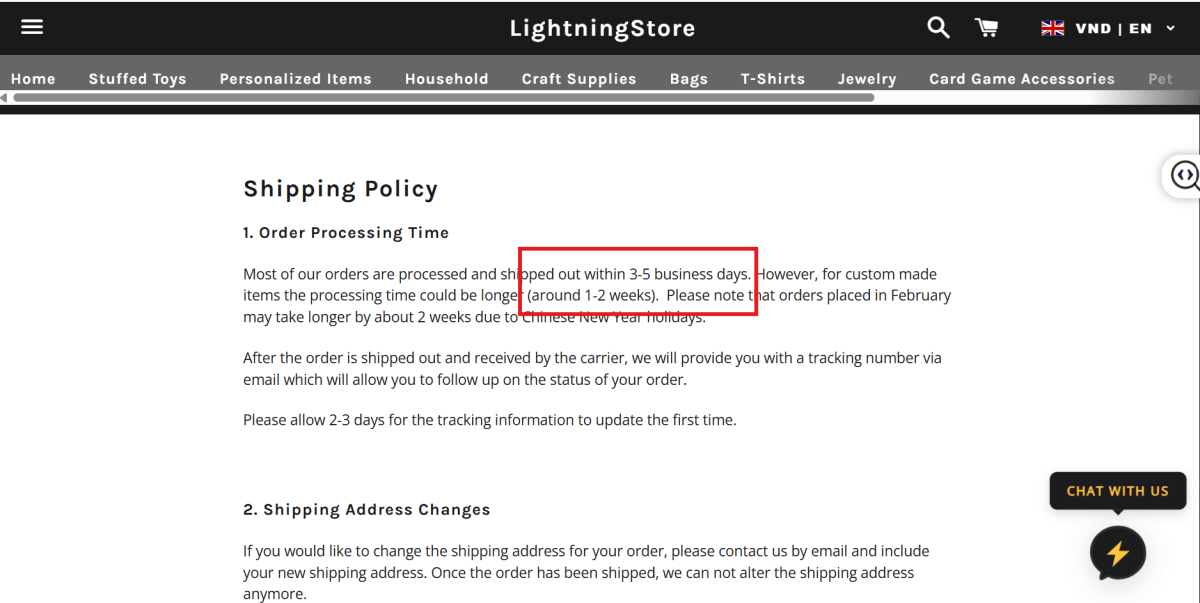
The same goes for your shipping, return, refund, and cancellation policies. Keep them easy to find on your website and write them in plain language. Customers shouldn’t have to dig through your site to figure out what happens if their order is late, damaged, or simply doesn’t work out.
This gives customers a clearer idea of what to expect before they buy and gives your support team something concrete to refer back to when handling requests.
2. Centralize Customer Communication
As your store grows, customers might reach you through email, live chat, social media, or even marketplace messages.
You don't want your team jumping between five different inboxes trying to figure out what happened with one order.
Bring your customer conversations into one place whenever possible. Tools like Gorgias or Richpanel can pull messages from different channels into a shared support inbox, while AI features can help categorize tickets, suggest replies, and handle simple questions automatically.
It also helps you avoid the classic situation where one person says one thing on email and another person gives a completely different answer on chat.
3. Automate Order and Tracking Updates
Here's an easy one to take off your team's plate.
If a customer can automatically receive an order confirmation, shipping notification, tracking number, and delivery update, there's much less reason for them to contact support in the first place.
For this, I’d look at AfterShip, 17TRACK, or ParcelPanel. They can handle most of the tracking updates for you, so customers know what’s happening without your team having to manually check and message them.
You don't need a human sitting there sending “Your order has shipped” messages all day.
Just make sure the information being sent is actually accurate. Automation is useful when it keeps customers informed, not when it sends them the wrong status faster.
4. Respond Quickly to Simple Issues
Not every customer question needs a long investigation.
If someone asks for their tracking number, wants to know your return window, or has a basic product question, get back to them quickly. For these simple, repetitive questions, you can even set up a chatbot with pre-written answers so customers get the information they need right away.
Tools like OpenClaw, n8n, Claude Code, or Codex can help you build one without handling every question manually.
At the same time, don't feel like every issue needs an immediate answer if you don't have the information yet. For more complicated problems, it's better to say you're checking and then come back with a useful answer than to reply quickly with something inaccurate.
5. Take Ownership Instead of Blaming Suppliers
This is probably one of the biggest mindset shifts you need to make with dropshipping.
Your supplier might be the one who shipped the wrong product. They might have caused a fulfillment delay. They might have packed the item poorly.
But your customer didn't buy from your supplier. They bought from you.
So instead of telling the customer, “That's the supplier's fault,” handle the issue on your side and work with the supplier behind the scenes.
You can absolutely hold your supplier accountable internally. Just don't make the customer responsible for sorting out your supply chain.
6. Use Customer Feedback to Improve Your Store
Don't look at customer complaints as just something your support team needs to get through.
Look for patterns.
If customers repeatedly complain about shipping times, maybe your shipping expectations aren't clear enough. If several people report the same product issue, take a closer look at that SKU or supplier. If customers keep asking the same pre-purchase question, maybe your product page is missing important information.
This is where customer service becomes more than just support.
Your inbox can show you exactly where the customer experience is breaking down.
When Should You Hire or Outsource Customer Support?
You don't need to hire a full-time support team just because you've started getting orders.
In the beginning, you can usually handle customer service yourself. As your ticket volume grows, though, it may reach a point where support is taking time away from product research, marketing, supplier management, or other work that actually grows the store.
That's when bringing in a VA, an in-house support person, or an outsourced customer service service can make sense.
A good rule is to look at ticket volume, response times, and how much of your day support is consuming, rather than choosing a specific order count as the trigger.
And before handing everything over, document your policies, common responses, escalation rules, and supplier contacts. Otherwise, you're not really outsourcing the work. You're just creating another person who needs to ask you what to do every time something unusual happens.

Customer Service Tools That Work Well for Dropshipping
Here are a few tools worth considering, depending on how your store operates:
The important part is not picking the tool with the longest feature list. Match the software to the bottleneck in your operation.
If most of your tickets are repetitive shipping and order questions, automation will probably create the biggest impact. If your team is losing track of conversations, focus on ticket organization and a shared inbox. And if you’re selling across multiple channels, centralizing those conversations becomes much more valuable.
That’s also why I wouldn’t rush into an advanced helpdesk just because your store is growing. Build the support system around your actual volume and workflow, then add complexity when you genuinely need it.
Which Customer Service Metrics Should You Track?
Once your order volume grows, the question isn’t simply “How fast are we replying?” It’s whether your team is resolving issues efficiently without creating more work, refunds, or frustrated customers downstream.
Here are the metrics I’d keep an eye on:
Don’t treat benchmarks as the goal.
There’s no single customer service benchmark that makes sense for every dropshipping store. A store selling low-ticket impulse products with straightforward orders will naturally have a different support profile from one selling higher-value or customized products.
Instead, establish your own baseline and watch how the numbers move over time.
For example, a first response time of 30 minutes might look great on paper. But if your average resolution time is three days because your team has to wait for suppliers to respond, the customer experience still has a problem.
The same applies to ticket volume. If tickets increase by 30% while orders increase by 50%, that may actually indicate that your support process is becoming more efficient.
Final Thoughts
Good customer service in dropshipping is less about having the perfect script and more about having a reliable process behind every customer conversation.
Know who handles each type of issue, keep supplier communication organized, and make sure customers aren’t left waiting while you figure things out internally. As your order volume grows, use automation and support tools to take repetitive work off your team.
The smoother your backend support process is, the easier it becomes to deliver a consistent customer experience.

[cta]
Harry Chu is the Founder of TrueProfit, a net profit tracking solution designed to help Shopify merchants gain real-time insights into their actual profits. With 11+ years of experience in eCommerce and technology, his expertise in profit analytics, cost tracking, and data-driven decision-making has made him a trusted voice for thousands of Shopify merchants.