The Complete Guide to Dropshipping Returns for Merchants in 2026


Table of Contents
- 1. How Dropshipping Returns Work in Practice
- 2. How to Handle Returns in Dropshipping Step by Step
- 3. 5 Practical Strategies to Manage Returns and Protect Your Profit
- 4. Building a Bulletproof Dropshipping Refund and Chargeback Process
- 5. Dropshipping Returns on Shopify and Other Platforms
- 6. Final Thoughts
- 7. FAQ About Dropshipping Returns
Nobody likes dealing with returns, but they’re part of running an ecommerce store. And with dropshipping, there’s one extra question: where does the product actually go?
The answer depends on your supplier, product, return policy, and target market.
So rather than treating every return the same way, let’s look at how the process works and what you should have in place before returns start piling up.
In this blog:
- 1. How Dropshipping Returns Work in Practice
- 2. How to Handle Returns in Dropshipping Step by Step
- 3. 5 Practical Strategies to Manage Returns and Protect Your Profit
- 4. Building a Bulletproof Dropshipping Refund and Chargeback Process
- 5. Dropshipping Returns on Shopify and Other Platforms
- 6. Final Thoughts
- 7. FAQ About Dropshipping Returns
How Dropshipping Returns Work in Practice
In a regular ecommerce store, it’s pretty simple. The customer sends the item back to your warehouse, and you handle the refund or exchange. With dropshipping, there’s another party involved: your supplier. They shipped the order in the first place, and in many cases, they’ll also handle the return.

That makes the process a little less straightforward.
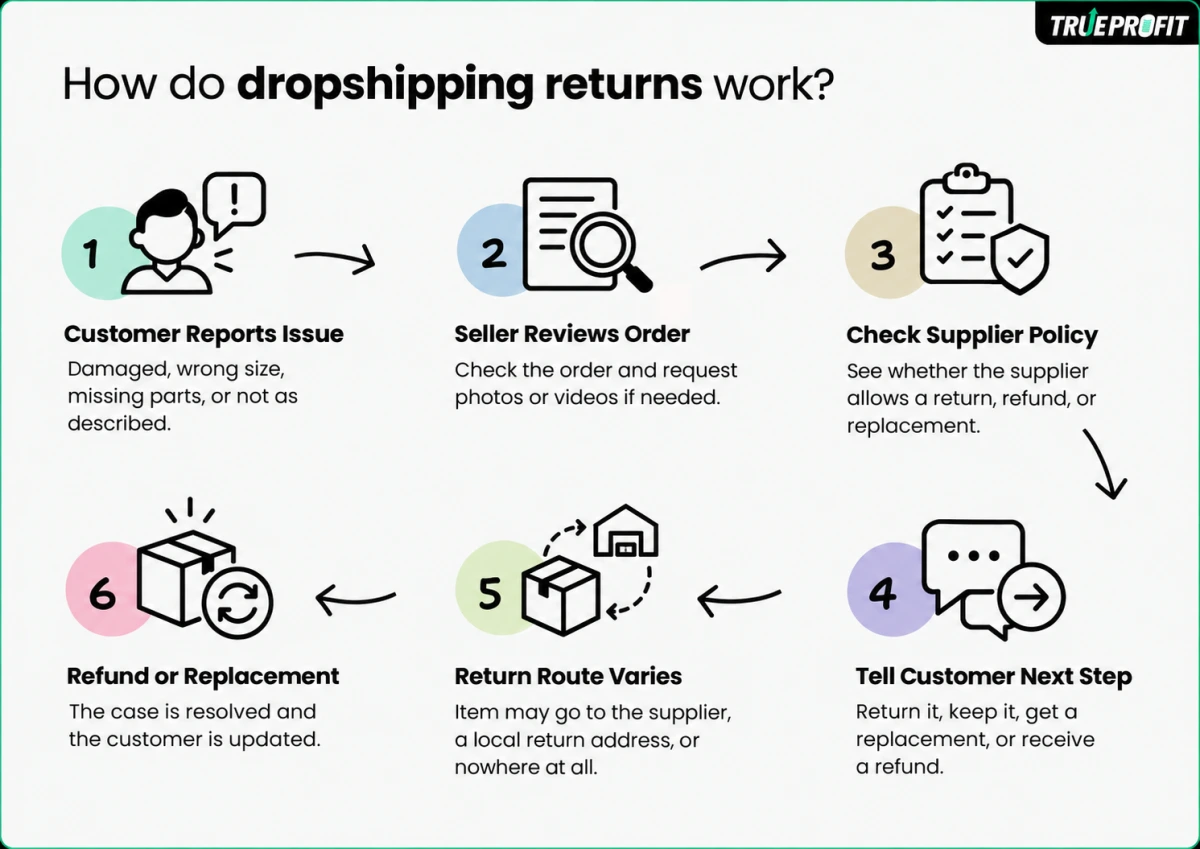
A typical dropshipping return starts when a customer reports an issue. You review the case, coordinate with your supplier, and then arrange the appropriate solution, whether that’s a return, replacement, refund, or store credit, based on your policies and the supplier’s terms.
And here’s the part that often surprises new dropshippers: the product usually doesn’t come back to you.
Depending on your setup, the return might go to the supplier’s warehouse, a local return address you control, or nowhere at all. With a returnless refund, for example, the customer keeps the product and you simply issue the refund.

How to Handle Returns in Dropshipping Step by Step
A return request comes in. The customer wants their money back, but the product isn’t even in your hands. So, what do you do?
I’d keep the process pretty straightforward: verify the issue, check with your supplier, give the customer clear instructions, then track and close the case.
Step 1: Verify the Return Request
First, start by asking the customer for their order number, a short explanation of the issue, and clear photos or videos if there’s a defect or damage.
Then check your store policy to make sure the request is still within your return window. At the same time, figure out what actually happened. Is the item defective? Was it damaged during shipping? Or did the customer simply change their mind?
That matters because it can affect who pays for return shipping and what resolution you can offer.
Step 2: Check the Return Process With Your Supplier
Once you understand the issue, check your supplier’s return rules before giving the customer an address.
If your supplier requires a return authorization or RMA, request it through their support system first. You’ll also want to confirm the correct return warehouse address and any special instructions.
I wouldn’t tell the customer to ship the item back based on an old address sitting in your inbox. If the supplier can’t identify the package, the return could be rejected, delayed, or lost.
Step 3: Send Clear Return Instructions to the Customer
Once the supplier confirms the return, send the customer everything they need in one message.
That usually includes the return address, packaging instructions, return authorization details, and the shipping label if you’re providing one.
For defective or damaged items, check your store policy and the consumer rules that apply to your market to determine who covers return shipping. For buyer’s remorse, the customer may be responsible for the return cost if your policy clearly states this before purchase.
The main thing is to avoid making the customer guess what to do next.
Step 4: Track the Return
After the customer ships the item, ask for the tracking number and add it to your order or support system.
From there, keep an eye on the shipment until the carrier confirms delivery. This gives you a clear record of when the item was sent and received, which can be useful if there’s a dispute about a delayed refund or missing return.
Step 5: Complete the Refund or Replacement
When the return has been received or the issue has been verified, it’s time to close the case.
If you’re issuing a refund, process it through your ecommerce platform and send it back to the customer’s original payment method. If they want a replacement and your policy allows it, place a new order with your supplier and arrange for it to be shipped out.
I’d also log the final outcome, including the reason for the return and any costs involved. Over time, this gives you useful data on which products and suppliers are creating the most return problems.
5 Practical Strategies to Manage Returns and Protect Your Profit
Returns aren’t just a customer service issue. They can also quietly eat into your margins through return shipping, refunds, replacements, and supplier costs.
So once your basic return process is in place, it’s worth looking at where you can reduce those costs without making the customer experience worse.
Strategy 1: Use Returnless Refunds for Low-COGS Products
Here’s one rule worth considering: don’t automatically ask customers to ship back low-cost products.
A cross-border return from North America or Europe to an overseas supplier can easily cost $15 to $35 or more. For a product with a $20 COGS, the return shipping alone may cost more than the item itself.
For lower-value products, you can handle the case without requiring a physical return. Depending on the situation, that could mean:
- Sending a free replacement immediately.
- Offering a partial refund, such as 50%, plus a discount code if the customer keeps the original item.
The right threshold depends on your product, shipping costs, and supplier terms. The key is to compare the cost of getting the product back with the cost of simply refunding or replacing it.
Strategy 2: Pre-Negotiate Photo-Proof Refunds With Suppliers
This is something I’d sort out before scaling sales volume, rather than dealing with it case by case later.
Talk to your suppliers about what happens when an order arrives damaged or has a manufacturing defect. Ideally, your agreement should state that verified photos or videos are enough to confirm the issue and trigger a supplier refund or free reshipment.
That way, you don’t have to send a damaged product back overseas just to prove that it was damaged.
It’s also worth getting these terms documented. Once your order volume grows, you don’t want to negotiate the same return issue with your supplier every time.
Strategy 3: Structure Policy Exemptions and Fee Terms Carefully
Not every product needs to follow the exact same return rules.
Hygiene-sensitive products such as swimwear, cosmetics, and intimate apparel, along with customized products, may have specific return restrictions where local law allows them. Make these exceptions clear in your store policy, especially when the product isn’t defective.
The same goes for restocking fees. Whether you can charge one, and how much, depends on the market and the reason for the return.
For example, some North American markets allow merchants to set restocking fees for certain buyer-remorse returns when the terms are properly disclosed. The rules are different in the UK and EU, where statutory cancellation rights can apply to online purchases.
Strategy 4: Build a Return Reserve Into Your Pricing
A practical approach is to treat returns as a predictable operating cost rather than a completely unexpected expense.
Start by tracking your actual return rate and the average cost of handling each return. You can then build an appropriate buffer into your pricing instead of taking the full cost directly out of your profit.
Return rates also vary significantly by category. General merchandise may have relatively low return rates, while apparel can see much higher rates because of sizing and fit issues.
So rather than automatically adding 3% to 5% to every product, use your own store data to work out how much of a return reserve actually makes sense.
Strategy 5: Audit Supplier Quality and Cut High-Defect Sources
Finally, look beyond how many returns you’re getting and track why they’re happening.
Log each return by SKU, issue type, and supplier. Over time, you may spot patterns such as damaged packaging, manufacturing defects, wrong items, or consistently poor product quality.
When one supplier or product starts generating an unusually high number of defects, it’s worth investigating before continuing to scale it.
You can ask the supplier to improve quality control, test another batch, or move the product to another vendor. And while you’re investigating, consider reducing ad spend on the affected product rather than sending more traffic toward a product that is already creating refunds and complaints.
Building a Bulletproof Dropshipping Refund and Chargeback Process
Returns and refunds are easier to manage when you have a clear process behind them. And when a customer takes the issue to their payment provider, your records can make a big difference.
1. Verify Issues With Photo or Video Proof
Let’s start with something simple: get evidence before you approve the refund.
For damage, defects, or “not as described” claims, ask the customer for the proof you need to understand what actually happened. Depending on the issue, that could be:
- Photos of the product and its packaging.
- Close-ups showing the specific defect.
- A short video showing that the product doesn’t work as expected.
- Screenshots or screen recordings for digital or functional issues.
This gives you something concrete to work with. You can see whether the issue is genuine, decide whether the supplier should cover the cost, and choose between a refund, replacement, or partial refund.
2. Coordinate Refunds With Your Suppliers
Here’s where dropshipping gets a little different from a traditional ecommerce store.
The customer comes to you for the refund, but you may need to recover that money from your supplier. So your process needs to connect both sides.
A typical case might look like this:
- The customer requests a refund or return.
- You review the issue and collect the necessary evidence.
- You send the order details and proof to your supplier.
- The supplier confirms the resolution, such as a refund, credit, replacement, or denial.
- You complete the refund, exchange, or alternative solution for the customer.
One thing I’d pay close attention to is how the supplier reimburses you.
They might send the money back, but they might also give you store credit instead. Either way, record what actually happened in your accounting and profit tracking. Otherwise, your reports can make a return look cheaper than it really was.
3. Prevent Chargebacks and Payment Disputes
Now let’s talk about chargebacks.
A chargeback can cost you more than the original refund. You may lose the order revenue, pay dispute-related fees, and spend additional time gathering evidence and responding to the payment provider.
The good news is that some disputes can be prevented much earlier in the process.
Start with the basics: respond quickly, make your policies easy to find, and tell customers exactly what happens next.

Dropshipping Returns on Shopify and Other Platforms
The return process is generally similar across ecommerce platforms, but the exact tools and settings can be different. The important thing is to separate what the platform handles from what you still need to manage yourself.
Shopify
With Shopify, you can manage returns and refunds directly from the order admin. You can create return requests, record returned items, issue refunds, and manage exchanges depending on your setup.
But Shopify doesn’t automatically solve the supplier side of a dropshipping return. You still need to contact the supplier, confirm where the product should go, and work out who covers the cost.
Amazon
Amazon is more customer-focused when it comes to returns. You need to follow Amazon’s return and refund requirements, even if a third-party supplier is fulfilling the order behind the scenes.
That means you can’t simply apply your supplier’s return policy to the customer. Your marketplace obligations come first, and you’ll need to make sure your supplier can support them.
eBay
eBay also has its own return settings and seller requirements. You can define certain aspects of your return policy, but buyer protections and marketplace rules still apply.
For dropshippers, the tricky part is usually coordination. The customer deals with you through eBay, while the physical product may need to go back to your supplier.
WooCommerce
WooCommerce gives you more flexibility because your store and return workflow are largely under your control. You can use WooCommerce’s built-in order management alongside returns and refund plugins or your own processes.
That flexibility is useful, but it also means you’re responsible for making sure the entire workflow actually works, from the customer’s request to the supplier reimbursement.
Final Thoughts
Here’s what I’d keep in mind: your return policy is part of your business model, not just a customer service page.
The right process depends on your products, suppliers, customers, and target markets. Set those rules early, make them clear, and review the actual costs as you scale.
It’s also important to track your return rate accurately. But for many stores, that’s easier said than done. Returns and refunds can get buried across orders and expenses, making it difficult to see their real impact on your bottom line.
That’s where TrueProfit, the #1 net profit analytics platform for Shopify merchants, can help. It brings your revenue, returns, refunds, and other often-overlooked costs into one place, so you can see your actual net profit with a clearer, more accurate picture of what your store is really keeping.

[cta]
Harry Chu is the Founder of TrueProfit, a net profit tracking solution designed to help Shopify merchants gain real-time insights into their actual profits. With 11+ years of experience in eCommerce and technology, his expertise in profit analytics, cost tracking, and data-driven decision-making has made him a trusted voice for thousands of Shopify merchants.