

Inventory is one of those things you don't think much about when orders are flowing smoothly. Then a supplier runs out of stock, a product stays live in your store, and suddenly you're dealing with canceled orders, unhappy customers, and lost profit.

That's why dropshipping inventory management matters.

The good news is that you don't need a complicated system to get this right. In this guide, I'll show you the practical ways to manage your inventory under control as your store grows.

In this blog:

What Is Dropshipping Inventory Management?

Let’s clear up one common misconception first: just because you don’t hold inventory doesn’t mean you can ignore inventory management.

In fact, it can be even more important when you’re dropshipping.

You’re selling products that sit in someone else’s warehouse. So while you don’t have to count boxes or manage shelf space yourself, you still need to know what your suppliers have in stock, what they can actually ship, and whether that information matches what customers see in your store.

That’s basically what dropshipping inventory management is about: keeping your store’s product availability, pricing, and order data in sync with your suppliers.

banner cta

Why Supplier Inventory Matters More Than You Think

Here’s the part I really want you to pay attention to.

Your supplier may also be fulfilling orders for other retailers, so stock levels can change quickly.

If your store does not keep up with those changes, you can run into operational issues that eventually affect your customer experience and profit. Here’s why that matters:

1. Prevent overselling. Overselling happens when your store shows an item as available, but the supplier has already sold out. Direct inventory feeds help your store update as soon as stock changes, protecting you from selling items the supplier cannot ship.

2. Reduce canceled orders. Canceled orders hurt your metrics and cash flow. When your system routes orders to the right supplier and keeps stock data accurate, you avoid unnecessary cancellations.

3. Improve customer experience and build trust. Customers care about two basic things: is the product available, and when will it arrive?

When your inventory data is outdated, you may promise a product that is no longer in stock or give customers a delivery expectation your supplier cannot meet. Keeping inventory updated helps you set realistic expectations, and build trust with customers.

4. Protect your profit margins. When you oversell and must refund, you lose money on payment processing fees, customer support time, and marketing spend used to acquire that order. Suppliers also change prices without warning.

Using an automation tool (I’ll cover a few options below) to sync inventory and pricing can help you catch these changes quickly and adjust your store before they eat into your margins.

How Inventory Management Actually Works in Dropshipping

Loading...Dropshipping inventory management workflow demonstration

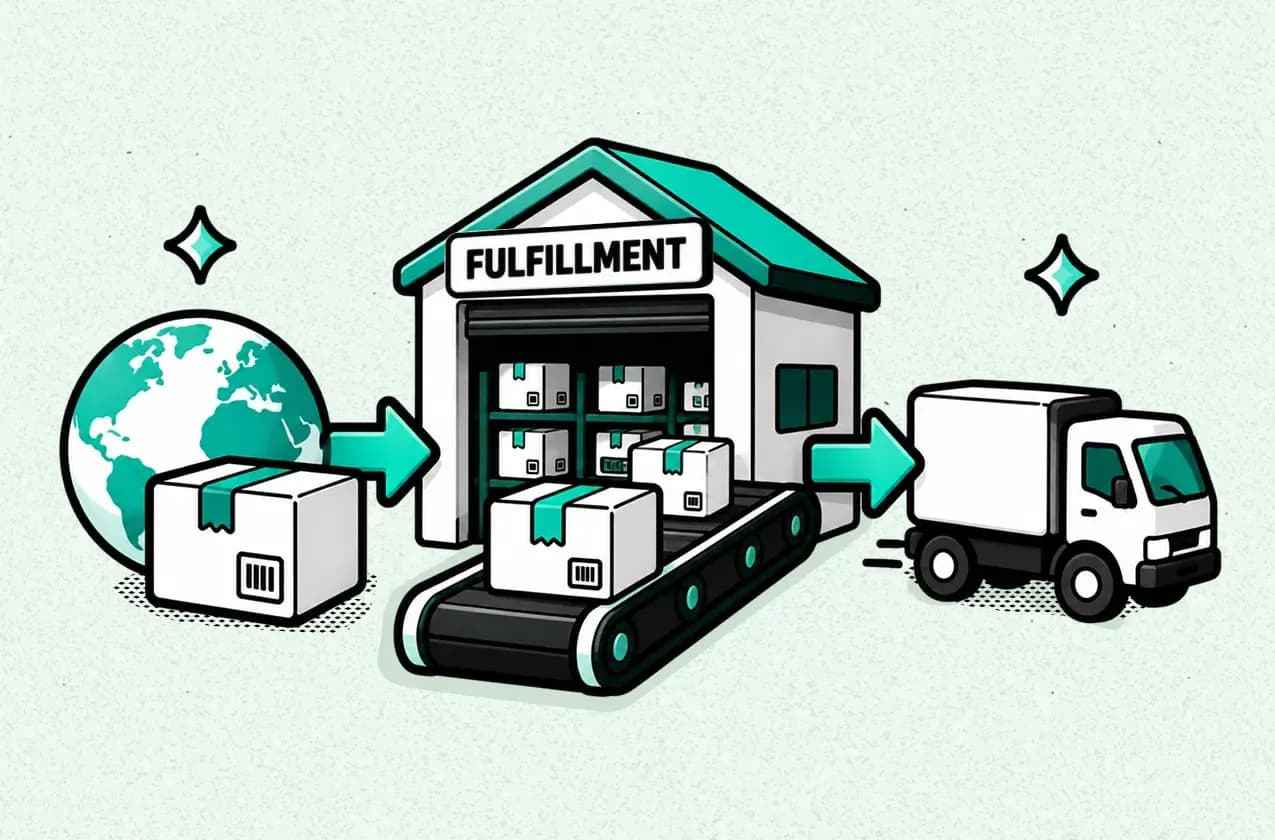
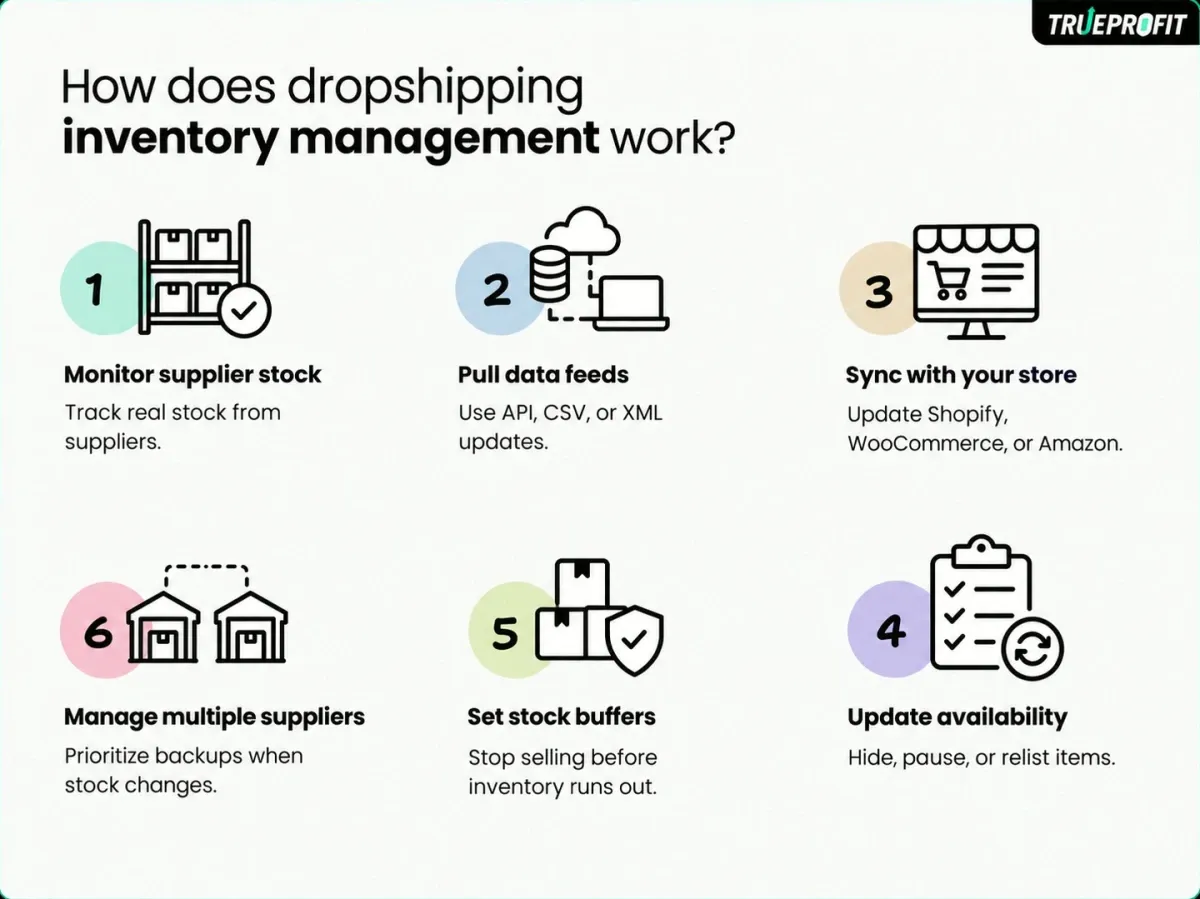
Dropshipping inventory management works through a constant flow of data between three core parts of your business: your suppliers, your automation software, and your storefront or marketplaces such as Shopify, WooCommerce, and Amazon.

Monitor Supplier Stock

Since you don't hold inventory yourself, your supplier's stock level is essentially your source of truth. You need to know what's actually available before you sell it, especially when stock can change quickly.

You can get this information through API connections, scheduled CSV or XML feeds, or manual checks. For growing stores, automation makes a big difference because you don't have to keep checking supplier portals just to know what's in stock.

Sync Inventory With Your Store

Once you have the supplier data, it needs to stay in sync with your storefront. When your supplier's stock changes, your store should reflect that change without requiring you to update every product manually.

The same applies to product prices and status. Keeping these details synced helps prevent situations where your store shows a product as available or profitable when the supplier's actual data says otherwise.

Update Product Availability

This is where inventory management becomes more than simply tracking stock numbers. Your store also needs to respond when that inventory changes.

When a product goes out of stock, you can automatically hide it, mark it as unavailable, or stop accepting new orders until it's back. You can also set a small stock buffer, so your store stops selling when supplier inventory drops below a certain level. This gives you some extra protection against overselling.

Manage Inventory Across Multiple Suppliers

Things get more complicated when you're working with multiple suppliers. You need to know which supplier fulfills each product and keep their inventory data organized.

It also helps to have clear rules for which supplier gets priority and when to switch to a backup. That way, if one supplier runs out of stock or has fulfillment issues, you have another option instead of leaving the product unavailable.

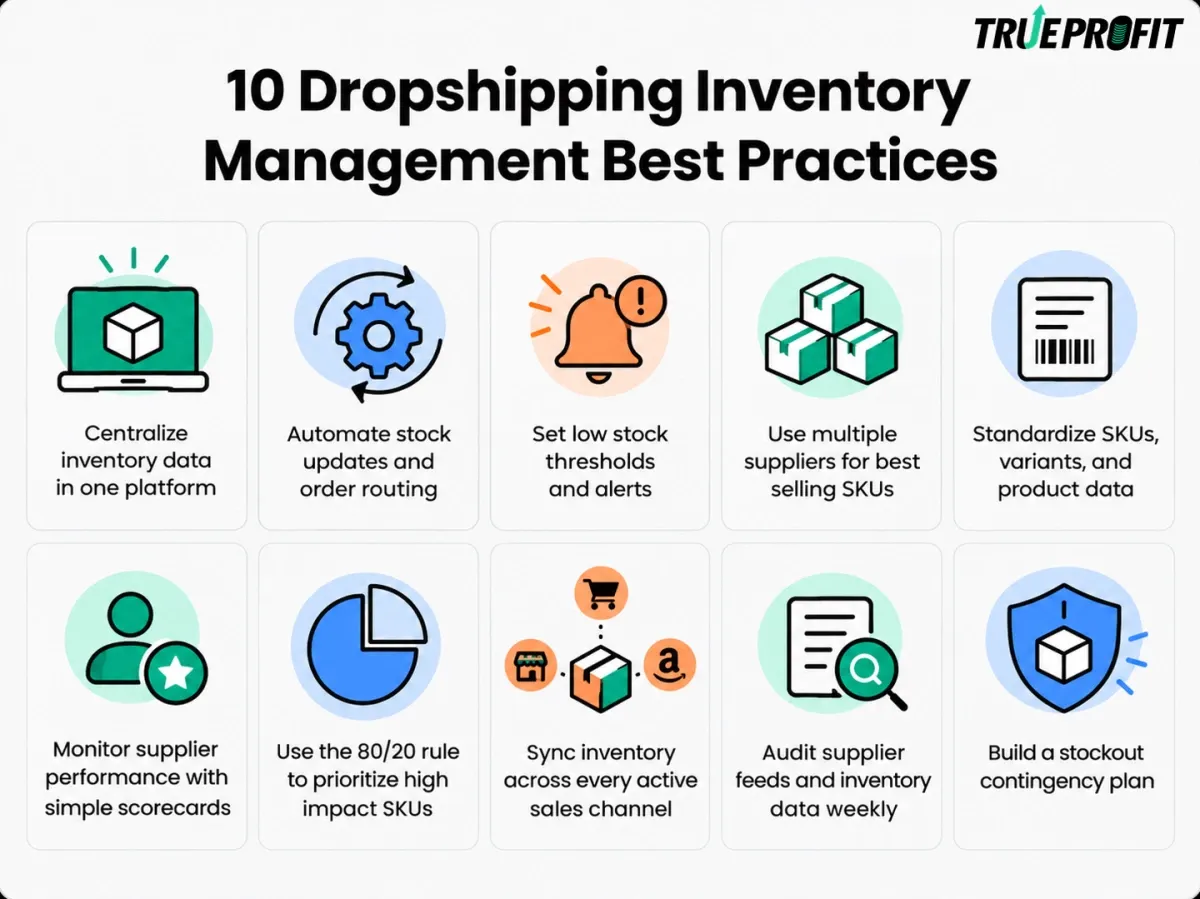
10 Smart Ways to Keep Your Dropshipping Inventory Under Control

Loading...Smart ways to control dropshipping inventory

These best practices help you turn the strategies above into a consistent, repeatable system.

1. Centralize Inventory Data in One Platform

As your store grows, inventory data can start getting messy pretty quickly, especially when you're working with multiple suppliers or selling across different channels. You may have stock information sitting in supplier portals, spreadsheets, Shopify, Amazon, and somewhere else entirely.

That's why centralizing your inventory data is a good place to start. Instead of managing each supplier and sales channel separately, you bring those inventory feeds into one platform and use it as your central source of truth.

From there, the same inventory data can be pushed to your active sales channels. So when stock changes, you have one system managing that information instead of manually updating each store or marketplace one by one.

2. Automate Stock Updates and Order Routing

Once your inventory data is centralized, the next step is automating what happens when that data changes. I’d use an automation tool to update stock levels, route orders to the right supplier, and sync tracking information without handling each update manually.

Depending on your setup, tools like DSers, AutoDS, Syncee, and Inventory Source can help automate inventory updates and order fulfillment across different ecommerce platforms and marketplaces.

For example, when a supplier’s inventory changes, your store can automatically reflect the new stock level. When an order comes in, the system can route it to the correct supplier and sync the tracking details back to your store once it ships.

If you’re using Shopify, WooCommerce, eBay, Amazon, or another platform, check that the automation tool supports both your sales channel and suppliers before choosing one. The right integration and accurate SKU mapping are what make the automation actually work.

3. Set Low Stock Thresholds and Alerts

You don’t want to wait until a product hits zero stock to realize you have a problem. I’d set a low-stock threshold for important SKUs so you get a warning while there’s still time to react.

The right threshold depends on factors like sales velocity, supplier reliability, and how quickly you can restock or switch suppliers. Once inventory falls below that level, you can trigger an alert to review the product, adjust the listing, or switch to another supplier.

For higher-volume stores, you can also connect these thresholds to automated actions, such as pausing a product or reducing ad spend when stock gets too low. This is particularly useful during promotions or sudden demand spikes, when inventory can disappear much faster than expected.

4. Use Multiple Suppliers for Best-Selling SKUs

This one becomes especially important once you have products that consistently drive sales. If your best seller depends entirely on one supplier, a sudden stockout can put a real dent in your revenue.

A better setup is to have at least one backup supplier ready for your key SKUs. Ideally, they should offer similar product quality and shipping times, so switching suppliers doesn’t create a completely different customer experience.

5. Standardize SKUs, Variants, and Product Data

This sounds like a small operational detail, but it can cause major inventory problems when you start working with multiple suppliers. The same product might have different SKUs, variant names, or product IDs across different systems, making it harder for your inventory tool to know what should be updated.

Keep your SKUs and variant information consistent wherever possible. Map each supplier SKU to the correct product and variant in your store, and make sure key product data such as prices and availability is structured consistently.

6. Monitor Supplier Performance With Simple Scorecards

Once you have multiple suppliers, it becomes harder to judge performance based on individual incidents. A simple scorecard gives you a clearer picture of which suppliers are actually reliable over time.

Keep track of a few practical metrics, such as fulfillment speed, stock reliability, pricing stability, and error rates. You can review these regularly and compare suppliers based on actual performance rather than just product cost.

This also helps you spot problems early. If a supplier starts having more stock discrepancies, fulfillment delays, or pricing changes, you can address the issue or consider moving more orders to a better-performing supplier.

7. Use the 80/20 Rule to Prioritize High-Impact SKUs

Not every SKU needs the same level of attention. Some products barely move, while a small group of best sellers can account for a large share of your revenue and profit.

That’s where the 80/20 rule comes in. Identify the products that have the biggest impact on your business, then give them tighter inventory controls. That could mean setting higher safety buffers, checking stock more frequently, or reviewing supplier performance more closely.

The idea is simple: put more inventory management effort where a stockout would hurt the most.

8. Sync Inventory Across Every Active Sales Channel

Once you start selling across multiple channels, keeping inventory aligned becomes much more important. A sale on one channel should be reflected everywhere else, otherwise you can end up selling the same remaining stock twice.

Keep Amazon, Shopify, eBay, and any other active channels connected to the same real inventory data. When stock changes, the update should flow across those channels automatically rather than relying on separate manual updates.

This gives you one consistent view of what's actually available to sell, while reducing the risk of overselling as your business expands across more marketplaces.

9. Audit Supplier Feeds and Inventory Data Weekly

Automation keeps the day-to-day work moving, but it still needs a regular check. A supplier feed can fail, a SKU mapping can break, or an inventory update can simply stop syncing without you noticing right away.

A weekly audit gives you a simple way to catch these issues early. Spot-check a selection of SKUs against your supplier's data, then compare stock levels, prices, and availability status with what appears on your store.

It's also worth reviewing your automation tool's error logs for failed updates or synchronization problems. A few minutes of checking each week can save you from dealing with oversold products and fulfillment issues later.

10. Build a Stockout Contingency Plan

Even with accurate inventory data and regular monitoring, stockouts can still happen. The important part is having a clear plan for what happens when they do.

Decide in advance how you'll handle a product that suddenly runs out. You might switch orders to a backup supplier, pause the listing, or temporarily stop accepting new orders. For products that can't be replaced quickly, have a process for notifying customers about delays or cancellations.

The goal is to avoid making these decisions under pressure. When a best seller suddenly goes out of stock, you already know who takes over, what happens to the listing, and how affected customers will be handled.

banner cta

Common Dropshipping Inventory Management Challenges & What To Do

Supplier Runs Out of Stock After an Order

This is probably one of the most frustrating things in dropshipping. A customer places an order, you go to fulfill it, and suddenly your supplier tells you the product is out of stock. Now you're stuck deciding whether to wait for a restock, find another supplier, or refund the customer.

What to do:

  • Set a minimum stock threshold: Don't wait until inventory hits zero. Set a buffer so you have time to react when stock starts getting low.
  • Keep a backup supplier: For products that sell consistently, know where you can source the same or a similar product if your main supplier runs out.
  • Communicate clearly with the customer: If there's going to be a delay, tell the customer early. Give them a realistic timeline and, when possible, let them choose between waiting or getting a refund.

Delayed Inventory Updates

Here's where things can get tricky. Your supplier might have already sold several units, but your store is still showing the old inventory number. That gap can lead to orders you can't actually fulfill, especially when you're selling a product that's moving quickly.

What to do:

  • Check how often inventory syncs: Don't just assume your tool is updating stock in real time. Check the actual sync frequency.
  • Leave a stock buffer: If updates aren't instant, keeping a small buffer can give you some protection against selling the last available units.
  • Keep an eye on fast sellers: For products that are moving quickly, check supplier availability more closely instead of relying entirely on automated updates.

Unexpected Supplier Price Changes

Inventory isn't just about how many units are left. Your supplier can also change the product cost while you're still selling it at the same price. And if you don't catch that change, you could be making far less profit on every order.

What to do:

  • Set a minimum margin: Know the lowest margin you're willing to accept before a product needs to be reviewed.
  • Watch supplier costs: Keep an eye on product costs, especially for your best-selling products.
  • Adjust quickly: If the new cost still leaves room for profit, update your selling price. If it doesn't, it may be time to rethink the product or supplier.

Overselling and Inventory Sync Errors

And then you have overselling, where your store says an item is available but your supplier can't actually fulfill it. This can happen because of delayed updates, incorrect SKU or variant mapping, or a failed inventory sync.

What to do:

  • Check your SKU mapping: Make sure every product and variant is connected to the right supplier item.
  • Watch for sync failures: Don't assume your automation is working perfectly. Check for failed or missed inventory updates.
  • Test the setup: Before scaling, make sure a stock change at the supplier actually flows through to your store correctly.

Final Thoughts

Dropshipping inventory management isn’t about checking stock every day and hoping nothing goes wrong. It’s about building a system that keeps supplier data, product availability, orders, and sales channels aligned.

Start with reliable suppliers, automate the repetitive updates, protect your best-selling SKUs, and have a clear plan for stockouts. Once those pieces are in place, inventory becomes much easier to manage as your store grows.

TrueProfit CTA

Harry Chu is the Founder of TrueProfit, a net profit tracking solution designed to help Shopify merchants gain real-time insights into their actual profits. With 11+ years of experience in eCommerce and technology, his expertise in profit analytics, cost tracking, and data-driven decision-making has made him a trusted voice for thousands of Shopify merchants.

Let's Collaborate