Shopify AI Recommendations Algorithm: How It Works & How to Optimize It (2026)


Table of Contents
- 1. What Is Shopify's Product Recommendations Algorithm?
- 2. How Does Shopify Generate Related Product Recommendations?
- 3. How Do Complementary Product Recommendations Work?
- 4. Does Shopify Use AI or Machine Learning for Recommendations?
- 5. Does Shopify Personalize Recommendations for Each Visitor?
- 6. Is Shopify Sidekick a Recommendation Engine?
- 7. How Do You Add Product Recommendations to a Shopify Theme?
- 8. How Do You Improve Shopify's Recommendation Accuracy?
- 9. When Should You Use a Third-Party Recommendation App Instead?
- 10. How Do You Measure Whether Recommendations Are Working?
- 11. Final Thoughts
- 12. FAQs
Search "Shopify AI recommendation algorithm" and you'll find confident claims about transformer models and generative AI running your "You may also like" section.
Shopify has never confirmed that architecture. What it has confirmed is more mechanical, and once you know how it actually works, you can optimize it instead of guessing.
Here's what's real, what's hype, and what you can control.
In this blog:
- 1. What Is Shopify's Product Recommendations Algorithm?
- 2. How Does Shopify Generate Related Product Recommendations?
- 3. How Do Complementary Product Recommendations Work?
- 4. Does Shopify Use AI or Machine Learning for Recommendations?
- 5. Does Shopify Personalize Recommendations for Each Visitor?
- 6. Is Shopify Sidekick a Recommendation Engine?
- 7. How Do You Add Product Recommendations to a Shopify Theme?
- 8. How Do You Improve Shopify's Recommendation Accuracy?
- 9. When Should You Use a Third-Party Recommendation App Instead?
- 10. How Do You Measure Whether Recommendations Are Working?
- 11. Final Thoughts
- 12. FAQs
What Is Shopify's Product Recommendations Algorithm?
Shopify's recommendation system runs through the Product Recommendations API. You'll recognize it as the engine behind the default "You may also like" and "Pair it with" sections in Online Store 2.0 themes, including Dawn.
The API supports two recommendation intents:
- Related. Products similar to the one a shopper is viewing.
- Complementary. Products commonly paired with it, like a case with a phone.
That's the entire official taxonomy. You won't find a third "AI intent" or a personalization intent baked into the API. If you want personalization, you're layering your own logic or a third-party app on top, not flipping a switch Shopify already built.

How Does Shopify Generate Related Product Recommendations?
Related recommendations are auto-generated. You don't configure them unless you want to override them.
Related recommendations draw on three inputs:
- Sales data (what tends to sell alongside what)
- Product descriptions
- Collection relationships
A clean, well-tagged catalog with logical collections gives the algorithm more to work with than a sparse one. Vague titles and empty descriptions give it almost nothing, and you'll see that in the quality of what gets recommended.
How Do Complementary Product Recommendations Work?
Here's what most merchants get wrong: complementary recommendations aren't algorithmic at all. Only related recommendations are auto-generated. Complementary products need to be set up manually, through the free Search & Discovery app.

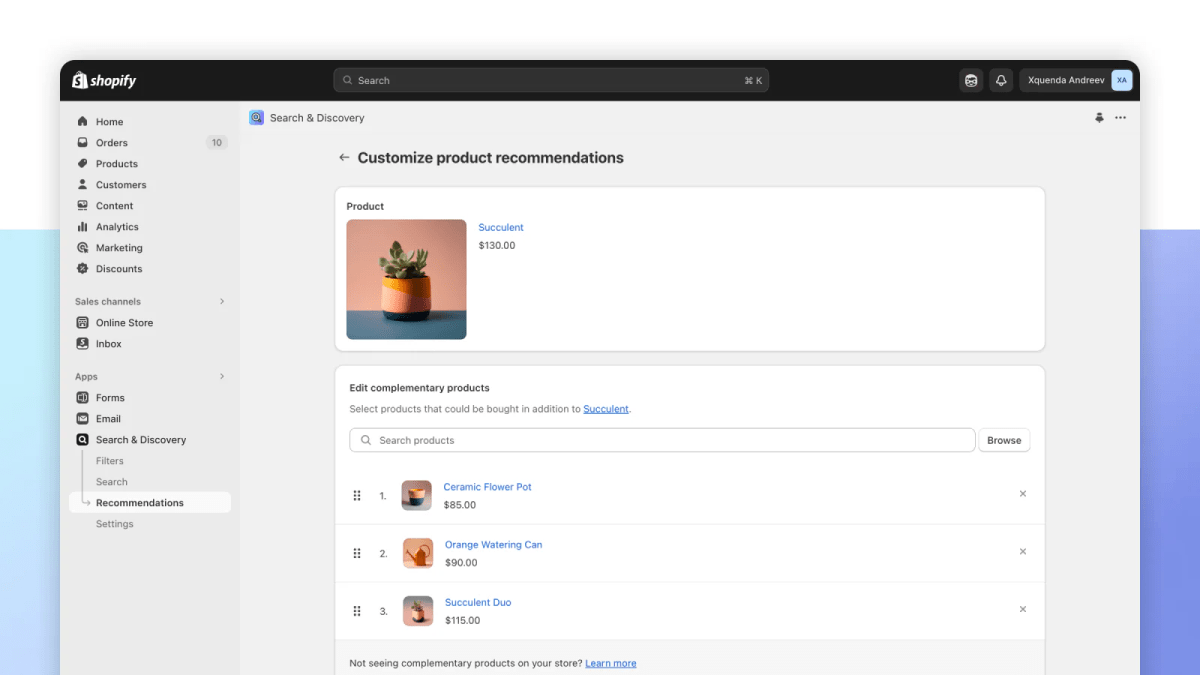
So when you see a "Pair it with" section on your store, you're looking at merchandising you or your team configured, not a model predicting cross-sells on its own.
Does Shopify Use AI or Machine Learning for Recommendations?
Yes, but not in the way most content about it implies. Related recommendations come from patterns in sales and catalog data, not hard-coded rules, so it's fair to call that machine learning.
Where things go off the rails is the model architecture. You'll see plenty of blog posts describing it as "generative" or "transformer-based, like ChatGPT." Treat those claims skeptically.
Shopify has never published what's actually running under the hood, so anyone naming a specific architecture is guessing, not reporting. You should just stick to what's actually known: recommendations come from sales data, descriptions, and collections. That's the whole verifiable picture until this point.

Does Shopify Personalize Recommendations for Each Visitor?
Not natively, and not the way Amazon or Netflix do. Shopify's built-in system doesn't ship with:
- Real-time, session-based personalization
- "Customers like you bought…" logic tied to an individual shopper's browsing history
- Embedding or vector-based ranking
If you want that level of personalization, you need to add a third-party app. It isn't a native feature you can turn on.
Is Shopify Sidekick a Recommendation Engine?
No, and this mix-up trips up a lot of merchants. Sidekick is a merchant-facing admin assistant. You can ask it which products are underperforming or which ones to discount, and it helps you act on the answer inside your admin.
Meanwhile, it doesn't generate or display product recommendations to customers on your storefront. If your "You may also like" section looks off, Sidekick isn't the tool you troubleshoot with, the Product Recommendations API is.
How Do You Add Product Recommendations to a Shopify Theme?
For most themes, you're calling the AJAX endpoint:
GET /recommendations/products.json?product_id={id}&intent=related&limit=4
In Dawn, this runs as a section (product-recommendations), not a snippet, and it loads asynchronously so it doesn't block your initial page render. Check whether your theme already includes this section before you build a custom integration. Most Online Store 2.0 themes do.
How Do You Improve Shopify's Recommendation Accuracy?
Related recommendations pull from sales data, descriptions, and collections, so your fastest wins live in your catalog, not your theme code.
Here are some of my tips:
- Write specific product descriptions. Vague copy gives the algorithm nothing to match against.
- Keep tags and product types consistent across your catalog.
- Organize collections logically. Collection membership is itself a similarity signal.
- Configure complementary products manually through Search & Discovery instead of assuming the algorithm will figure out your cross-sells on its own.
- Give it time and traffic. New or low-traffic stores see thinner, more generic recommendations until there's enough sales data to work with.
When Should You Use a Third-Party Recommendation App Instead?
Reach for a third-party app when you need something the native system can’t do: cross-channel recommendations, margin- or inventory-aware logic, deeper segmentation, or true session-level personalization. Here's some of our top recommendations:
1. Nosto
Nosto is built for larger catalogs and Shopify Plus merchants who want to run real experiments, not just turn on a widget. You get segmentation, A/B testing, and personalization across email and on-site placements.
It's the heaviest option on this list, both in capability and in setup effort, so it earns its place when you have the traffic and the team to run it properly.
2. Rebuy Personalization Engine
Rebuy focuses on the cart and post-purchase moment. You'll use it to build "complete your setup" bundles, upsell offers at checkout, and personalized post-purchase flows. If your gap is specifically getting shoppers to add one more thing before they check out, this is the app built for that job.
3. LimeSpot
LimeSpot spreads personalization across the whole customer journey: homepage, product page, cart, and email. It's a reasonable middle ground if you want broader coverage than Rebuy's cart-focused approach without committing to Nosto's enterprise setup.
4. Wiser
Wiser is a budget option for "frequently bought together" style recommendations. You won't get deep personalization here, but you also won't need a big setup lift. It's a fit if your catalog has obvious product pairings and you just want them surfaced without much configuration.
5. Frequently Bought Together
Frequently bought together does exactly what the name says: simple, Amazon-style product pairings based on past orders. Install it, and it starts showing pairs almost immediately. No personalization layer, but also no learning curve.
Check current pricing and reviews on the Shopify App Store before you commit to any of these. Plans and ratings change often enough that any number printed here would be stale within months.
How Do You Measure Whether Recommendations Are Working?
Track these at minimum:
- Click-through rate on recommendation widgets
- Conversion rate of recommended products specifically
- Average order value in sessions where a recommendation was clicked
Revenue from recommendations and profit from recommendations aren't the same number, though. If your related-products section keeps surfacing low-margin items, you can grow top-line revenue while your margins quietly shrink, and Shopify's native reporting stops at revenue. It won't flag that for you.
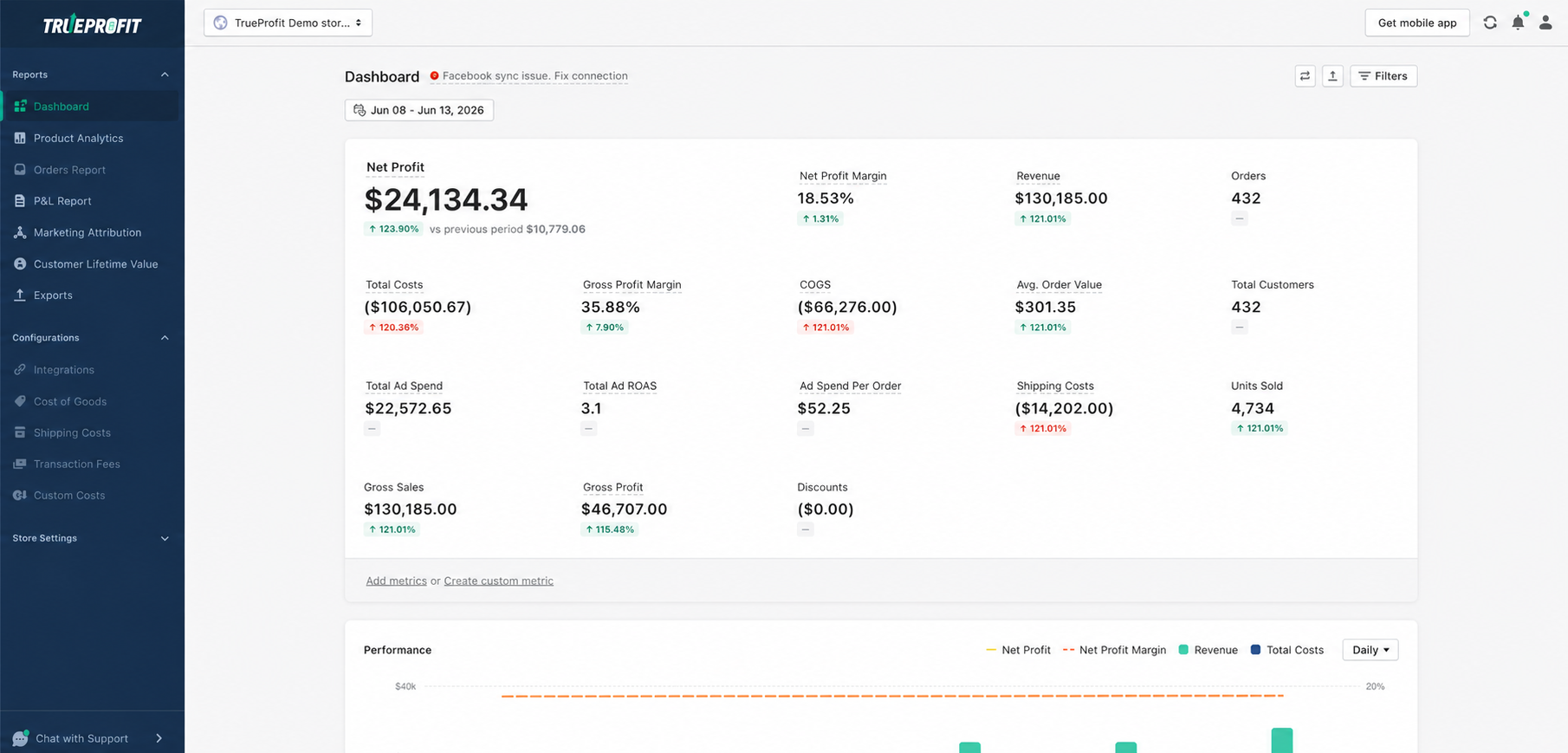
This is where a profit analytics tool like TrueProfit earns its place in your stack. It tracks true net profit at the order and product level, factoring in COGS, shipping, ad spend, and transaction fees, so you can see whether the products your recommendation widget is pushing are actually profitable, not just frequently clicked.
Final Thoughts
Shopify's native recommendation system does one thing well: it turns your existing sales and catalog data into reasonable "You may also like" suggestions with zero setup. It doesn't do personalization at the level of Amazon or Netflix, and it doesn't quietly run a language model in the background no matter what you've read elsewhere.
Know that distinction before you decide whether you need a third-party app. If your catalog data is thin or your complementary products aren't configured, fix that first. It's free and it's usually the bigger lever. If you've already done that and you still need segmentation or real personalization, that's your cue to add an app.
Either way, watch profit alongside clicks. A recommendation widget that's technically converting can still be quietly steering shoppers toward your lowest-margin products, and revenue reports alone won't show you that.

Irene Le is the Content Manager at TrueProfit, specializing in crafting insightful, data-driven content to help eCommerce merchants scale profitably. With over 5 years of experience in content creation and growth strategy for the eCommerce industry, she is dedicated to producing high-value, actionable content that empowers merchants to make informed financial decisions.