
How to Run Google Ads for Dropshipping in 2026: Beginner-friendly Guide


Table of Contents
Google Ads can put your dropshipping products in front of shoppers who are already looking for what you sell. But getting clicks is the easy part. Turning those clicks into profitable orders is where the real challenge begins.
In this guide, you'll learn how to run Google Ads for dropshipping from setup to scale, including how to choose your campaigns, launch your first ads, set a testing budget, and know when a winning campaign is actually ready for more spend.
In this blog:
Why Choose Google Ads for Dropshipping?
Google Ads can be a strong acquisition channel for dropshippers because it puts your products in front of people who are already searching for what you sell.
So the biggest advantage of Google Ads for dropshipping is buyer intent.
A shopper searching for a specific product is generally further down the buying journey than someone who happens to see a product in their social feed. That gives you an opportunity to capture demand at the moment when a purchase is already being considered.
For example, compare these two audiences:
- Someone scrolling TikTok who sees a video for a portable blender
- Someone searching Google for “best portable blender for smoothies”
The first person may become interested after seeing the ad. The second person is actively looking for a solution.
This doesn't mean Google Ads will always outperform social advertising. It means the two channels play different roles. Google is particularly useful when your product has existing search demand and clear purchase intent.
That makes product selection critical. A highly visual impulse product with almost no search volume may struggle on Google, while a problem-solving product with thousands of relevant searches can have much more room to scale.

Google Ads vs. Social Media Ads: Which Is Better for Your Store?
Google Ads and social media ads serve different purposes. Google Ads captures existing demand, while social media ads are better for creating demand and reaching new audiences.
With Google Ads, users are already searching for products or solutions, so it tends to work well for high-intent searches. Social media ads rely more on audience targeting and creative content, making them a strong fit for visual, impulse-driven, or new-to-market products.
Factor | Google Ads | Social Media Ads |
|---|---|---|
Main strength | Capture demand | Create demand |
User intent | Higher | Lower |
Targeting | Keywords & search intent | Interests, behaviors & audiences |
Best for | High-intent products | Discovery & product testing |
Creative | Less visual-focused | Highly creative |
For ecommerce, you don't necessarily have to choose one. Use social ads to generate demand and Google Ads to capture shoppers who are ready to buy.
Which Google Ads Campaigns Should You Use for Dropshipping?
For most dropshipping stores, three campaign types are worth prioritizing: Performance Max, Shopping Ads, and Search Ads. Each serves a different purpose, from promoting products across Google's network to capturing shoppers with specific purchase intent.
1. Performance Max: Your Core Ecommerce Campaign
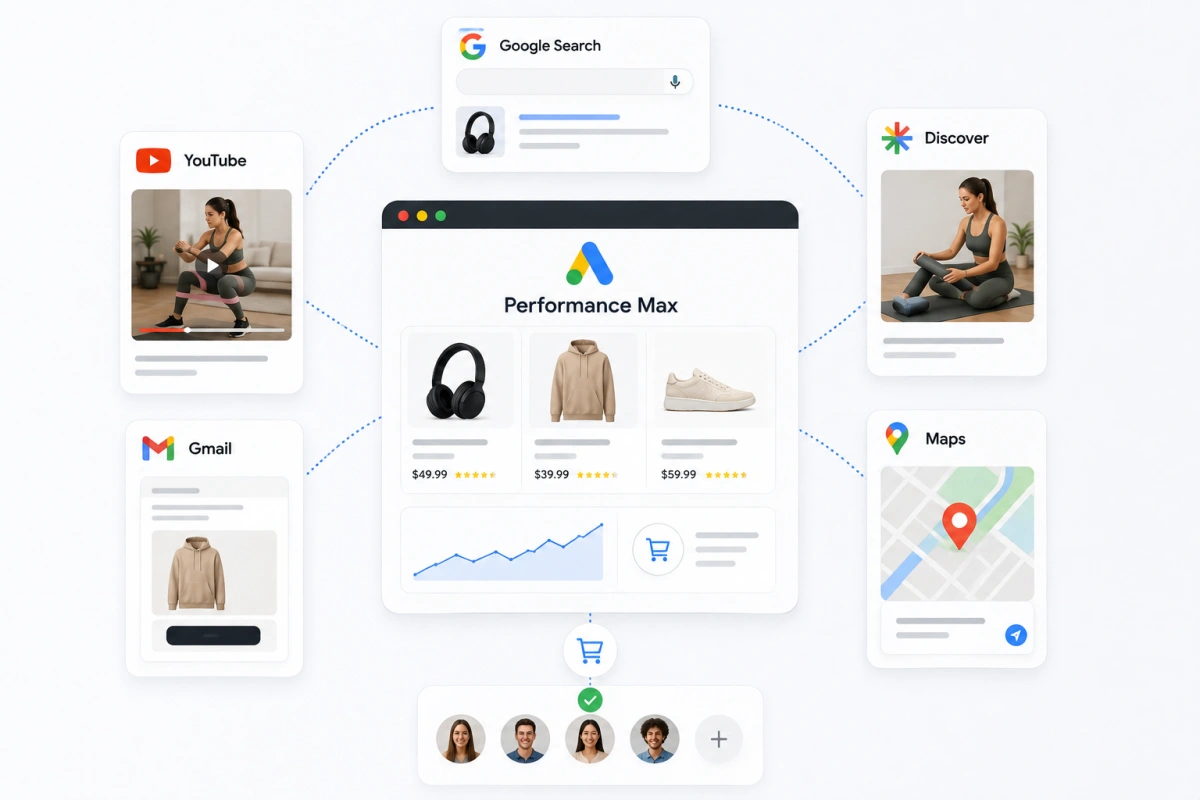
Performance Max is often the strongest starting point for ecommerce because it can promote your products across Google's advertising inventory, including Shopping, Search, YouTube, Discover, Gmail, and Maps.
Instead of manually targeting every placement, Google uses your product data, audience signals, and conversion data to find shoppers who are more likely to take action.
For dropshipping stores, this makes Performance Max useful when you have:
- A properly optimized product feed
- Reliable purchase conversion tracking
- Products with clear demand
- Enough conversion data for Google to learn from
The main trade-off is control. You give Google more freedom over where and when your ads appear, so your product feed and conversion tracking need to be accurate.

2. Shopping Ads: More Control Over Product Advertising
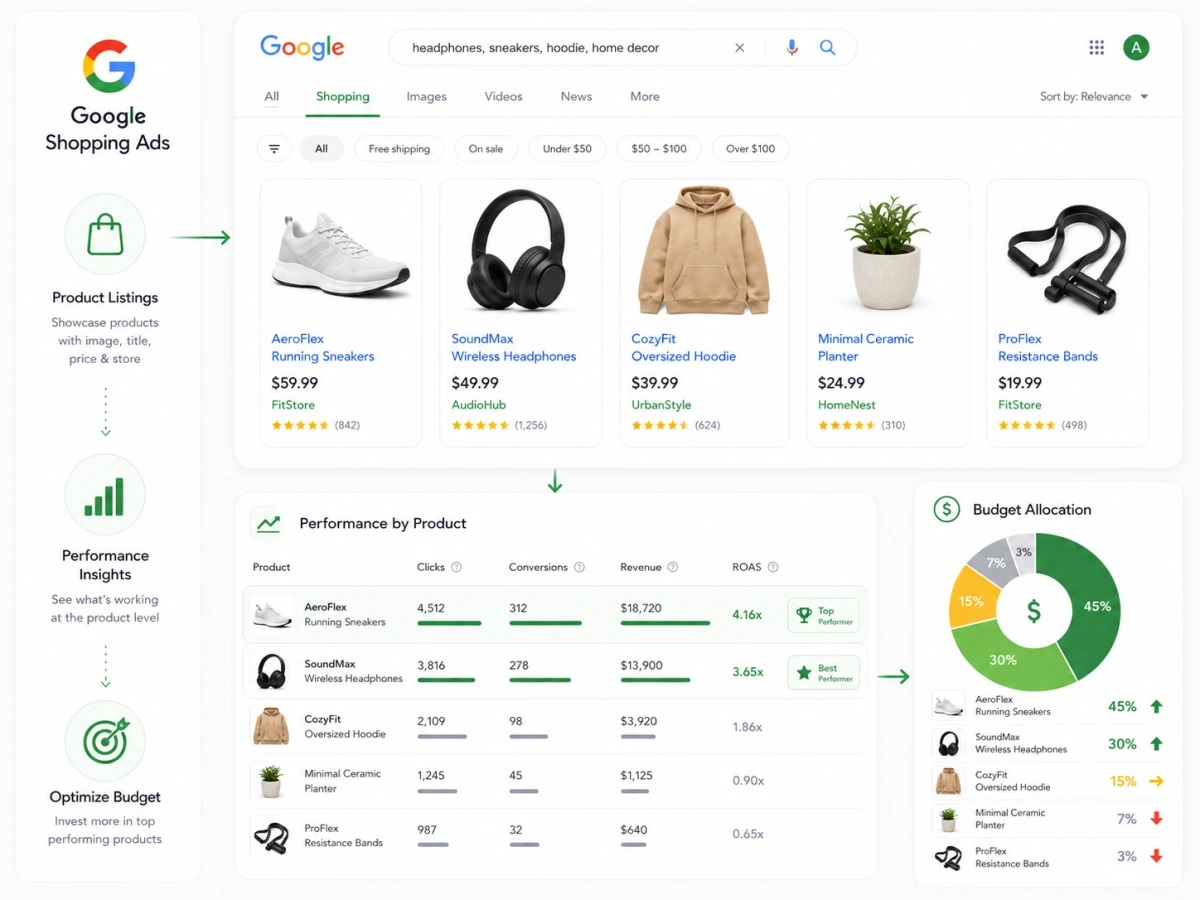
Shopping Ads put your products right in front of shoppers with the image, price, and store name attached. That matters for dropshipping because people compare your listing against competitors before they ever click. Your price, image, and title do the selling.
Shopping also hands you product-level data. Advertise several products and you can see which ones pull clicks, conversions, and revenue, then move budget toward the winners.
That's the whole point, because not every product deserves the same budget. One item might rack up clicks but convert poorly. Another might sell less often yet leave far more profit per order. Your structure should make those differences obvious at a glance.
3. Search Ads: Capture High-Intent Keywords
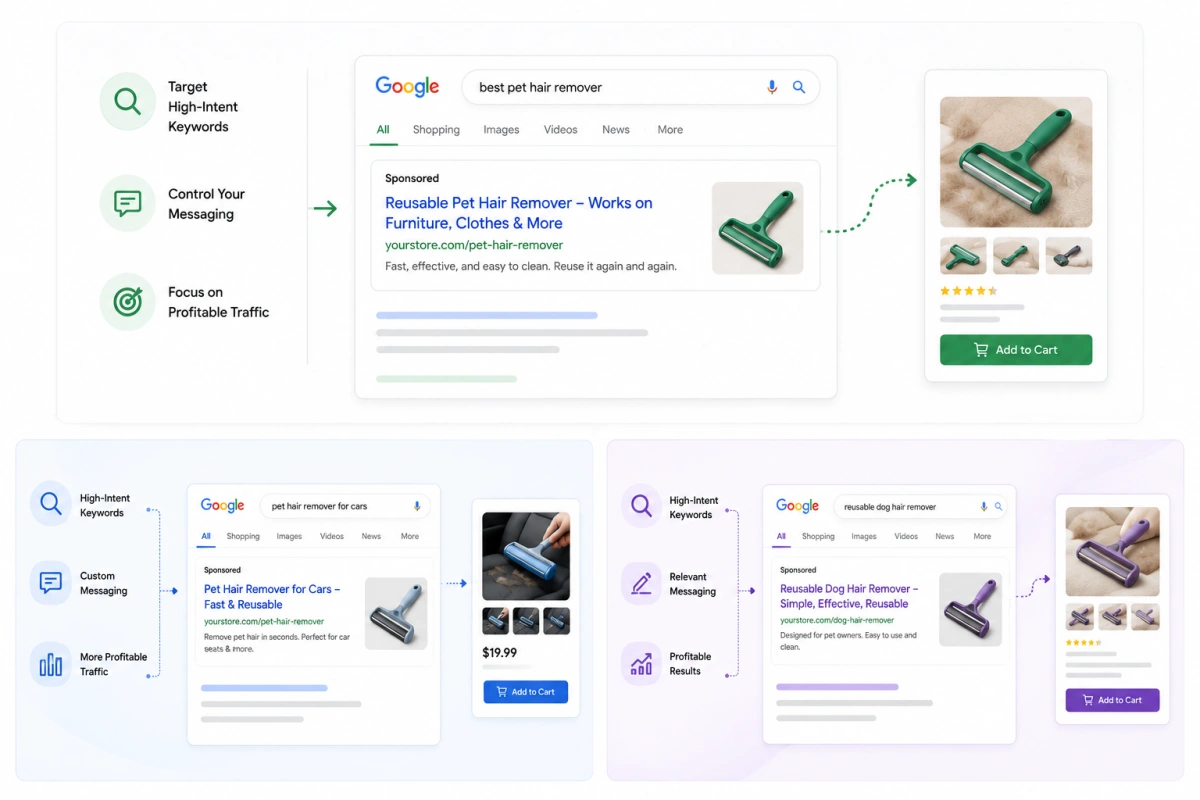
Search Ads target specific queries instead of showing a product listing, which makes them ideal for shoppers with strong commercial intent. A pet store might target "best pet hair remover," "pet hair remover for cars," or "reusable dog hair remover." Those tell you far more than a vague "pet products" search.
Search also gives you control over messaging. You can lead with a specific benefit or offer and send the click straight to the most relevant product page. The key is chasing high-intent searches, not raw volume. More traffic doesn't mean more profitable customers.
What About Other Google Ads Campaign Types?
Google also offers campaign types such as Demand Gen, Display, and YouTube campaigns. These can be useful for building awareness, reaching potential customers earlier in the buying journey, and remarketing to previous visitors.
However, they don't need to be part of your initial setup.
For a new dropshipping store, it's usually more productive to first establish which products and campaigns can generate profitable sales. Once you have enough traffic and conversion data, you can expand into additional channels to support acquisition and remarketing.
Step-by-Step Execution: How to Launch Your First Google Ads Campaign in 2026?
Follow these five steps to build a campaign that’s ready to attract, convert, and scale.
- Step 1: Get Your Store and Merchant Center Ready
- Step 2. Set Up Google Ads and Conversion Tracking
- Step 3. Choose Your Products and Optimize the Feed
- Step 4. Set Your Campaign, Targeting, and Budget
- Step 5. Launch and Monitor Performance
Step 1: Get Your Store and Merchant Center Ready
Before creating your campaign, make sure Google can verify your business and accurately understand what you're selling.
Start by verifying your website in Google Merchant Center and connecting your product feed. Your store and Merchant Center should show consistent information, especially around:
- Product details: Titles, descriptions, images, and product attributes
- Pricing: Product prices, discounts, and sale prices
- Availability: In-stock/out-of-stock status
- Shipping: Shipping methods, costs, and estimated delivery times
- Returns: Clear return and refund policies
- Business information: Accurate store and contact details
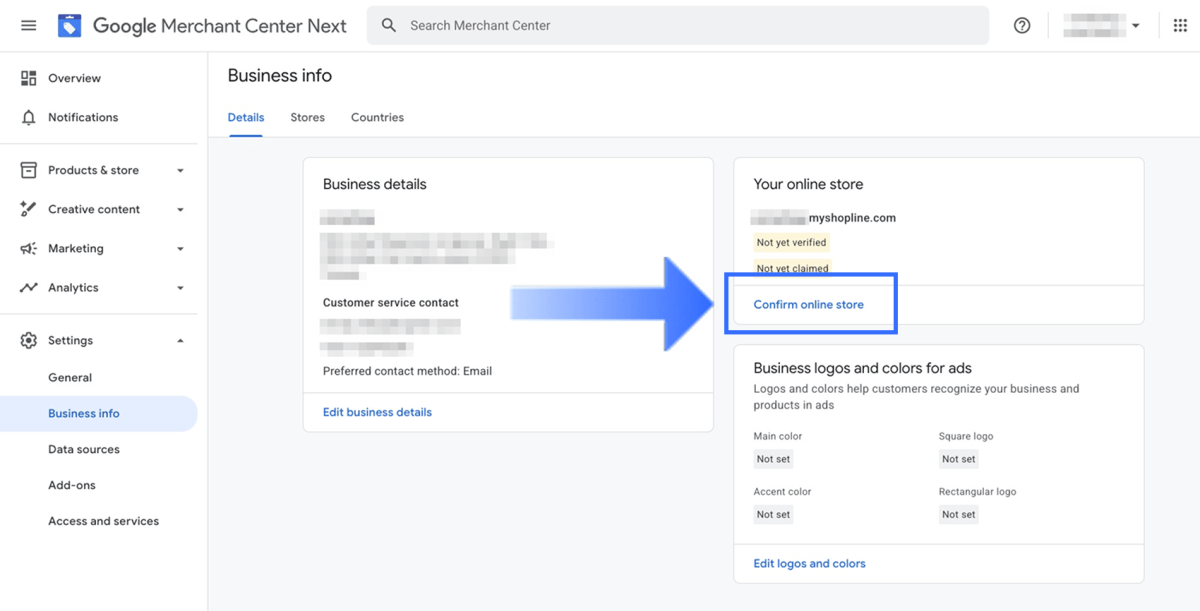
This is especially important for dropshipping stores because longer fulfillment times can create trust issues if they're not clearly communicated to customers.
You should also check your Merchant Center account for potential compliance issues before launching. Common problems that can lead to product disapprovals or account suspensions include:
- Price mismatches between your product feed and website
- Inaccurate product information
- Misleading product claims or promotions
- Missing or unclear shipping information
- Missing return or refund policies
- Unclear business or contact information
Once your store, Merchant Center, and conversion tracking are ready, you're ready to launch your first campaign. But don't treat the first campaign as a race to spend as much as possible.
Your initial goal is to validate whether your product can acquire customers profitably. Start with a controlled budget, collect enough data to identify patterns, and scale only after the economics make sense.
Step 2. Set Up Google Ads and Conversion Tracking
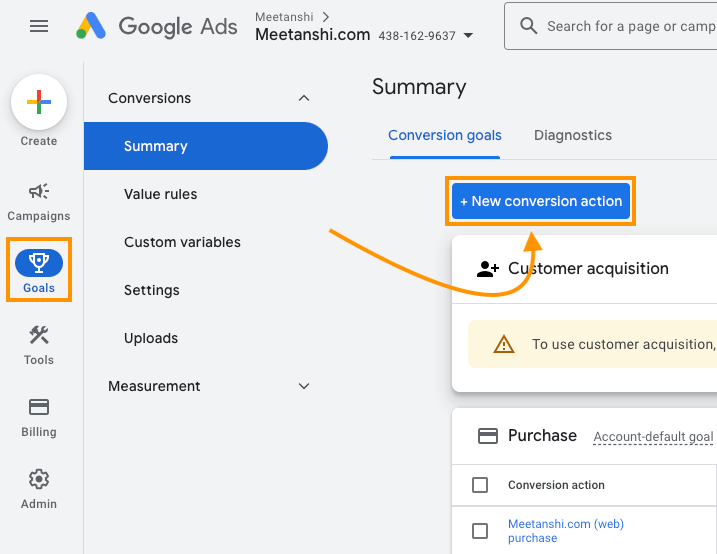
Next, connect your Google Ads account to the tools that measure purchases accurately. At a minimum, set up purchase conversion tracking and pass the actual order value back to Google. Connecting Google Analytics adds visibility into what visitors do after they click.
Then test it yourself. Run a test purchase and confirm the transaction records correctly with a value that matches your store. People skip this step constantly, and it's a costly miss.
Google's automated bidding leans entirely on conversion data to decide who to chase. Feed it broken data and it optimizes toward the wrong people.
Step 3. Choose Your Products and Optimize the Feed
Don't advertise your whole catalog just because you can. Start with products that have clear search demand, competitive pricing, healthy margins, and reliable fulfillment. Items that solve a specific problem are easier to match with high-intent searches.
Then let your feed reinforce that relevance. Take titles. "Portable Blender" gives Google almost nothing to work with. "Portable USB Rechargeable Blender for Smoothies & Protein Shakes" tells both Google and shoppers exactly what it is and who it's for.
Apply the same thinking to descriptions, categories, attributes, images, pricing, and availability, and keep everything consistent with your product page.
Step 4. Set Your Campaign, Targeting, and Budget
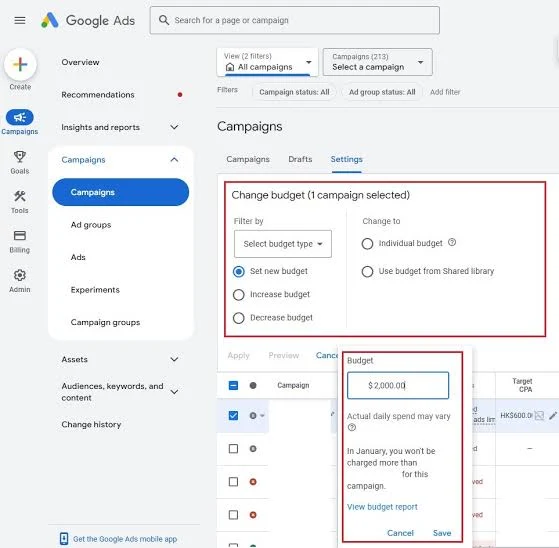
Now build the campaign. Pick the type based on your goal: Performance Max or Shopping for product-focused advertising, Search Ads for specific high-intent queries. Then set your target market, choose products, define your conversion goal, pick a bidding strategy, and set a daily budget.
Don't pull a budget number out of thin air. Start from your target CAC. If your product can support a $20 CAC, a starting budget around $40 to $60 a day usually gives enough room to gather data without overexposing yourself.
Higher-ticket products with a higher sustainable CAC can justify more. The goal isn't to spend as much as possible, it's to spend enough to learn whether the campaign acquires customers profitably.
Step 5. Launch and Monitor Performance
Once everything checks out, launch and give the campaign room to breathe. Don't yank levers every few hours because CPC or ROAS wobble. Early performance swings, and constant tinkering makes it harder to read what's real.
Watch the metrics that show how efficiently traffic becomes profitable customers: CPC, conversion rate, CAC, AOV, ROAS, and revenue, always tied back to your real costs. A product at 3X ROAS can look like a winner, but if COGS, shipping, fees, and refunds leave almost nothing, scaling it makes you less profitable, not more.
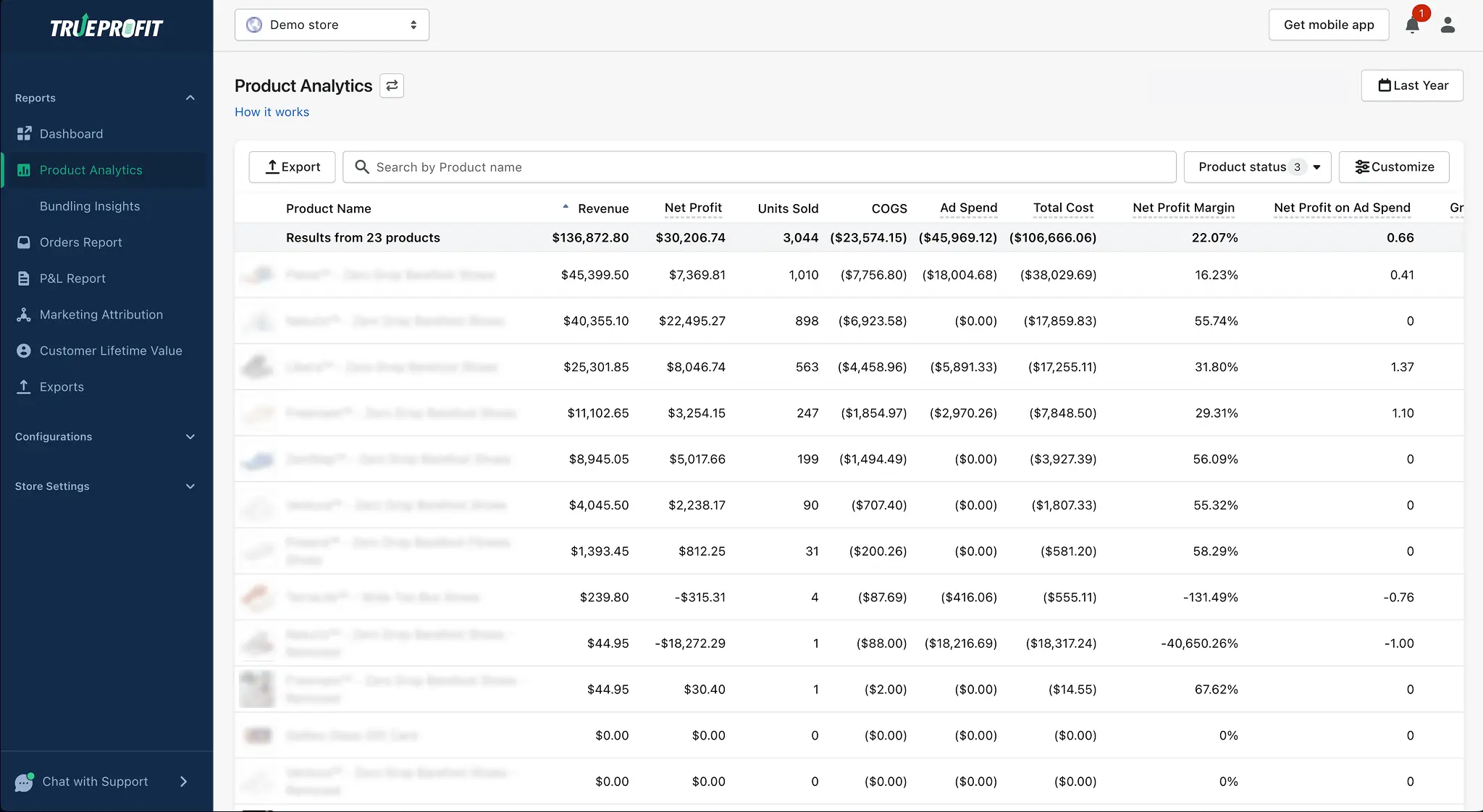
So your first campaign should answer more than "Can I generate sales?" The real question is:
"Can I acquire customers at a cost that leaves enough profit to scale?"
Answer that, and you've got a real foundation for raising the budget without watching your margins fall apart.

How Much Should You Spend on Google Ads?
Your budget shouldn't be based on what other advertisers brag about spending. Tie it to your target CAC, product margin, and how much loss you can absorb during testing.
The cleanest way to structure it is three stages: validation, stabilization, and scaling. Each has a different objective, so your budget and optimization should shift as the campaign matures.
Phase 1: Validation and Testing ($50 to $100/Day)
The first phase answers one question: can this product and campaign generate purchases at a viable cost? For many stores, $50 to $100 a day is a reasonable range for a serious test, though the right number depends on your target CAC and price.
A $30 product and a $150 product shouldn't carry the same testing budget.
Keep the structure simple. A single Performance Max or Shopping campaign covering your initial products is easier to read than a small budget split across several. Give it a 7 to 14 day window to establish a pattern rather than reacting every few hours, assuming no tracking, feed, or policy issues need urgent attention.
Your main guardrail is break-even economics. A quick benchmark:
Break-even ROAS = 1 ÷ Gross Margin
At a 70% gross margin, that's roughly 1.43X. But that figure ignores payment processing, shipping, refunds, discounts, and operating costs, so your true threshold is usually higher.
Don't kill a product on a fixed day or dollar count. Judge whether it's generating enough conversion signal and whether the economics point to a realistic path to profit.
Phase 2: Stabilization and Profit Triage ($100 to $300/Day)
Once you've found products that convert consistently, the job shifts from collecting data to improving efficiency. Now you separate products by real performance. Winners earn more money. Products that sell but carry weak margins need pricing or offer work. Products that burn without meaningful conversions get cut back.
Bidding strategy matters more here. With enough conversion data, Maximize Conversions helps Google focus on purchases. Once you have reliable volume and a clear profit target, you can bring in Target ROAS. Don't rush tROAS just to force a number. An aggressive target chokes delivery when the campaign lacks data or the goal is unrealistic for your market.
Push your optimization past campaign-level metrics too. Look at which products drive profitable orders, which eat the budget, and whether CAC moves the right way as spend climbs.
Phase 3: Controlled Vertical Scaling ($300 to $1,000+/Day)
At this point you have a proven campaign and a real grip on your unit economics. The objective now is raising spend without letting profitability slide too fast.
Start with vertical scaling: add budget to campaigns that already work. A conservative move is to raise budgets 20% to 30% at a time, then watch before the next bump. You don't have to follow that mechanically, but gradual steps make it obvious when extra spend starts pushing CAC past your limit.
For example: $300/day to $375 to $470 to $600. The exact numbers don't matter, the principle does. If doubling spend from $300 to $600 sends CAC up 80%, you haven't scaled in a healthy way. So base scaling decisions on conversion volume, CAC, ROAS, and net profitability together, not revenue alone.
Horizontal vs. Vertical Scaling
Vertical scaling puts more money behind campaigns that already work. Horizontal scaling creates more profitable acquisition opportunities in the first place.
Once you've found a winning product, expand by introducing others with similar economics, testing new high-intent search terms, entering new markets, or building complementary campaigns.
This matters for dropshipping because leaning on a single winner makes the whole business fragile. A supplier price hike, a new competitor, or creative fatigue can gut your profitability overnight.
A healthy scaling path looks more like this:
Validate → Stabilize → Scale winners → Expand horizontally → Reinvest in proven opportunities
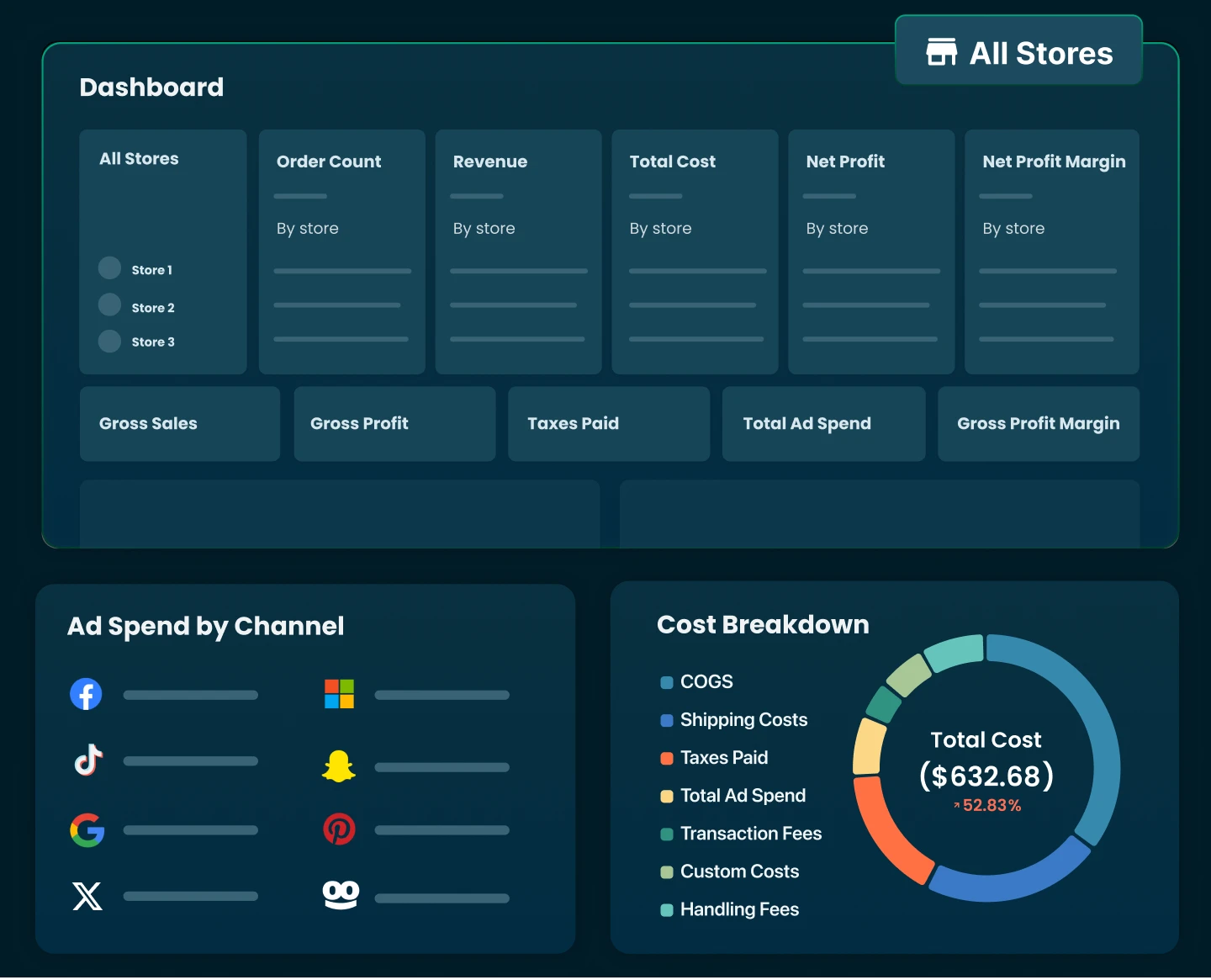
The goal was never to hit $1,000 a day as fast as possible. It's to get there without destroying the economics that made the campaign work. And that's exactly why your scaling dashboard has to go beyond ROAS.
Track CAC, AOV, net profit per order, net profit per product, and net profit on ad spend alongside your Google metrics to confirm that more spend is actually creating more bottom-line profit.
Final Thoughts
Running Google Ads for a dropshipping store isn't about finding a campaign that suddenly prints sales. It's about finding a repeatable acquisition model that still makes sense when you increase your spend.
Start small, test products with enough margin to support paid traffic, and use your early campaigns to identify where the real opportunities are. Once a product consistently converts at an acceptable CAC, scale it gradually and keep an eye on whether efficiency holds.
Most importantly, don't let ROAS become the final scorecard. A campaign can look great inside Google Ads while delivering disappointing returns once you account for COGS, shipping, fees, refunds, and other costs.

Rosie Doan is a Senior Content Specialist at TrueProfit with over 4 years of experience creating content for the ecommerce and SaaS industry. Having worked closely with Shopify merchants and ecommerce businesses, she has developed a deep understanding of the challenges store owners face, from growing revenue and acquiring customers to tracking performance, managing costs, and improving profitability.