The Complete Shopify Bookkeeping Guide Every Merchant Should Know in 2026


Shopify bookkeeping turns orders, fees, refunds, taxes, and payouts into organized financial records.
Accurate books require more than tracking Shopify sales. You also need to record expenses, inventory, cost of goods sold, liabilities, payment processor activity, and bank deposits.
This guide explains how Shopify bookkeeping works, what to track, how to reconcile payouts, which tools to consider, and when to hire professional help.
How Bookkeeping Works for a Shopify Store
If you're new to Shopify bookkeeping, there's one thing you want to get right from the start: the money that hits your bank account isn't necessarily your sales.
Shopify usually sends you a net payout, which means the amount you receive may already have fees, refunds, and other adjustments taken into account. So if you simply look at your bank statement and record every Shopify deposit as revenue, your books can quickly become misleading.
The easiest way to understand this is to think of Shopify as a middle step between the customer and your bank account:

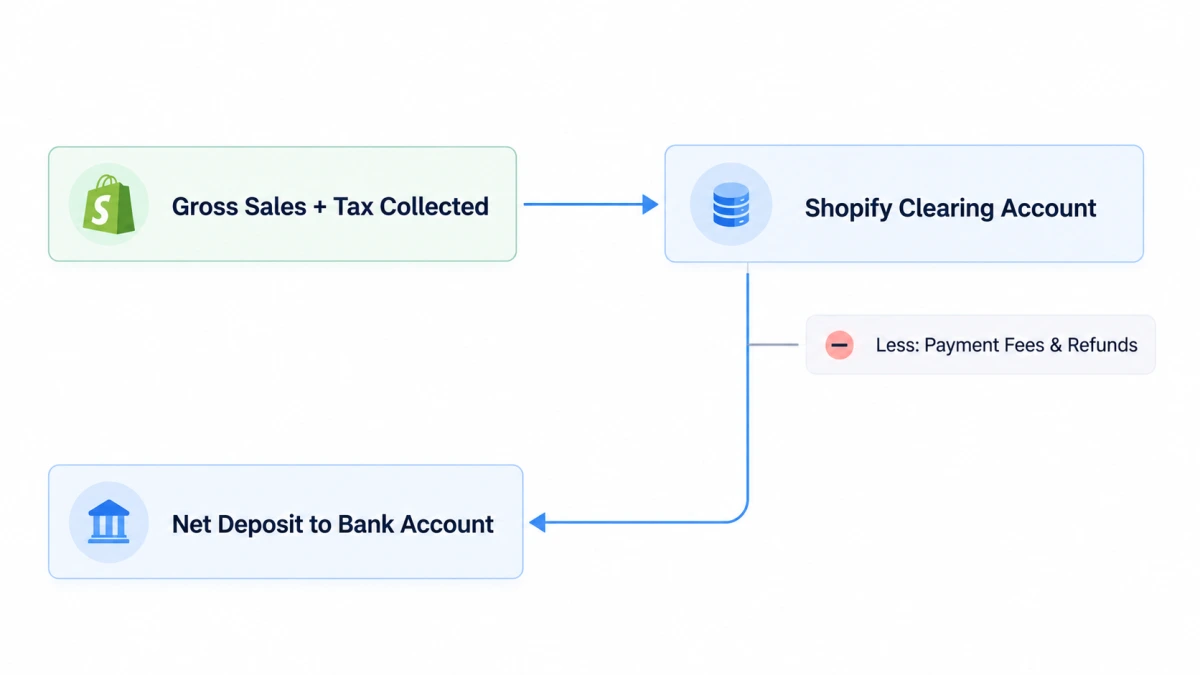
- Record sales through a clearing account: When orders come in, the sales activity is recorded through a temporary asset account, often called a Shopify Clearing Account, rather than going straight to your bank account.
- Break down each payout: The payout is then matched against the underlying Shopify activity, including sales, shipping income, refunds, processing fees, and other adjustments.
- Match the payout to your bank: Finally, the net payout recorded in your books should be matched with the actual deposit that reaches your bank account.
This gives you a much clearer trail from customer order → Shopify transactions → payout → bank deposit. It also makes it easier to spot missing transactions or discrepancies before they turn into bigger bookkeeping problems.

What Shopify Merchants Need to Track
You don't need to make your books complicated. But you do need to separate the numbers that actually affect your store's revenue, costs, and profit.
Here are the main ones to keep an eye on:
- Gross sales and discounts: Start with the original order value, then account for discounts and promotions. This gives you a clearer picture of what customers actually paid.
- Returns and refunds: Keep refunds separate from your sales instead of simply reducing your sales total. This makes it much easier to see how much you're giving back to customers.
- Shipping income: If customers pay for shipping, track those charges separately from your product sales.
- Sales tax collected: Sales tax isn't your revenue. You're collecting it from customers and generally holding it until it's time to remit it to the relevant tax authority.
- Shopify and payment processing fees: Don't forget Shopify subscription fees, transaction fees, and payment processing charges from Shopify Payments or other providers. These costs can add up quickly.
- Inventory and COGS: Keep track of what you spend on inventory and the cost of the products you've actually sold. Inventory you haven't sold yet isn't the same thing as COGS.
- Advertising, apps, shipping, and other operating expenses: Ad spend, apps, fulfillment, packaging, software, and other day-to-day costs all eat into what your store actually keeps.
- Chargebacks and other adjustments: Chargebacks, disputes, payout adjustments, and similar transactions can also affect your numbers, so they shouldn't be left out of your books.
The big thing to remember is don't lump all of this into the Shopify payout. That payout is just the amount that eventually reaches your bank after the underlying transactions and deductions have been accounted for.
And this is where bookkeeping starts becoming useful beyond tax season. When each category is tracked separately, you can actually see what's driving your revenue, where your money is going, and how much profit your store is really keeping.
How to Do Bookkeeping for a Shopify Store?
Now that you know what needs to be tracked, let's get into the actual setup.
The good news is that you don't need a complicated accounting system to get started. You just need a clean way to organize your Shopify transactions and make sure they eventually tie back to your bank account.
Step 1: Set Up Your Accounting Basics
First, keep your business and personal finances separate. Have a dedicated business bank account and, ideally, a business credit card for store-related expenses.
You'll also want an accounting platform such as QuickBooks Online or Xero, then connect Shopify to it through an ecommerce connector like A2X or Link My Books.
The goal isn't to automate everything from day one. It's to avoid manually entering every Shopify order as your store grows.
Step 2: Create a Shopify-Friendly Chart of Accounts
Your chart of accounts doesn't need to be huge. Start with the categories that actually matter to your store.
The Shopify Clearing Account is especially useful here. Think of it as the middle ground between what happens in Shopify and what eventually lands in your bank account.
Step 3: Record Shopify Transactions and Payouts
Once your accounts are set up, your basic flow looks like this:
Customer pays → Shopify records the transaction → fees, refunds, taxes, and other adjustments are accounted for → Shopify sends the payout → bank receives the deposit.
For example, imagine you have:
- $1,000 in product sales
- $50 in shipping income
- $80 in sales tax collected
- $150 in refunds
- $30 in payment fees
Your bank deposit won't simply be $1,080. The actual payout depends on how those transactions and adjustments are handled by your Shopify payment setup.
That's why you want to record the underlying activity first, then use the payout to clear the Shopify Clearing Account.
Step 4: Reconcile Each Shopify Payout With Your Bank
This is the part I wouldn't skip, especially once your store starts doing decent volume.
For each payout, check the Shopify payout details and make sure the amount recorded in your accounting system matches the deposit that actually reached your bank.
And don't just reconcile by calendar date. Payouts can cross weekends or month-end, so a sale recorded on the last day of the month may not hit your bank until the following month.
Using the payout ID or reference makes this much easier because you can trace each bank deposit back to the Shopify transactions that created it.
If there's a difference, don't just force the numbers to match. Look for the actual reason, such as a refund, chargeback, processing fee, currency conversion, or another payout adjustment.
Step 5: Keep Inventory and COGS in Sync
Inventory is another area where Shopify bookkeeping can get messy.
Buying $10,000 worth of inventory doesn't necessarily mean you have $10,000 of COGS that month. Unsold inventory generally stays on the balance sheet until those products are sold.
So you'll want your bookkeeping to account for inventory purchases, returns, and the cost of the products you've actually sold. Your inventory records and accounting records should tell the same story.
Step 6: Handle Sales Tax and Gift Cards Separately
Sales tax and gift cards are two things you don't want to casually lump into sales revenue.
Sales tax collected from customers is generally recorded as a liability until it's remitted to the relevant tax authority.
Gift cards are generally treated as a liability when customers buy them. Revenue is typically recognized when the gift card is redeemed, subject to the accounting rules that apply to your business.
Keeping these separate makes your financial reports much easier to understand later.
Step 7: Review Your Books Regularly
Finally, don't wait until tax season to find out that your numbers don't match.
At least once a month, review your Shopify payouts, bank account, clearing account, expenses, inventory, and key financial reports. If you're doing higher volume, you may want to reconcile more frequently.
The goal isn't just to have "clean books." You want to be able to look at your numbers and quickly answer questions like How much did I actually make? Where did the money go? And which costs are eating into my margin?
DIY vs. Hiring a Shopify Bookkeeper: Which’s Better?
Not every Shopify store needs a bookkeeper from day one. If your store is still small and your transactions are fairly straightforward, you can usually handle the basics yourself with a good accounting system and a consistent reconciliation process.
The question is less about store size and more about how complicated your finances have become.
If you do it yourself, the most important thing is consistency. Don't wait until tax season to sort through months of Shopify payouts. Keep your transactions, expenses, inventory, and bank activity organized as you go.
On the other hand, hiring a bookkeeper can make sense when bookkeeping starts taking time away from running the store or when your books have become too complicated to manage confidently.
Either way, the goal is the same: keep your books accurate enough that you can trust the numbers when making decisions.

From Bookkeeping to Profit Tracking
Good bookkeeping records and organizes every sale, fee, refund, tax, inventory purchase, and expense your store generates. That's the foundation.
But a clean ledger alone won't answer the question that matters most: after everything is paid, how much money did your store actually make?
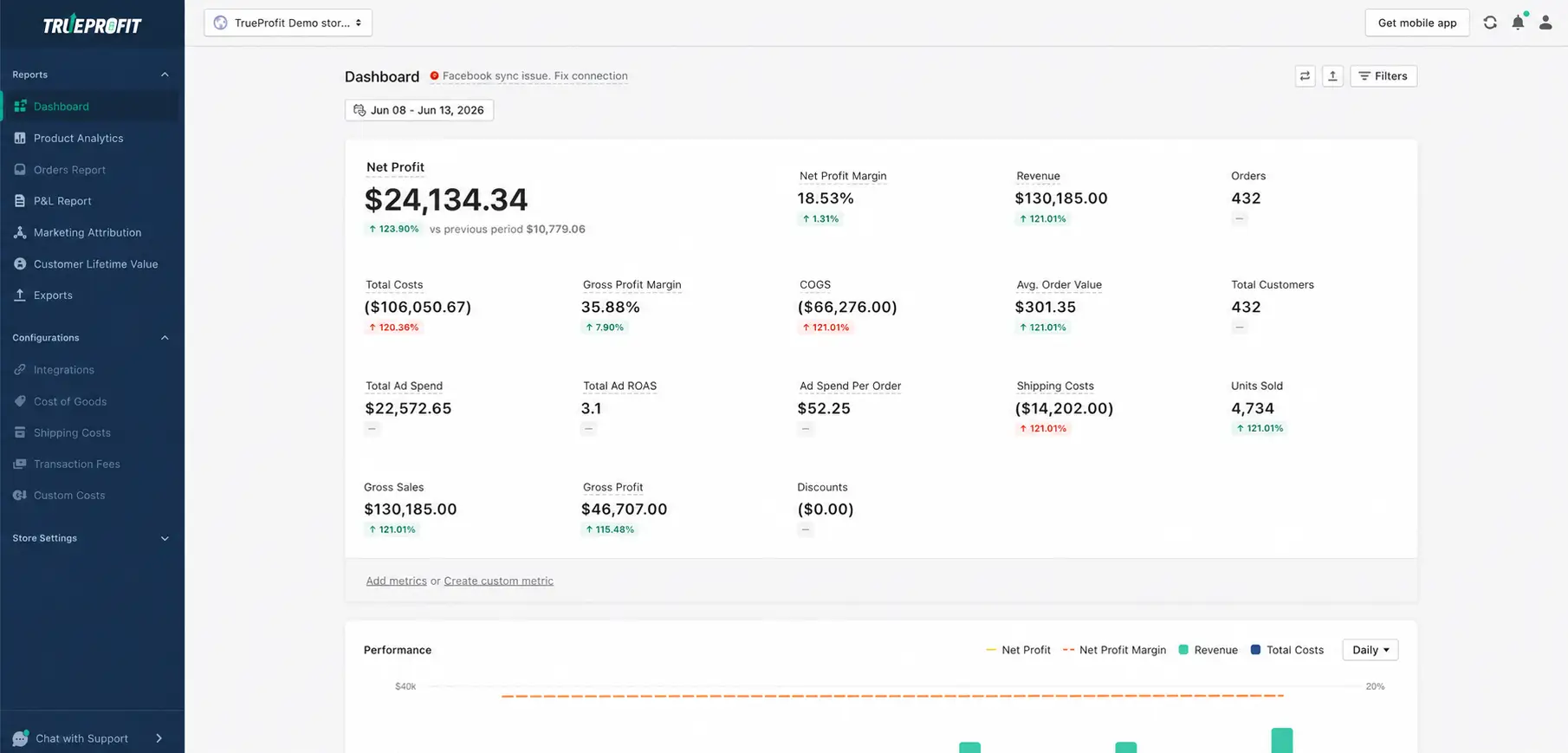
That's the job of profit tracking. It connects your revenue to every cost behind it, so you can see your real net profit, catch shrinking margins early, and pinpoint which expenses are quietly eating into your bottom line.
In short, it's the difference between knowing your revenue and knowing your profit.
But the challenge is that most merchants pull these numbers together by hand, across spreadsheets, ad dashboards, and payment reports.
By the time the math is done, the data is already outdated. For Shopify stores, TrueProfit removes that step by automatically syncing the costs that affect profitability and showing your net profit in real time.
Final Thoughts
Bookkeeping probably isn't the part of running a Shopify store you look forward to. But once you have a simple system in place, it doesn't have to be a headache either.
Keep your Shopify transactions organized, reconcile your payouts, and stay on top of the costs that actually affect your profit. As the store grows, automate what you can and get help when things start getting too complicated to manage on your own.
The real benefit is pretty simple: you know what your store is making, where the money is going, and what you're actually keeping.


Harry Chu is the Founder of TrueProfit, a net profit tracking solution designed to help Shopify merchants gain real-time insights into their actual profits. With 11+ years of experience in eCommerce and technology, his expertise in profit analytics, cost tracking, and data-driven decision-making has made him a trusted voice for thousands of Shopify merchants.